目录
项目背景
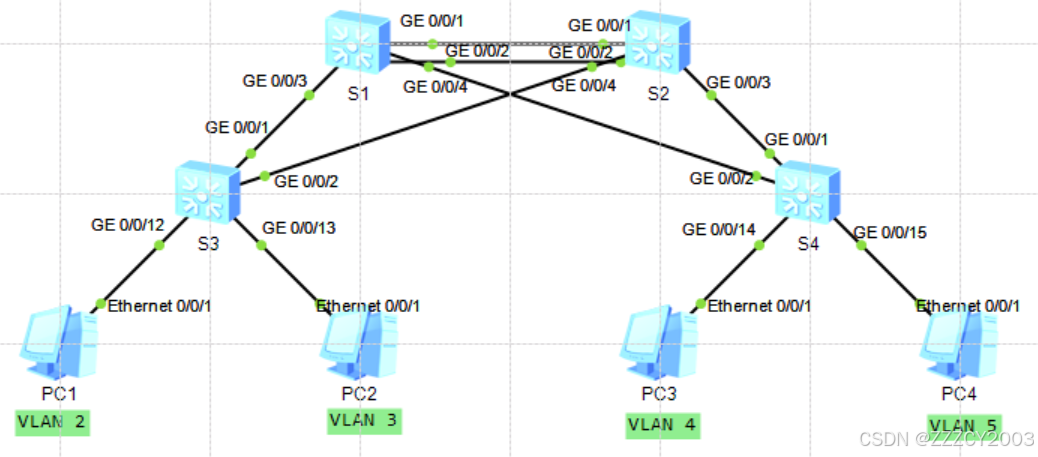
公司G总部包含4个部门,园区网络包含2台核心交换机和10台接入交换机,项目组为了增加网络的可靠性,避免单点故障,在接入层交换机通过双链路分别连接到2台核心层交换机,前期已经完成设计和部署,现在需要在所有交换机上配置MSTP,确保网络中不会出现交换环路,同时要实现负载均衡。同时需要在核心交换机配置VRRP与MSTP联动,为连接到接入层交换机的主机提供冗余网关。李同学正在该公司实习,为了提高实际工作的准确性和工作效率,项目经理安排他在实验室环境下完成测试,为设备上线运行奠定坚实的基础。小李用2台交换机模拟核心层交换机,2台交换机模拟接入层交换机
项目任务
前期准备
- VLAN部署:在核心层和接入层交换机上完成VLAN相关配置,包括VLAN创建和端口划分、Trunk配置等。在交换机S1和S2之间链路配置链路聚合
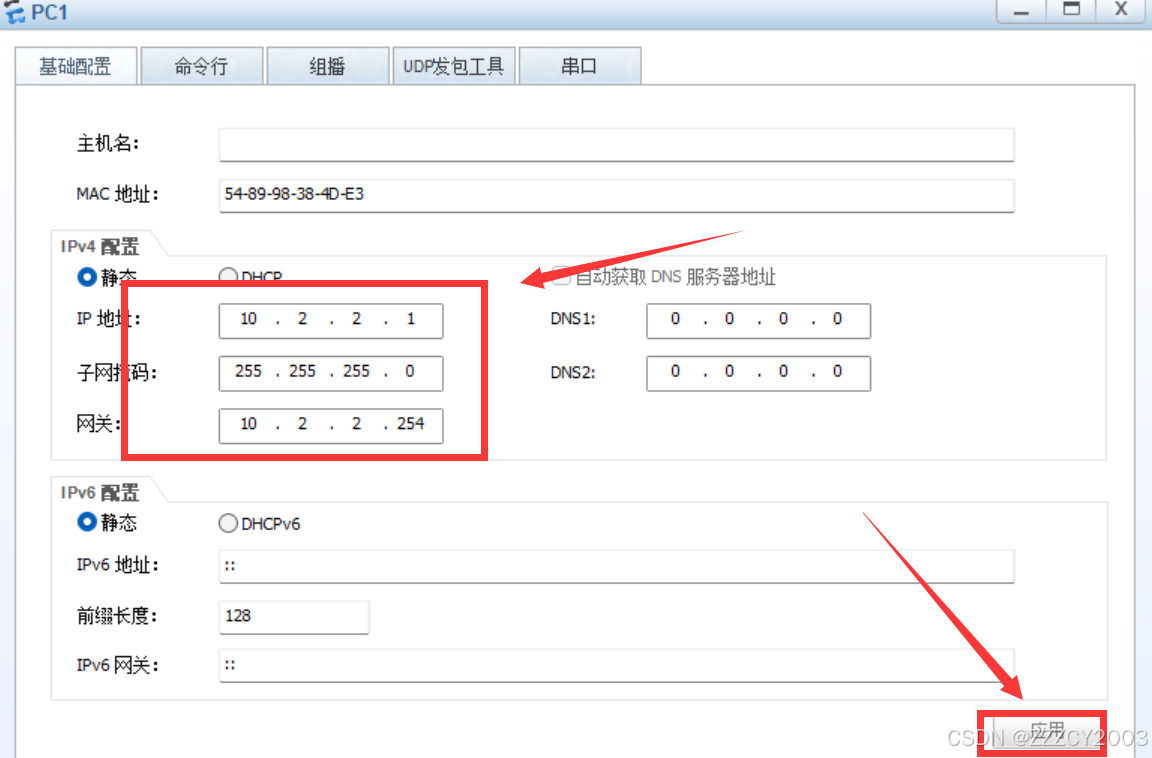
- IP地址部署:在核心三层交换机S1和S2上创建VLANIF并配置IP地址以及配置计算机的IP地址、子网掩码和网关
项目核心
- 配置MSTP域:在交换机S1、S2 、S3和S4上配置MSTP域,包括MSTP域名、修订级别、实例和VLAN映射关系,并且激活MSTP域配置
- 配置MSTP实例优先级:通过实例1(VLAN2和VLAN3)和实例2(VLAN4和VLAN5)选举不同的根桥实现负载分担。交换机S1是实例1的根桥(优先级为4096),是实例2的次根桥(优先级为8192);交换机S2是实例1的次根桥(优先级为8192),是实例2的根桥(优先级为4096)
- 配置边缘端口和BPDU保护:将接入层交换机S3和S4上连接主机的接口配置为边缘端口,并开启BPDU保护
- 配置VRRP:核心交换机S1和S2上配置VRRP,为VLAN2-VLAN5主机提供冗余网关。通过修改接口优先级控制交换机S1作为VLAN2和VLAN3的Master,交换机S2作为VLAN4和VLAN5的Master。确保每个VLAN的VRRP的Master和MSTP的根一致
项目步骤
准备工作
(1)配置VLAN
在核心层和接入层交换机上完成VLAN2-5的配置,在S1和S2之间配置链路聚合
展开代码# S1配置
[S1]vlan batch 2 to 5
Info: This operation may take a few seconds. Please wait for a moment...done.
[S1]interface Eth-Trunk 1
[S1-Eth-Trunk1]port link-type trunk
[S1-Eth-Trunk1]port trunk allow-pass vlan all
[S1-Eth-Trunk1]q
[S1]interface GigabitEthernet 0/0/1
[S1-GigabitEthernet0/0/1]eth-trunk 1
Info: This operation may take a few seconds. Please wait for a moment...done.
[S1-GigabitEthernet0/0/1]q
[S1]interface GigabitEthernet 0/0/2
[S1-GigabitEthernet0/0/2]eth-trunk 1
Info: This operation may take a few seconds. Please wait for a moment...done.
[S1-GigabitEthernet0/0/2]q
[S1]interface GigabitEthernet 0/0/3
[S1-GigabitEthernet0/0/3]port link-type trunk
[S1-GigabitEthernet0/0/3]port trunk allow-pass vlan all
[S1-GigabitEthernet0/0/3]q
[S1]interface GigabitEthernet 0/0/4
[S1-GigabitEthernet0/0/4]port link-type trunk
[S1-GigabitEthernet0/0/4]port trunk allow-pass vlan all
[S1-GigabitEthernet0/0/4]q
[S1]

# S2配置
[S2]vlan batch 2 to 5
Info: This operation may take a few seconds. Please wait for a moment...done.
[S2]interface Eth-Trunk 1
[S2-Eth-Trunk1]port link-type trunk
[S2-Eth-Trunk1]port trunk allow-pass vlan all
[S2-Eth-Trunk1]q
[S2]interface GigabitEthernet 0/0/1
[S2-GigabitEthernet0/0/1]eth-trunk 1
Info: This operation may take a few seconds. Please wait for a moment...done.
[S2-GigabitEthernet0/0/1]q
[S2]interface GigabitEthernet 0/0/2
[S2-GigabitEthernet0/0/2]eth-trunk 1
Info: This operation may take a few seconds. Please wait for a moment...done.
[S2-GigabitEthernet0/0/2]q
[S2]interface GigabitEthernet 0/0/3
[S2-GigabitEthernet0/0/3]port link-type trunk
[S2-GigabitEthernet0/0/3]port trunk allow-pass vlan all
[S2-GigabitEthernet0/0/3]q
[S2]interface GigabitEthernet 0/0/4
[S2-GigabitEthernet0/0/4]port link-type trunk
[S2-GigabitEthernet0/0/4]port trunk allow-pass vlan all
[S2-GigabitEthernet0/0/4]q
[S2]

# S3配置
[S3]vlan batch 2 to 5
Info: This operation may take a few seconds. Please wait for a moment...done.
[S3]interface GigabitEthernet 0/0/1
[S3-GigabitEthernet0/0/1]port link-type trunk
[S3-GigabitEthernet0/0/1]port trunk allow-pass vlan all
[S3-GigabitEthernet0/0/1]q
[S3]interface GigabitEthernet 0/0/2
[S3-GigabitEthernet0/0/2]port link-type trunk
[S3-GigabitEthernet0/0/2]port trunk allow-pass vlan all
[S3-GigabitEthernet0/0/2]q
[S3]interface GigabitEthernet 0/0/12
[S3-GigabitEthernet0/0/12]port link-type access
[S3-GigabitEthernet0/0/12]port default vlan 2
[S3-GigabitEthernet0/0/12]q
[S3]interface GigabitEthernet 0/0/13
[S3-GigabitEthernet0/0/13]port link-type access
[S3-GigabitEthernet0/0/13]port default vlan 3
[S3-GigabitEthernet0/0/13]q
[S3]

# S4配置
[S4]vlan batch 2 to 5
Info: This operation may take a few seconds. Please wait for a moment...done.
[S4]interface GigabitEthernet 0/0/1
[S4-GigabitEthernet0/0/1]port link-type trunk
[S4-GigabitEthernet0/0/1]port trunk allow-pass vlan all
[S4-GigabitEthernet0/0/1]q
[S4]interface GigabitEthernet 0/0/2
[S4-GigabitEthernet0/0/2]port link-type trunk
[S4-GigabitEthernet0/0/2]port trunk allow-pass vlan all
[S4-GigabitEthernet0/0/2]q
[S4]interface GigabitEthernet 0/0/14
[S4-GigabitEthernet0/0/14]port link-type access
[S4-GigabitEthernet0/0/14]port default vlan 4
[S4-GigabitEthernet0/0/14]q
[S4]interface GigabitEthernet 0/0/15
[S4-GigabitEthernet0/0/15]port link-type access
[S4-GigabitEthernet0/0/15]port default vlan 5
[S4-GigabitEthernet0/0/15]q
[S4]
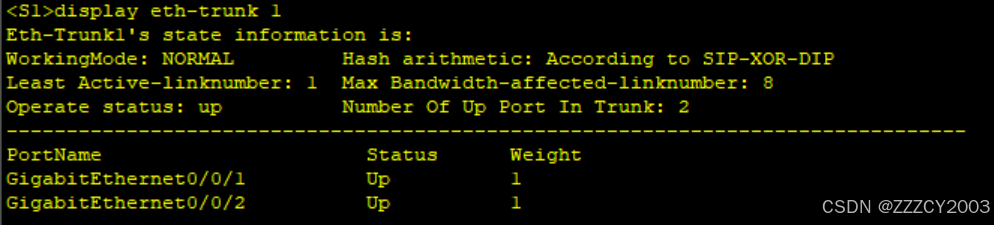
查看链路聚合信息
展开代码<S1>dispaly eth-trunk 1
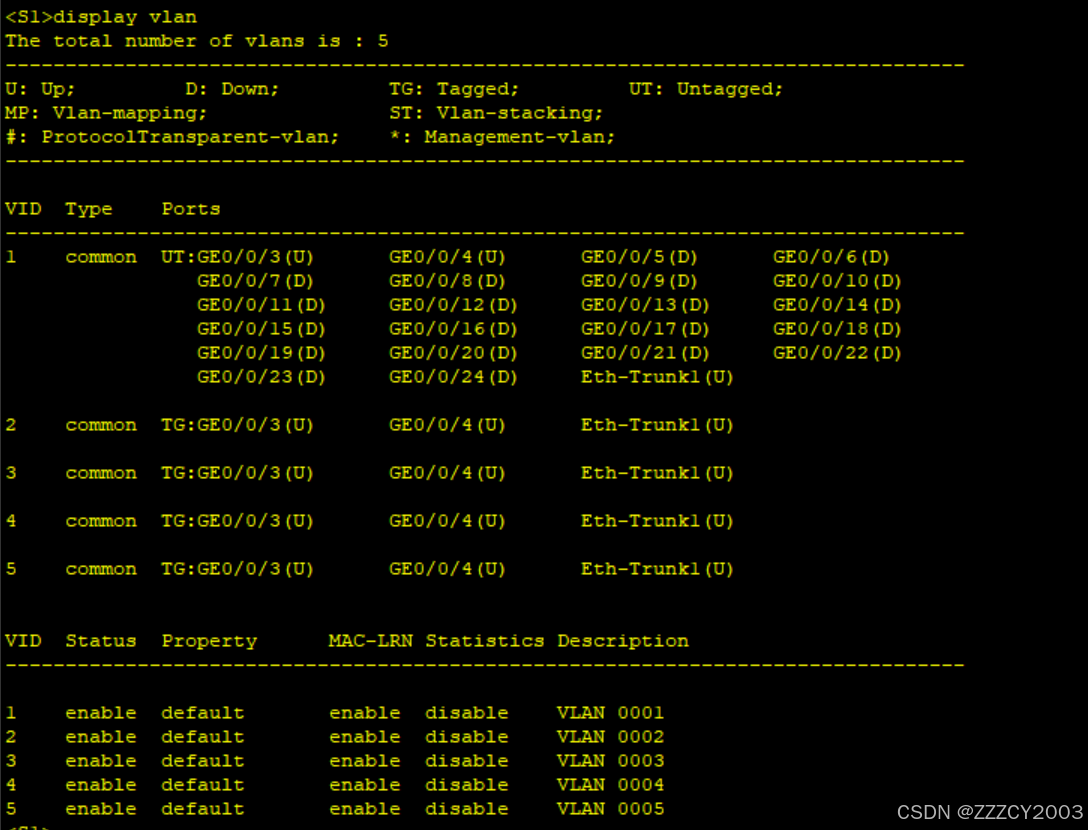
验证VLAN信息
展开代码<S1>display vlan
(2)配置IP地址
在核心三层交换机S1和S2上创建VLANIF并配置IP地址以及配置计算机的IP地址、子网掩码和网关
展开代码# S1配置
[S1]interface Vlanif 12
Error: The VLAN does not exist.
[S1]interface Vlanif 2
[S1-Vlanif2]ip address 10.2.2.252 24
[S1-Vlanif2]q
[S1]interface Vlanif 3
[S1-Vlanif3]ip address 10.3.3.252 24
[S1-Vlanif3]q
[S1]interface Vlanif 4
[S1-Vlanif4]ip address 10.4.4.252 24
[S1-Vlanif4]q
[S1]interface Vlanif 5
[S1-Vlanif5]ip address 10.5.5.252 24
[S1-Vlanif5]q
[S1]

# S2配置
[S2]interface Vlanif 2
[S2-Vlanif2]ip address 10.2.2.253 24
[S2-Vlanif2]q
[S2]interface Vlanif 3
[S2-Vlanif3]ip address 10.3.3.253 24
[S2-Vlanif3]q
[S2]interface Vlanif 4
[S2-Vlanif4]ip address 10.4.4.253 24
[S2-Vlanif4]q
[S2]interface Vlanif 5
[S2-Vlanif5]ip address 10.5.5.253 24
[S2-Vlanif5]q
[S2]
配置设备PC机IP地址、掩码和网关(以PC1为例)
核心工作
(1)配置MSTP域
在交换机S1、S2、S3和S4上配置MSTP域,包括MSTP域名、修订级别、实例和VLAN映射关系,并且激活MSTP域配置
展开代码# S1配置
[S1]stp mode mstp
[S1]stp region-configuration
[S1-mst-region]region-name Region1
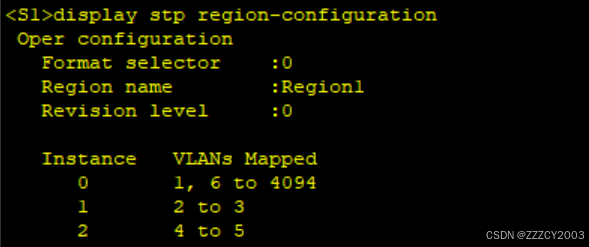
[S1-mst-region]instance 1 vlan 2 to 3
[S1-mst-region]instance 2 vlan 4 to 5
[S1-mst-region]active region-configuration
Info: This operation may take a few seconds. Please wait for a moment...done.
[S1-mst-region]q
[S1]

# S2配置
[S2]stp mode mstp
[S2]stp region-configuration
[S2-mst-region]region-name Region1
[S2-mst-region]instance 1 vlan 2 to 3
[S2-mst-region]instance 2 vlan 4 to 5
[S2-mst-region]active region-configuration
Info: This operation may take a few seconds. Please wait for a moment...done.
[S2-mst-region]q
[S2]

# S3配置
[S3]stp mode mstp
[S3]stp region-configuration
[S3-mst-region]region-name Region1
[S3-mst-region]instance 1 vlan 2 to 3
[S3-mst-region]instance 2 vlan 4 to 5
[S3-mst-region]active region-configuration
Info: This operation may take a few seconds. Please wait for a moment...done.
[S3-mst-region]q
[S3]

# S4配置
[S4]stp mode mstp
[S4]stp region-configuration
[S4-mst-region]region-name Region1
[S4-mst-region]instance 1 vlan 2 to 3
[S4-mst-region]instance 2 vlan 4 to 5
[S4-mst-region]active region-configuration
Info: This operation may take a few seconds. Please wait for a moment...done.
[S4-mst-region]q
[S4]
(2)配置MSTP实例优先级
通过实例1(vlan2、vlan3)和实例2(vlan4、vlan5)选举不同的根桥实现负载分担。交换机S1是实例1的根桥(优先级为4096),是实例2的次根桥(优先级为8192);S2是实例1的次根桥(优先级为8192),是实例2的根桥(优先级为4096)
展开代码# S1配置
[S1]stp instance 0 priority 4096
[S1]stp instance 1 priority 4096
[S1]stp instance 2 priority 8192

# S2配置
[S2]stp instance 0 priority 8192
[S2]stp instance 1 priority 8192
[S2]stp instance 2 priority 4096
(3)配置边缘端口和BPDU保护
将接入交换机S3和S4上连接主机的接口配置为边缘端口,并开启BPDU保护
展开代码# S3配置
[S3]stp bpdu-protection
[S3]interface GigabitEthernet 0/0/12
[S3-GigabitEthernet0/0/12]stp edged-port  enable
[S3-GigabitEthernet0/0/12]q
[S3]interface GigabitEthernet 0/0/13
[S3-GigabitEthernet0/0/13]stp edged-port enable
[S3-GigabitEthernet0/0/13]q
[S3]

# S4配置
[S4]stp bpdu-protection
[S4]interface GigabitEthernet 0/0/14
[S4-GigabitEthernet0/0/14]stp edged-port enable
[S4-GigabitEthernet0/0/14]q
[S4]interface GigabitEthernet 0/0/15
[S4-GigabitEthernet0/0/15]stp edged-port enable
[S4-GigabitEthernet0/0/15]q
[S4]
(4)配置VRRP
核心交换机S1和S2上配置VRRP,为VLAN2-VLAN5主句提供冗余网关。通过修改接口优先级控制交换机S1作为VLAN2和VLAN3的Master,交换机S2作为VLAN 4和VLAN 5的Master。确保每个VLAN的VRRP的Master和MSTP的根一致
展开代码# S1配置
[S1]interface Vlanif 2
[S1-Vlanif2]vrrp vrid 2 virtual-ip 10.2.2.254
[S1-Vlanif2]vrrp vrid 2 priority 120
[S1-Vlanif2]q
[S1]interface Vlanif 3
[S1-Vlanif3]vrrp vrid 3 virtual-ip 10.3.3.254
[S1-Vlanif3]vrrp vrid 3 priority 120
[S1-Vlanif3]q
[S1]interface Vlanif 4
[S1-Vlanif4]vrrp vrid 4 virtual-ip 10.4.4.254
[S1-Vlanif4]q
[S1]interface Vlanif 5
[S1-Vlanif5]vrrp vrid 5 virtual-ip 10.5.5.254
[S1-Vlanif5]q
[S1]

# S2配置
[S2]interface Vlanif 2
[S2-Vlanif2]vrrp vrid 2 virtual-ip 10.2.2.254
[S2-Vlanif2]q
[S2]interface Vlanif 3
[S2-Vlanif3]vrrp vrid 3 virtual-ip 10.3.3.254
[S2-Vlanif3]q
[S2]interface Vlanif 4
[S2-Vlanif4]vrrp vrid 4 virtual-ip 10.4.4.254
[S2-Vlanif4]vrrp vrid 4 priority 120
[S2-Vlanif4]q
[S2]interface Vlanif 5
[S2-Vlanif5]vrrp vrid 5 virtual-ip 10.5.5.254
[S2-Vlanif5]vrrp vrid 5 priority 120
[S2-Vlanif5]q
[S2]
验证
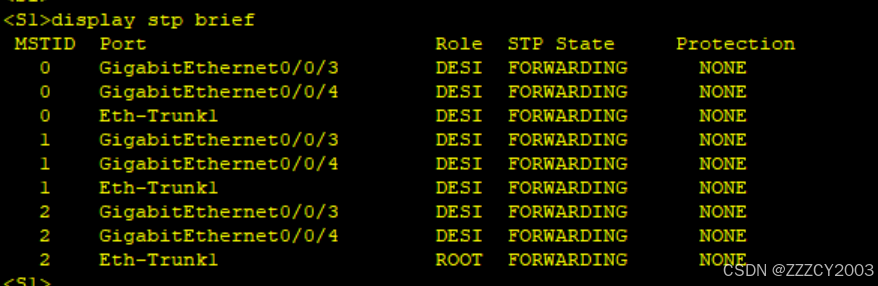
查看MSTP摘要信息
展开代码<S1>display stp brief
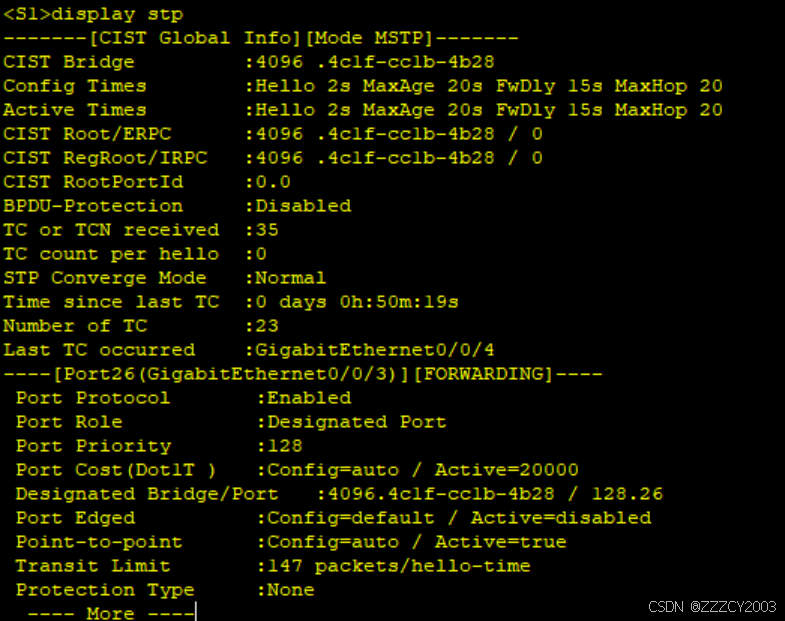
查看STP信息
展开代码<S1>display stp
查看MSTP域配置信息
展开代码<S1>display stp region-configuration
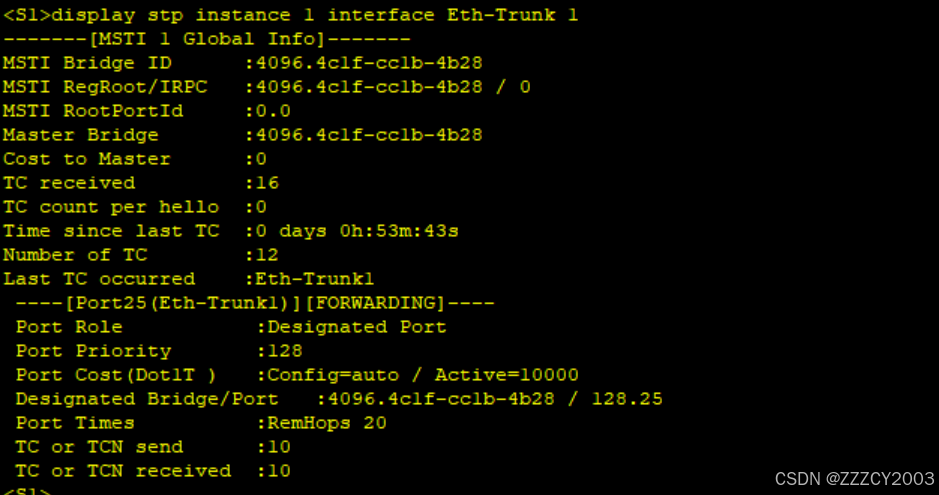
查看MSTP实例端口信息
展开代码<S1>display stp instance 1 interface Eth-Trunk 1
本文作者:zzz
本文链接:
版权声明:本博客所有文章除特别声明外,均采用 BY-NC-SA 许可协议。转载请注明出处!