目录
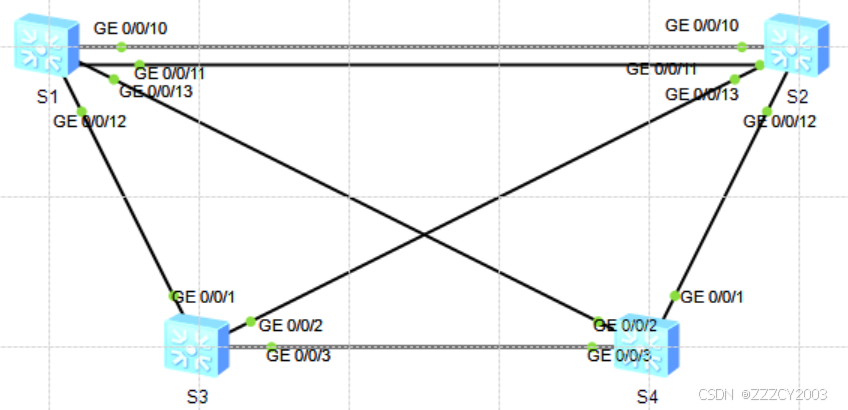
配置RSTP、MSTP打破二层环路,同时手动指定根桥、备份根桥
为避免环路问题,在网络中部署RSTP。所有的VLAN共享一颗STP生成树,为了实现VLAN间数据流量的负载均衡,在网络中部署MSTP
实验任务
- 开启STP,修改STP模式为RSTP
- 手动指定S1为RSTP根桥、S2为RSTP备份根桥
- 通过修改接口开销值,使得S4的G0/0/1接口成为根端口
- 通过修改S1的G0/0/11接口优先级,使得S2的G0/0/11接口成为根端口
- 修改STP模式为MSTP,创建Instance1、2,指定S1为MSTI1的根桥、MSTI2的备份根桥,指定S2为MSTI2的根桥、MSTI的备份根桥
实验步骤
(1)RSTP基础配置
在S1、S2、S3、S4上开启STP,并将STP模式切换为RSTP
展开代码# 以S1为例
[S1]stp enable
[S1]stp mode rstp
查看STP的状态和统计信息摘要(以S4为例)
展开代码[S4]display stp brief

S4上所有接口都是指定端口,S4为根桥交换机。由于交换机的MAC地址不可确定性,每次实验的根桥交换机可能都不一样
在S4上查看STP的状态和统计信息
展开代码<S4>display stp
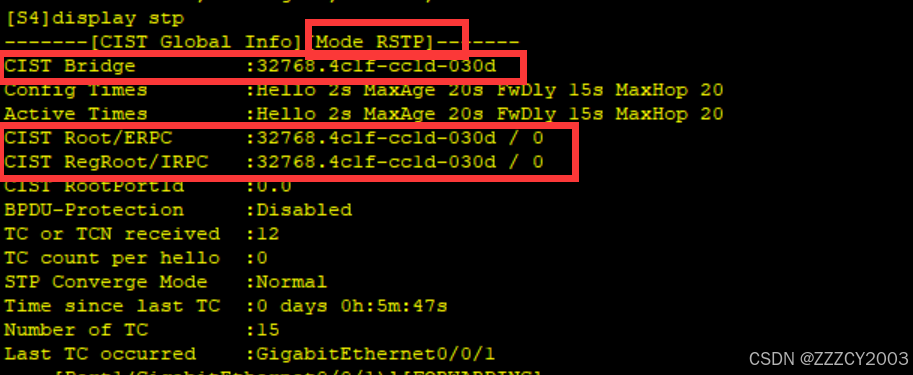
S4为根桥交换机
(2)根桥选举控制
配置S1为主根桥、S2为备份根桥
展开代码# 手动调整STP优先级,指定S1为主根桥、S2为备份根桥
[S1]stp priority 4096

[S2]stp priority 8192
在S1上查看STP的状态和统计信息
展开代码<S1>display stp
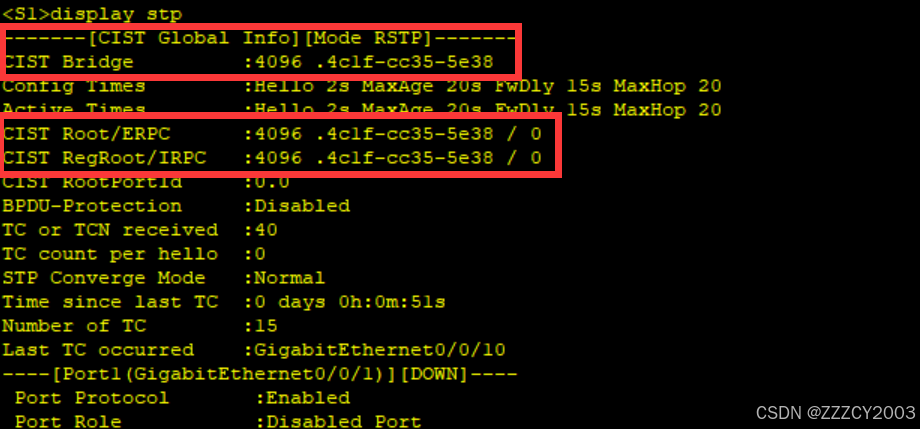
现在S1的桥优先级为4096,并且现在S1为根桥交换机
(3)修改接口开销值控制根端口选举
在S4上查看STP的状态和统计信息摘要
展开代码<S4>display stp brief

S4上G0/0/2拥有更小的RPC(根路径开销),从而成为根端口
在S4上查看G0/0/2接口的STP的状态和统计信息
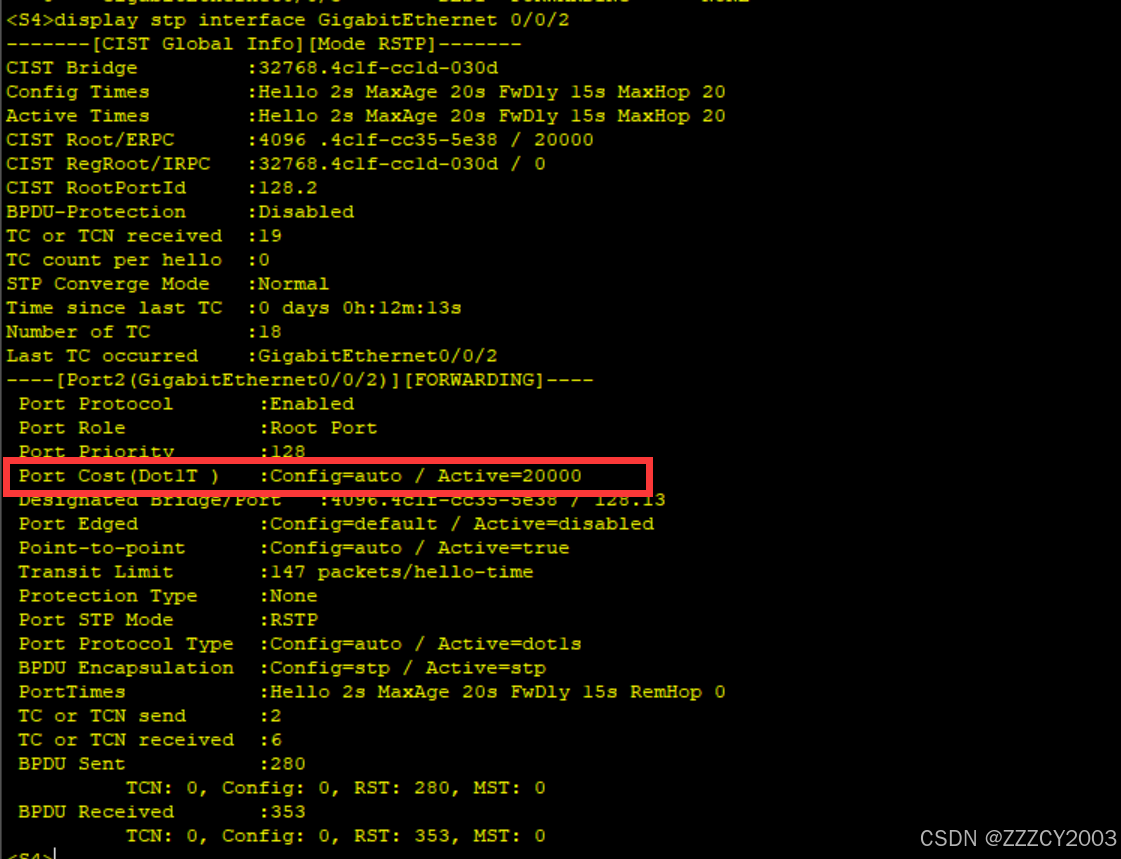
此时路径的计算方法为Dot1t,接口的STP cost值为20000
修改S4的G0/0/2接口的STP cost值为40001
展开代码[S4]interface GigabitEthernet 0/0/2
[S4-GigabitEthernet0/0/2]stp cost 40001
[S4-GigabitEthernet0/0/2]q
[S4]
再次在S4上查看STP的状态和统计信息摘要

此时G0/0/1接口的RPC为40000,小于G0/0/2的RPC值40001,S4的G0/0/1接口成为根端口
(4)修改接口优先级控制根端口选举
在S2上查看STP的状态和统计信息摘要
展开代码<S2>display stp brief
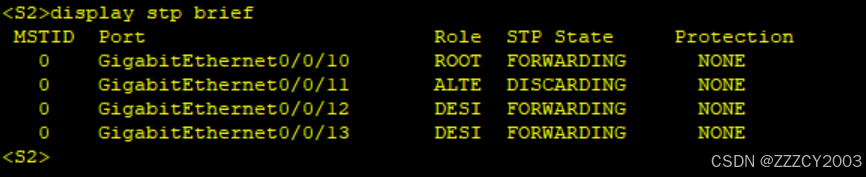
S2上G0/0/10、G0/0/11接口收到的BPDU拥有相同的RPC、网桥ID、接口优先级,此时将会比较接收到的BPDU接口ID中的接口编号
在S1、S2上开启LLDP,查看接口的互联关系
展开代码[S1]lldp enable

[S2]lldp enable

[S2]display lldp neighbor brief

S2的G0/0/10接口对端为S1的G0/0/10接口,S2的G0/0/11接口对端为S1的G0/0/11接口,S2的G0/0/10接口接收到的BPDU拥有更小的接口编号,这就是G0/0/10成为根端口的原因
在S1上修改G0/0/11的STP接口优先级,使其发送的BPDU优于G0/0/10发送的BPDU
展开代码[S1]interface GigabitEthernet 0/0/11
[S1-GigabitEthernet0/0/11]stp port priority 64
[S1-GigabitEthernet0/0/11]q
[S1]
STP接口优先级为128,数值越小越优
再次查看S2上的STP状态和统计信息下摘要
展开代码[S2]display stp brief
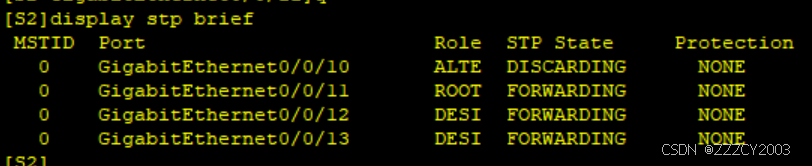
现在G0/0/11为根端口
(5)MSTP基础配置
在所有交换机上创建VLAN10-80,配置MSTP域zzz,并创建两个新的实例:Instance1、Instance2,将VLAN10、30、50、70映射到Instance1,将VLAN20、40、60、80映射到Instance2,同时将S1规划为MSTI1的主根桥、MSTI2的备份根桥,将S2规划为MSTI的主根桥、MSTI的备份根桥
创建VLAN10-80,并配置所有互联接口为trunk,放通所有VLAN,同时修改STP模式为MSTP(以S1为例)
展开代码[S1]stp mode mstp

[S1]vlan batch 10 20 30 40 50 60 70 80
Info: This operation may take a few seconds. Please wait for a moment...done.

[S1]interface GigabitEthernet 0/0/10
[S1-GigabitEthernet0/0/10]port link-type trunk
[S1-GigabitEthernet0/0/10]port trunk all
[S1-GigabitEthernet0/0/10]port trunk allow-pass vlan all
[S1-GigabitEthernet0/0/10]q
[S1]interface GigabitEthernet 0/0/11
[S1-GigabitEthernet0/0/11]port link-type trunk
[S1-GigabitEthernet0/0/11]port trunk allow-pass vlan all
[S1-GigabitEthernet0/0/11]q
[S1]interface GigabitEthernet 0/0/12
[S1-GigabitEthernet0/0/12]port link-type trunk
[S1-GigabitEthernet0/0/12]port trunk allow-pass vlan all
[S1-GigabitEthernet0/0/12]q
[S1]interface GigabitEthernet 0/0/13
[S1-GigabitEthernet0/0/13]port link-type trunk
[S1-GigabitEthernet0/0/13]port trunk allow-pass vlan all
[S1-GigabitEthernet0/0/13]q
[S1]
配置MSTP
展开代码# S1配置
[S1]stp region-configuration
[S1-mst-region]region-name zzz
[S1-mst-region]revision-level 1
[S1-mst-region]instance 1 vlan 10 30 50 70
[S1-mst-region]instance 2 vlan 20 40 60 80
[S1-mst-region]active region-configuration
Info: This operation may take a few seconds. Please wait for a moment...done.
[S1-mst-region]q
[S1]

# S2配置
[S2]stp region-configuration
[S2-mst-region]region-name zzz
[S2-mst-region]revision-level 1
[S2-mst-region]instance 1 vlan 10 30 50 70
[S2-mst-region]instance 2 vlan 20 40 60 80
[S2-mst-region]active region-configuration
Info: This operation may take a few seconds. Please wait for a moment...done.
[S2-mst-region]q
[S2]

# S3配置
[S3]stp region-configuration
[S3-mst-region]region-name zzz
[S3-mst-region]revision-level 1
[S3-mst-region]instance 1 vlan 10 30 50 70
[S3-mst-region]instance 2 vlan 20 40 60 80
[S3-mst-region]active region-configuration
Info: This operation may take a few seconds. Please wait for a moment...done.
[S3-mst-region]q
[S3]

# S4配置
[S4]stp region-configuration
[S4-mst-region]region-name zzz
[S4-mst-region]revision-level 1
[S4-mst-region]instance 1 vlan 10 30 50 70
[S4-mst-region]instance 2 vlan 20 40 60 80
[S4-mst-region]active region-configuration
Info: This operation may take a few seconds. Please wait for a moment...done.
[S4-mst-region]q
[S4]
在S1上检查MSTP实例和VLAN的映射关系
展开代码<S1>display stp region-configuration
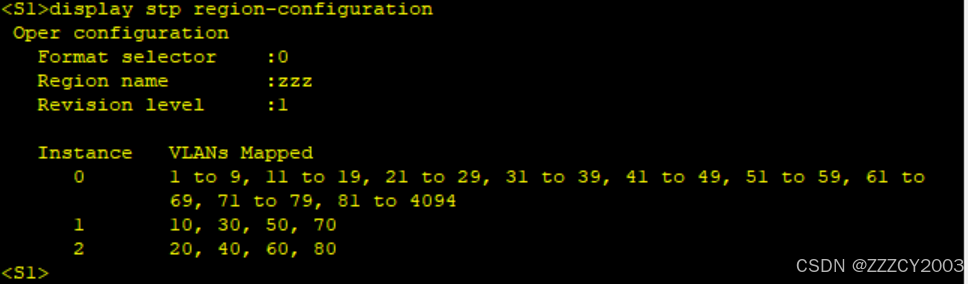
配置S1为MSTI1的根桥、MSTI2的备份根桥
展开代码[S1]stp instance 1 root primary
[S1]stp instance 2 root secondary
配置S2为MSTI2的根桥、MSTI1的备份根桥
展开代码[S2]stp instance 1 root secondary
[S2]stp instance 2 root primary
在S1、S2上分别查看MSTI1、MSTI2的状态和统计信息摘要
展开代码[S1]display stp instance 1 brief
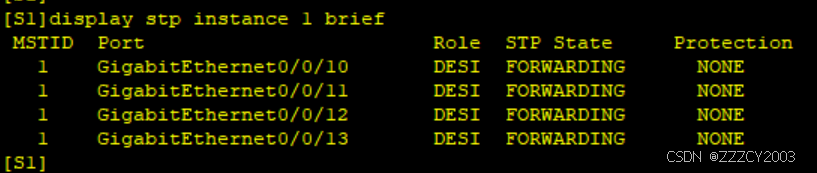
S1上所有接口都是指定接口,S1为MSTI1的根桥
展开代码[S2]display stp instance 2 brief
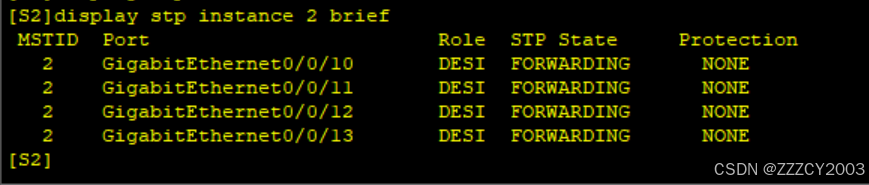
S2上所有接口都是指定接口,S2为MSTI2的根桥
本文作者:zzz
本文链接:
版权声明:本博客所有文章除特别声明外,均采用 BY-NC-SA 许可协议。转载请注明出处!