目录
部署方案
Zabbix 模式:Server + Database + Proxy
Zabbix Server/Proxy/Agent2 版本:7.0.10
MySQL Server 版本:8.0.41
三节点使用系统:CentOS Stream 9
监控主机:Ubuntu 22.04
框架搭建
使用命令行部署
database端
展开代码# ----------------  变量段  ----------------
zabbix_ver=7.0.10-release1.el9
mysql_ver=8.0.41-2.el9
# 123456为数据库密码
database_pass=123456

# ----------------  1. 关闭防火墙  ----------------
systemctl stop firewalld
systemctl disable firewalld

# ----------------  2. 永久关闭 SELinux  ----------------
sed -ri 's/^SELINUX=.*/SELINUX=disabled/' /etc/selinux/config
setenforce 0

# ----------------  3. 安装 Zabbix 官方仓库  ----------------
dnf install -y https://repo.zabbix.com/zabbix/7.0/centos/9/x86_64/zabbix-release-latest-7.0.el9.noarch.rpm

# ----------------  4. 安装所需软件包  ----------------
dnf clean all
dnf install -y zabbix-sql-scripts-${zabbix_ver} \
               mysql-server-${mysql_ver} \
               python3-PyMySQL

# ----------------  5. 启动并开机自启 MySQL  ----------------
systemctl enable --now mysqld

# ----------------  6. 创建 Zabbix 数据库  ----------------
mysql -uroot <<'EOF'
CREATE DATABASE IF NOT EXISTS zabbix
  CHARACTER SET utf8mb4
  COLLATE utf8mb4_bin;
EOF

# ----------------  7. 创建 Zabbix 用户并授权  ----------------
mysql -uroot <<EOF
CREATE USER IF NOT EXISTS 'zabbix'@'%' IDENTIFIED BY '${database_pass}';
GRANT ALL PRIVILEGES ON zabbix.* TO 'zabbix'@'%';
EOF

# ----------------  8. 导入初始 schema 与数据  ----------------
# 允许创建函数
mysql -uroot -e "SET GLOBAL log_bin_trust_function_creators = 1;"
# 导入
zcat /usr/share/zabbix-sql-scripts/mysql/server.sql.gz \
  | mysql --default-character-set=utf8mb4 -uzabbix -p${database_pass} zabbix
# 恢复安全设置
mysql -uroot -e "SET GLOBAL log_bin_trust_function_creators = 0;"
server端
展开代码# ----------------  变量段  ----------------
zabbix_ver=7.0.10-release1.el9
# 192.168.120.137为database机器的IP地址
database_ip=192.168.120.137
# 123456为database机器的数据库密码
database_pass=123456

# ----------------  1. 关闭防火墙  ----------------
systemctl stop firewalld
systemctl disable firewalld

# ----------------  2. 永久关闭 SELinux  ----------------
sed -ri 's/^SELINUX=.*/SELINUX=disabled/' /etc/selinux/config
setenforce 0

# ----------------  3. 安装 Zabbix 官方仓库  ----------------
dnf install -y https://repo.zabbix.com/zabbix/7.0/centos/9/x86_64/zabbix-release-latest-7.0.el9.noarch.rpm

# ----------------  4. 安装 Zabbix Server 及相关包  ----------------
dnf clean all
dnf --disablerepo=epel install -y \
  zabbix-server-mysql-${zabbix_ver} \
  zabbix-web-mysql-${zabbix_ver} \
  zabbix-nginx-conf-${zabbix_ver} \
  zabbix-selinux-policy \
  google-noto-sans-cjk-ttc-fonts

# ----------------  5. 配置数据库连接  ----------------
sed -ri "s/^# DBHost=localhost$/DBHost=${database_ip}/" /etc/zabbix/zabbix_server.conf
sed -ri "s/^# DBPassword=$/DBPassword=${database_pass}/" /etc/zabbix/zabbix_server.conf

# ----------------  6. 启用 Nginx 的 Zabbix 虚拟主机 8080 端口  ----------------
sed -ri 's/^#\s*listen\s+8080;/listen 8080;/' /etc/nginx/conf.d/zabbix.conf

# ----------------  7. 修复中文字体(软链接方式)  ----------------
ln -sf /usr/share/fonts/google-noto-cjk/NotoSansCJK-Regular.ttc \
       /usr/share/fonts/dejavu-sans-fonts/DejaVuSans.ttf

# ----------------  8. 启动并开机自启相关服务  ----------------
for svc in zabbix-server nginx php-fpm; do
  systemctl enable --now $svc
done
zabbix-server web配置
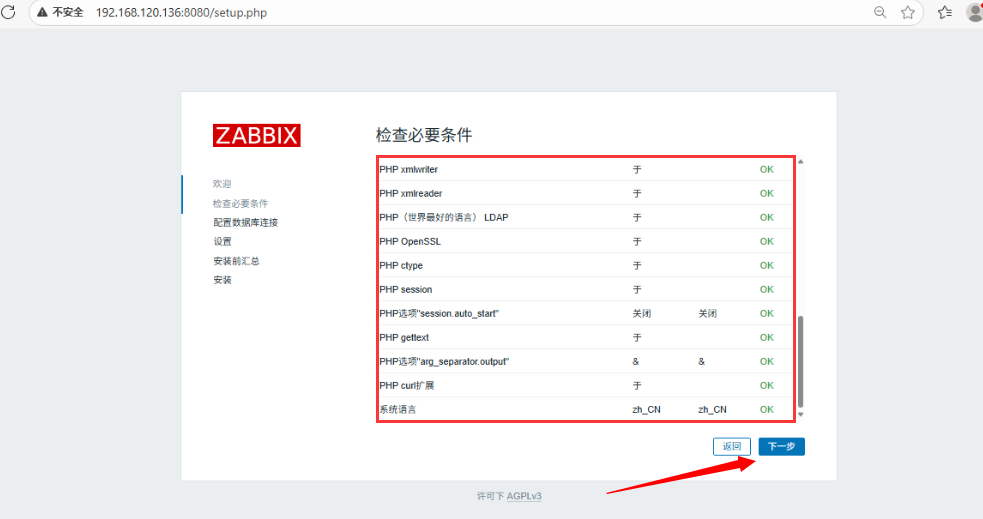
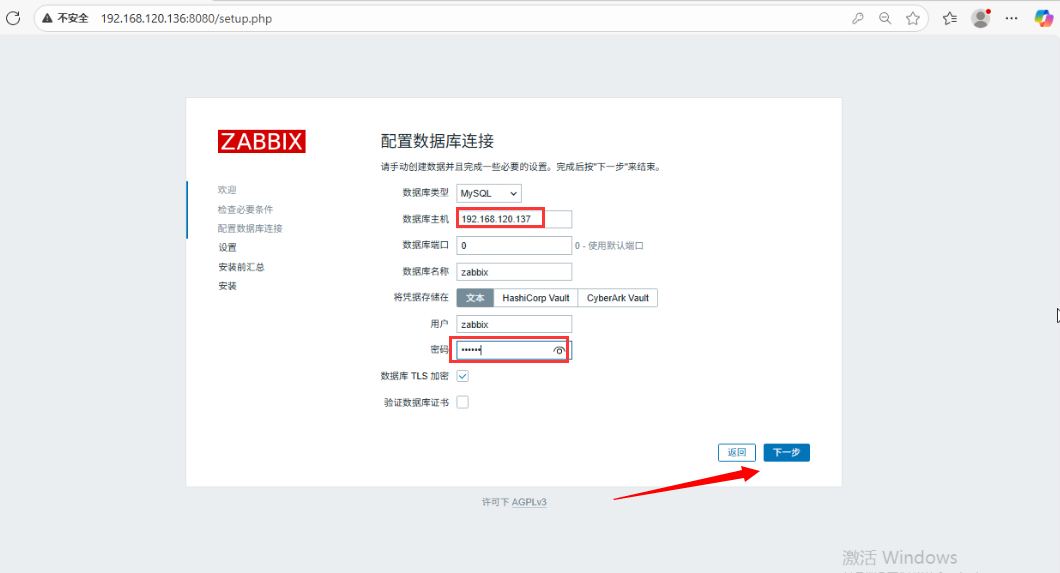
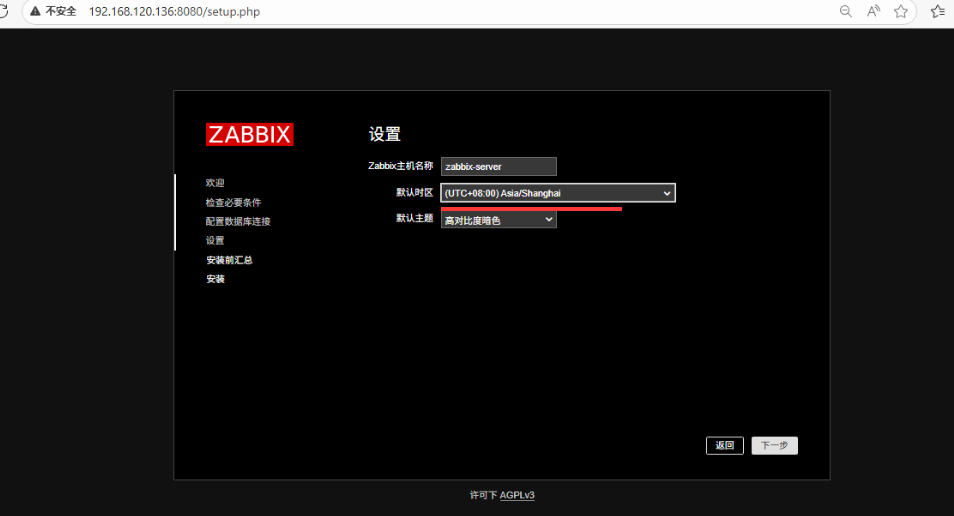
以上执行完毕,到浏览器访问zabbix-server的web界面https://ip:8080
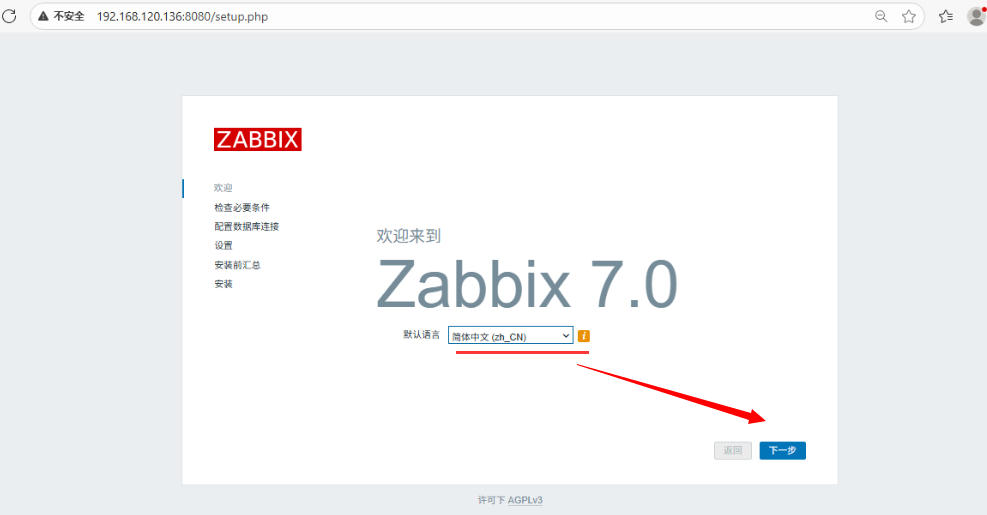
检查是否全部OK
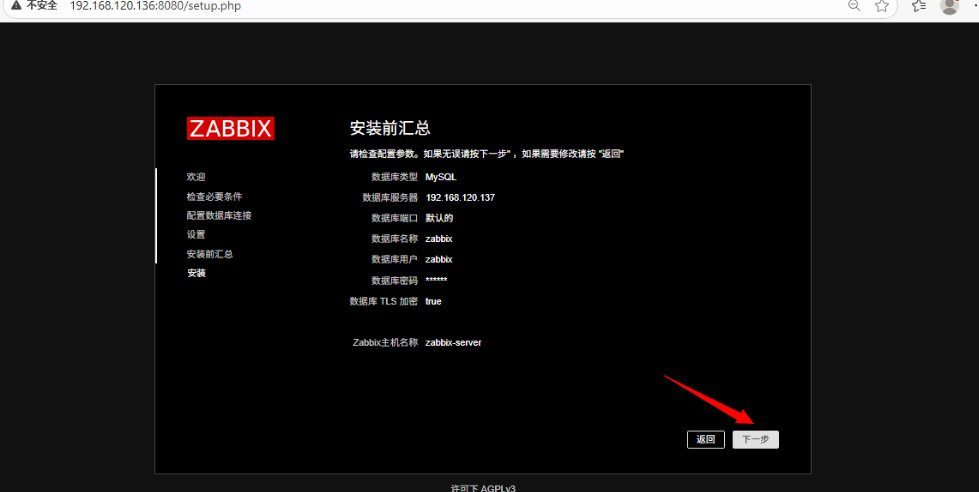
填写database端IP地址以及数据库密码
设置名称、时间、主题
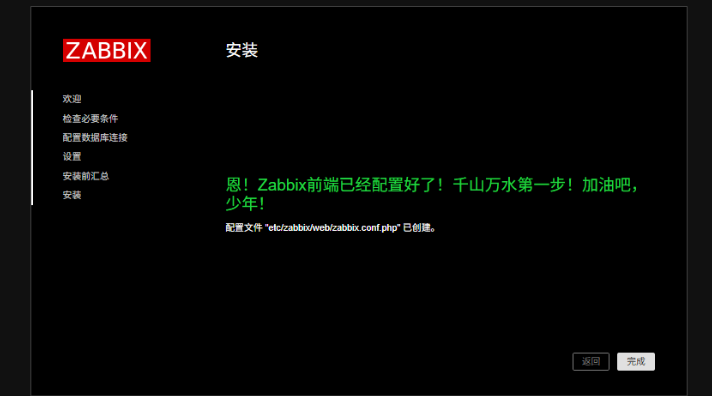
检验无误之后,下一步完成安装
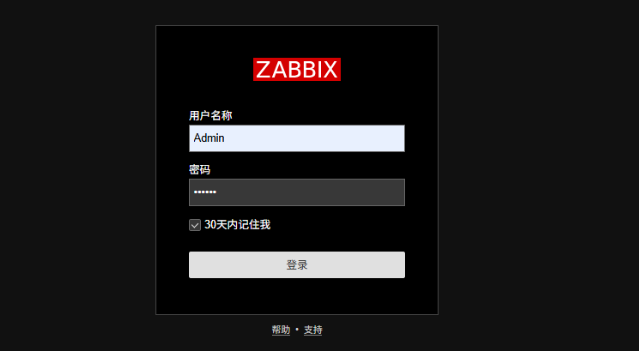
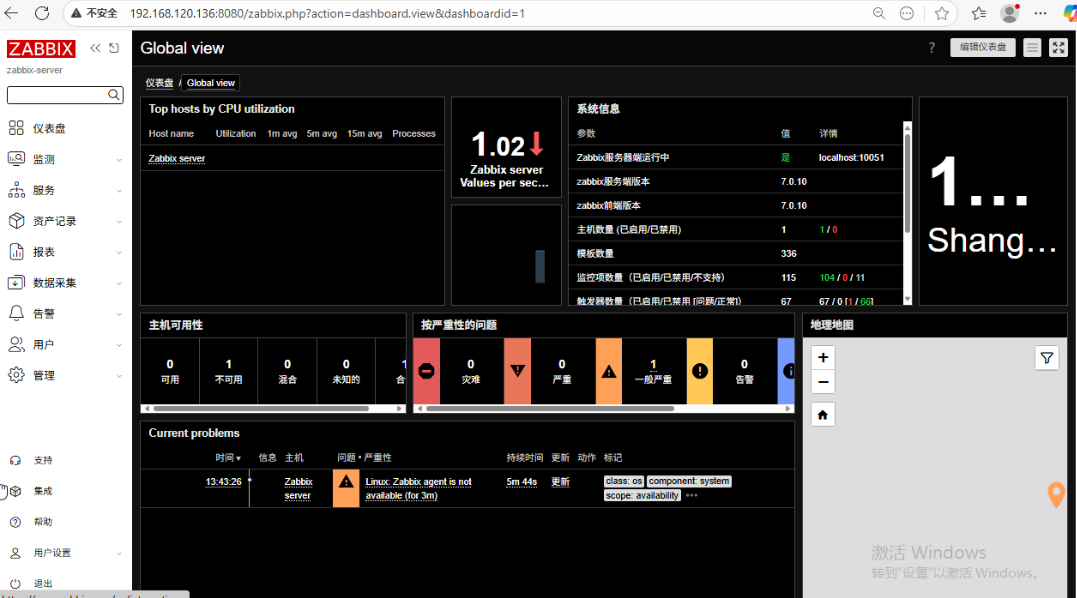
初始账密为:Admin/zabbix
proxy端
展开代码# ----------------  变量段  ----------------
zabbix_ver=7.0.10-release1.el9
mysql_ver=8.0.41-2.el9
zabbix_server_ip=192.168.120.136
database_pass=123456

# ----------------  1. 关闭防火墙  ----------------
systemctl stop firewalld
systemctl disable firewalld

# ----------------  2. 永久关闭 SELinux  ----------------
sed -ri 's/^SELINUX=.*/SELINUX=disabled/' /etc/selinux/config
setenforce 0

# ----------------  3. 安装 Zabbix 官方仓库  ----------------
dnf install -y https://repo.zabbix.com/zabbix/7.0/centos/9/x86_64/zabbix-release-latest-7.0.el9.noarch.rpm

# ----------------  4. 安装 Zabbix Proxy 及本地 MySQL  ----------------
dnf clean all
dnf --disablerepo=epel install -y \
  zabbix-proxy-mysql-${zabbix_ver} \
  zabbix-sql-scripts \
  zabbix-selinux-policy \
  mysql-server-${mysql_ver} \
  python3-PyMySQL

# ----------------  5. 启动并开机自启 MySQL  ----------------
systemctl enable --now mysqld

# ----------------  6. 创建 zabbix_proxy 数据库  ----------------
mysql -uroot <<'EOF'
CREATE DATABASE IF NOT EXISTS zabbix_proxy
  CHARACTER SET utf8mb4
  COLLATE utf8mb4_bin;
EOF

# ----------------  7. 创建用户并授权  ----------------
mysql -uroot <<EOF
CREATE USER IF NOT EXISTS 'zabbix'@'localhost' IDENTIFIED BY '${database_pass}';
GRANT ALL PRIVILEGES ON zabbix_proxy.* TO 'zabbix'@'localhost';
EOF

# ----------------  8. 导入 Zabbix Proxy 初始 schema  ----------------
# 允许创建函数
mysql -uroot -e "SET GLOBAL log_bin_trust_function_creators = 1;"
# 导入
cat /usr/share/zabbix-sql-scripts/mysql/proxy.sql \
  | mysql --default-character-set=utf8mb4 -uzabbix -p${database_pass} zabbix_proxy
# 恢复安全设置
mysql -uroot -e "SET GLOBAL log_bin_trust_function_creators = 0;"

# ----------------  9. 修改 Zabbix Proxy 配置文件  ----------------
sed -ri "s/^Server=127.0.0.1$/Server=${zabbix_server_ip}/" /etc/zabbix/zabbix_proxy.conf
sed -ri "s/^Hostname=Zabbix proxy$/Hostname=zabbix-proxy/" /etc/zabbix/zabbix_proxy.conf
sed -ri "s/^# DBPassword=$/DBPassword=${database_pass}/" /etc/zabbix/zabbix_proxy.conf

# ----------------  10. 启动并开机自启 Zabbix Proxy  ----------------
systemctl enable --now zabbix-proxy
zabbix-proxy 部署完成后,还需要在 zabbix-server Web 设置
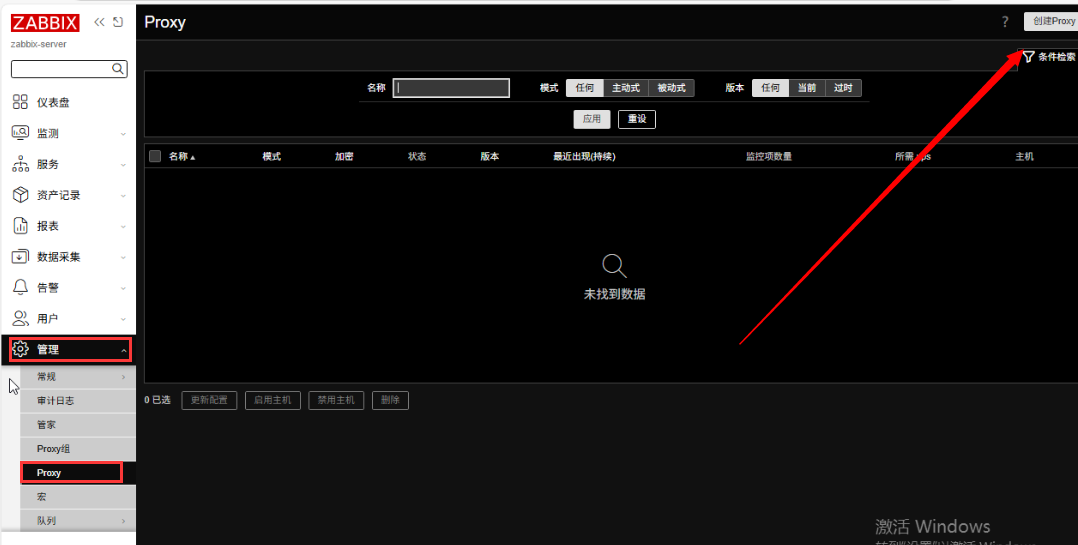
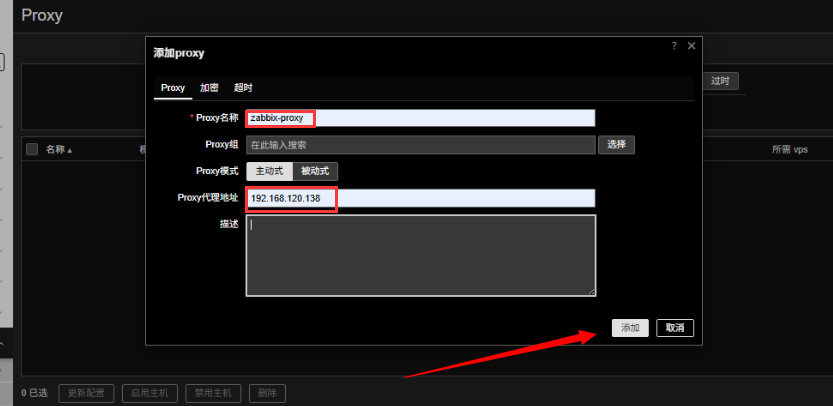
等待几分钟,若显示离线,修改名称,需要与/etc/zabbix/zabbix_proxy.conf配置文件中的Hostanme相同
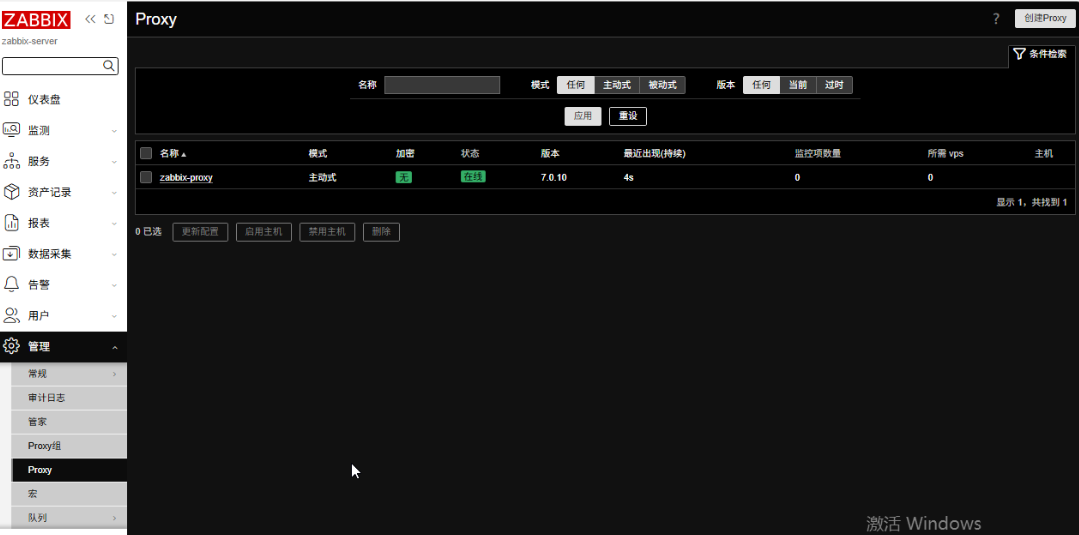
zabbix-proxy 成功连接后,后续可以通过 Proxy 去采集数据,如果配置 agent,可以将配置文件里 Server 目标地址写成 Proxy 的地址。
三节点配置agent
展开代码# ----------- 变量 -----------
zabbix_ver=7.0.10-release1.el9
zabbix_server_ip=192.168.120.136

# 1. 关防火墙
systemctl stop firewalld
systemctl disable firewalld

# 2. 永久并立即禁用 SELinux
sed -ri 's/^SELINUX=.*/SELINUX=disabled/' /etc/selinux/config
setenforce 0

# 3. 装 Zabbix 7.0 仓库
dnf install -y https://repo.zabbix.com/zabbix/7.0/centos/9/x86_64/zabbix-release-latest-7.0.el9.noarch.rpm

# 4. 装 Agent
dnf clean all
dnf install -y zabbix-agent-${zabbix_ver}

# 5. 指向 Zabbix Server/Proxy
sed -ri "s/^Server=127.0.0.1$/Server=${zabbix_server_ip}/" /etc/zabbix/zabbix_agentd.conf

# 6. 启动并开机自启
systemctl enable --now zabbix-agent
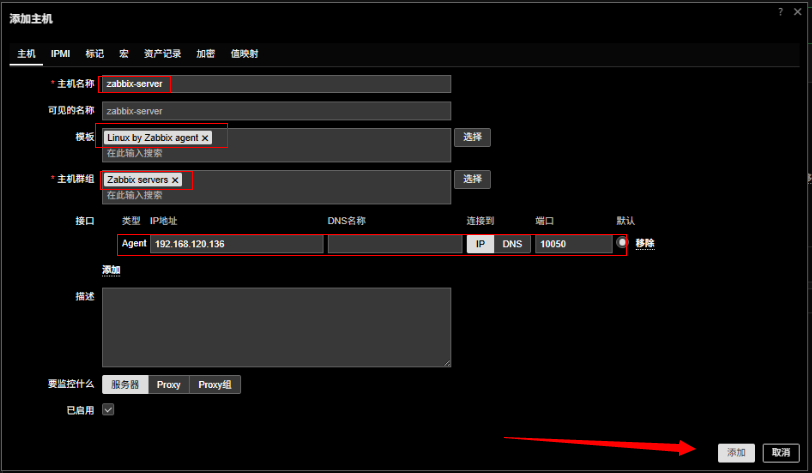
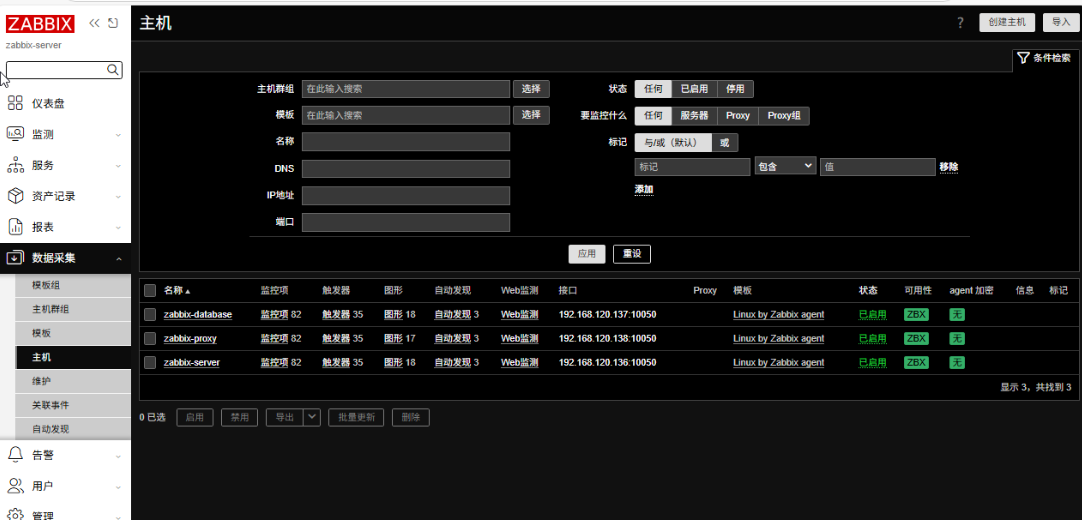
Zabbix Agent 安装配置完成后,需要到 Zabbix Server Web 添加主机
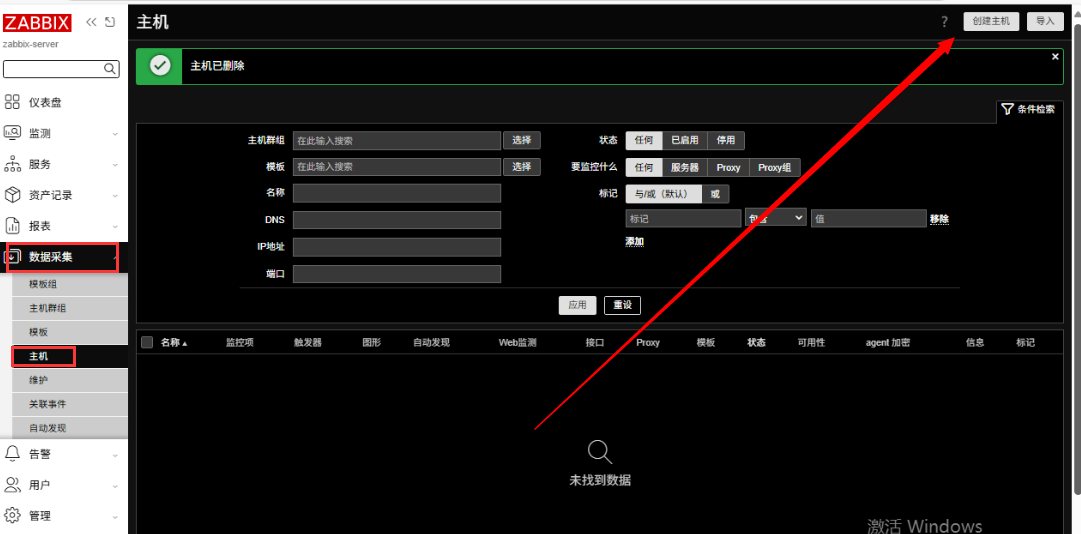
添加主机配置
使用ansible剧本部署
安装ansible工具
先确认需要部署 zabbix 的目标系统已正常启动,且 ssh 服务已开启
在 zabbix-server 机器上安装 ansible 工具
展开代码# Debian/Ubuntu:
apt install ansible -y

# Red Hat/CentOS/Rocky Linux/Alma Linux:
dnf install epel-release -y
dnf install ansible -y
安装完成,需要创建 ansible 配置文件
展开代码nano ~/.ansible.cfg
粘贴以下内容,将会指定主机配置文件存放在 ~/.ansible/inventory
展开代码[defaults]
inventory = ~/.ansible/inventory
创建主机配置文件:
展开代码mkdir ~/.ansible
nano ~/.ansible/inventory
粘贴以下内容,根据实际情况修改主机名、IP、用户名、密码:
展开代码[server]
zabbix-server ansible_host=192.168.120.136

[database]
zabbix-data1 ansible_host=192.168.120.137

[proxy]
zx-3f3-proxy ansible_host=192.168.120.138

[all:vars]
; 指定默认使用的用户名
ansible_user=root
; 指定默认使用的密码
ansible_ssh_pass=root
; 忽略首次连接时的主机警告
ansible_ssh_host_key_checking=False
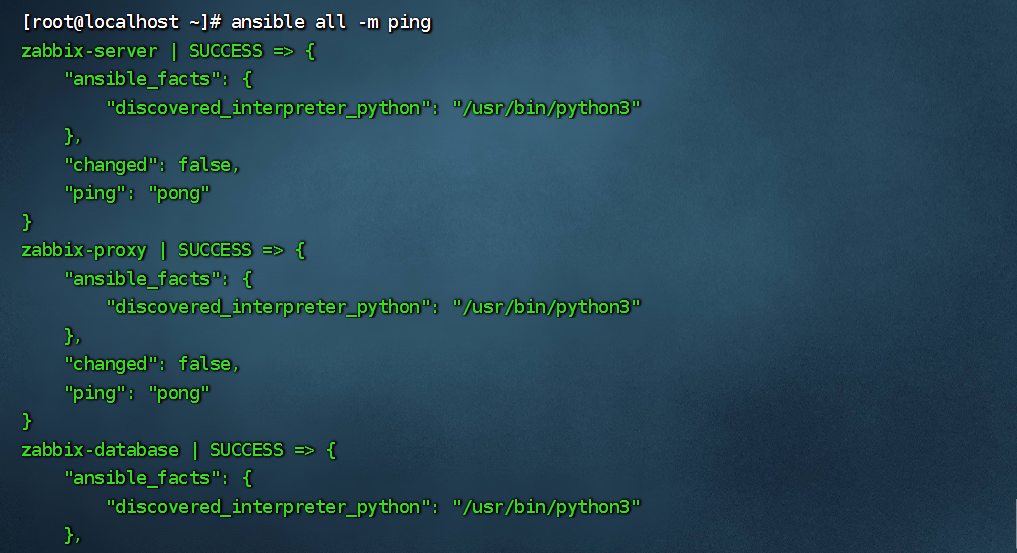
配置完成后,使用以下命令检测是否可以正常连接到目标系统:
展开代码ansible all -m ping
database端
创建安装数据库的 ansible playbook 文件
展开代码nano 00-sql.yml
展开代码---
- name: 配置 zabbix-database
  hosts: zabbix-database

  vars:
    # 指定 zabbix 版本
    zabbix_ver: 7.0.10-release1.el9
    # 指定 mysql 版本
    mysql_ver: 8.0.41-2.el9
    # 数据库密码
    database_pass: 123456

  tasks:
    - name: 关闭防火墙
      systemd:
        name: firewalld
        state: stopped
        enabled: no

    - name: 关闭 SELinux
      lineinfile:
        path: /etc/selinux/config
        regexp: "^SELINUX=enforcing"
        line: "SELINUX=disabled"
      register: selinux_config_changed

    - name: 立即禁用 SELinux
      command: setenforce 0
      when: selinux_config_changed.changed

    - name: 安装 Zabbix 仓库
      dnf:
        name: https://repo.zabbix.com/zabbix/7.0/centos/9/x86_64/zabbix-release-latest-7.0.el9.noarch.rpm
        state: present
        disable_gpg_check: yes

    - name: 安装数据库和 Zabbix 数据库初始化脚本
      dnf:
        update_cache: yes
        name:
          - zabbix-sql-scripts-{{ zabbix_ver }}
          - mysql-server-{{ mysql_ver }}
          - python3-PyMySQL
        state: present

    - name: 启动 mysql 服务
      systemd:
        name: mysqld
        enabled: yes
        state: started

    - name: 创建 Zabbix 数据库
      mysql_db:
        name: zabbix
        state: present
        collation: utf8mb4_bin
        encoding: utf8mb4
      register: result

    - name: 初始化 zabbix 数据库
      when: result.changed
      block:
        - name: 创建 Zabbix 用户并授予权限
          mysql_user:
            name: zabbix
            password: "{{ database_pass }}"
            priv: "zabbix.*:ALL"
            host: "%"
            state: present

        - name: Set global log_bin_trust_function_creators to 1
          mysql_variables:
            variable: log_bin_trust_function_creators
            value: 1

        - name: 导入 Zabbix 导入初始架构和数据
          shell: "zcat /usr/share/zabbix-sql-scripts/mysql/server.sql.gz | mysql --default-character-set=utf8mb4 -uzabbix -p{{ database_pass }} zabbix"

        - name: Set global log_bin_trust_function_creators back to 0
          mysql_variables:
            variable: log_bin_trust_function_creators
            value: 0
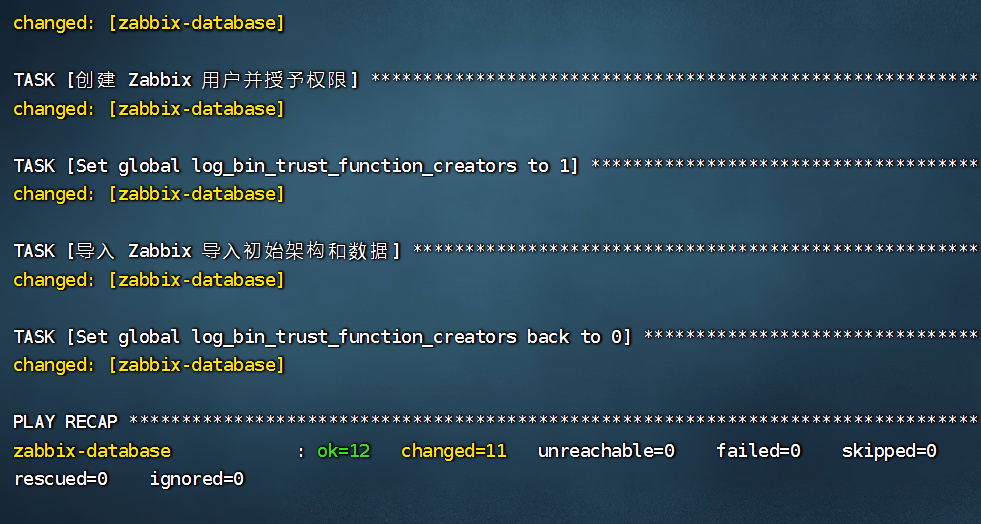
该 playbook 将会在 zabbix-data1 上安装 mysql 数据库,初始化 zabbix 数据
检验文件是否存在语法错误
展开代码ansible-playbook --syntax-check 00-sql.yml

开始执行
展开代码ansible-playbook 00-sql.yml
server端
配置 zabbix-server,创建 playbook 文件:
展开代码nano 01-zbs.yml
展开代码---
- name: Zabbix Server 安装
  hosts: zabbix-server

  vars:
    # 指定 zabbix 版本
    zabbix_ver: 7.0.10-release1.el9
    # 数据库主机 ip
    database_ip: 192.168.120.137
    # 数据库密码
    database_pass: 123456

  tasks:
    - name: 关闭防火墙
      systemd:
        name: firewalld
        state: stopped
        enabled: no

    - name: 关闭 SELinux
      lineinfile:
        path: /etc/selinux/config
        regexp: "^SELINUX=enforcing"
        line: "SELINUX=disabled"
      register: selinux_config_changed

    - name: 立即禁用 SELinux
      command: setenforce 0
      when: selinux_config_changed.changed

    - name: 安装 Zabbix 仓库
      dnf:
        name: https://repo.zabbix.com/zabbix/7.0/centos/9/x86_64/zabbix-release-latest-7.0.el9.noarch.rpm
        state: present
        disable_gpg_check: yes

    - name: 安装 Zabbix Server
      dnf:
        update_cache: yes
        name:
          - zabbix-server-mysql-{{ zabbix_ver }}
          - zabbix-web-mysql-{{ zabbix_ver }}
          - zabbix-nginx-conf-{{ zabbix_ver }}
          - zabbix-selinux-policy
          - google-noto-sans-cjk-ttc-fonts # 中文字体
        disablerepo: epel
        state: present

    - name: 配置 Zabbix 数据库 ip
      lineinfile:
        path: /etc/zabbix/zabbix_server.conf
        regexp: "^# DBHost=localhost$"
        line: "DBHost={{ database_ip }}"

    - name: 配置 Zabbix 数据库密码
      lineinfile:
        path: /etc/zabbix/zabbix_server.conf
        regexp: "^# DBPassword=$"
        line: "DBPassword={{ database_pass }}"

    - name: 启用 Zabbix Web 界面监听端口
      lineinfile:
        path: /etc/nginx/conf.d/zabbix.conf
        regexp: '^#\s*listen\s+8080;'
        line: "listen 8080;"

    - name: 备份原 DejaVuSans.ttf
      command: cp /usr/share/fonts/dejavu-sans-fonts/DejaVuSans.ttf /usr/share/fonts/dejavu-sans-fonts/DejaVuSans.ttf.bak
      ignore_errors: yes

    - name: 修复 Zabbix 中文字体显示
      file:
        src: /usr/share/fonts/google-noto-cjk/NotoSansCJK-Regular.ttc
        dest: /usr/share/fonts/dejavu-sans-fonts/DejaVuSans.ttf
        state: link
        force: yes

    - name: 启动 Zabbix 服务
      systemd:
        name: "{{ item }}"
        enabled: yes
        state: started
      loop:
        - zabbix-server
        - nginx
        - php-fpm
该 playbook 将会在 zabbix-server 上安装 zabbix server 和 nginx,修改 zabbix_server 配置文件以使用 zabbix-database 的数据库。
检查配置文件是否有语法错误
展开代码ansible-playbook --syntax-check 01-zbs.yml

开始执行 playbook
展开代码ansible-playbook 01-zbs.yml
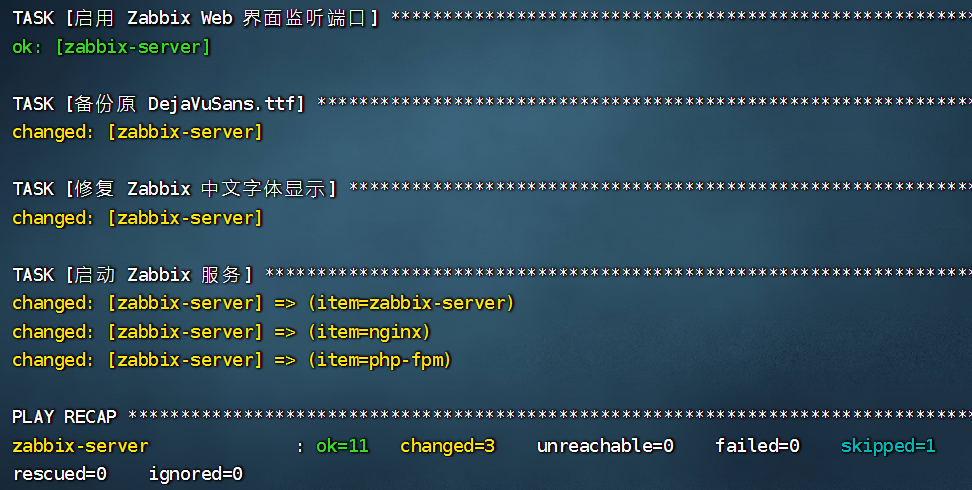
以上执行完毕,可以配置zabbix-server web配置,与上一大点相同,暂不重复
proxy端
为减轻 zabbix-server 压力,各机房安装 Zabbix Proxy 采集同一机房内 agent 数据后,提交到 zabbix-server 存储。zabbix-Proxy 需要本地数据库存储采集到的数据。
创建 playbook 文件:
展开代码nano 02-zbp.yml
展开代码---
- name: 配置 zabbix-proxy
  hosts: zabbix-proxy

  vars:
    # 指定 zabbix 版本
    zabbix_ver: 7.0.10-release1.el9
    # 指定 Zabbix Server ip
    zabbix_server_ip: 192.168.120.136
    # 指定 mysql 版本
    mysql_ver: 8.0.41-2.el9
    # 数据库密码
    database_pass: 123456

  tasks:
    - name: 关闭防火墙
      systemd:
        name: firewalld
        state: stopped
        enabled: no

    - name: 关闭 SELinux
      lineinfile:
        path: /etc/selinux/config
        regexp: "^SELINUX=enforcing"
        line: "SELINUX=disabled"
      register: selinux_config_changed

    - name: 立即禁用 SELinux
      command: setenforce 0
      when: selinux_config_changed.changed

    - name: 安装 Zabbix 仓库
      dnf:
        name: https://repo.zabbix.com/zabbix/7.0/centos/9/x86_64/zabbix-release-latest-7.0.el9.noarch.rpm
        state: present
        disable_gpg_check: yes

    - name: 安装数据库和 Zabbix Proxy
      dnf:
        update_cache: yes
        name:
          - zabbix-proxy-mysql-{{ zabbix_ver }}
          - zabbix-sql-scripts
          - zabbix-selinux-policy
          - mysql-server-{{ mysql_ver }}
          - python3-PyMySQL
        disablerepo: epel
        state: present

    - name: 启动 mysql 服务
      systemd:
        name: mysqld
        enabled: yes
        state: started

    - name: 创建 zabbix_proxy 数据库
      mysql_db:
        name: zabbix_proxy
        state: present
        collation: utf8mb4_bin
        encoding: utf8mb4
      register: result

    - name: 初始化 zabbix_proxy 数据库
      when: result.changed
      block:
        - name: 创建 Zabbix 用户并授予权限
          mysql_user:
            name: zabbix
            password: "{{ database_pass }}"
            priv: "zabbix_proxy.*:ALL"
            host: "localhost"
            state: present

        - name: Set global log_bin_trust_function_creators to 1
          mysql_variables:
            variable: log_bin_trust_function_creators
            value: 1

        - name: 导入 Zabbix Proxy 初始架构和数据
          shell: "cat /usr/share/zabbix-sql-scripts/mysql/proxy.sql | mysql --default-character-set=utf8mb4 -uzabbix -p{{ database_pass }} zabbix_proxy"

        - name: Set global log_bin_trust_function_creators back to 0
          mysql_variables:
            variable: log_bin_trust_function_creators
            value: 0

    - name: 配置 Zabbix Server ip
      lineinfile:
        path: /etc/zabbix/zabbix_proxy.conf
        regexp: "^Server=127.0.0.1$"
        line: "Server={{ zabbix_server_ip }}"

    - name: 配置 Zabbix Proxy 名称
      lineinfile:
        path: /etc/zabbix/zabbix_proxy.conf
        regexp: "^Hostname=zabbix-proxy$"
        line: "Hostname=zabbix-proxy"

    - name: 配置 Zabbix 数据库密码
      lineinfile:
        path: /etc/zabbix/zabbix_proxy.conf
        regexp: "^# DBPassword=$"
        line: "DBPassword={{ database_pass }}"

    - name: 启动 Zabbix Proxy 服务
      systemd:
        name: zabbix-proxy
        enabled: yes
        state: started
该 playbook 将会在 zx-3f3-proxy 上安装 zabbix proxy 和 mysql,修改 zabbix_proxy 配置文件,使用本地数据库,并将采集的数据提交到 zabbix_server。
检查文件是否存在语法错误
展开代码ansible-playbook --syntax-check 02-zbp.yml

开始执行 playbook 文件
展开代码ansible-playbook 02-zbp.yml
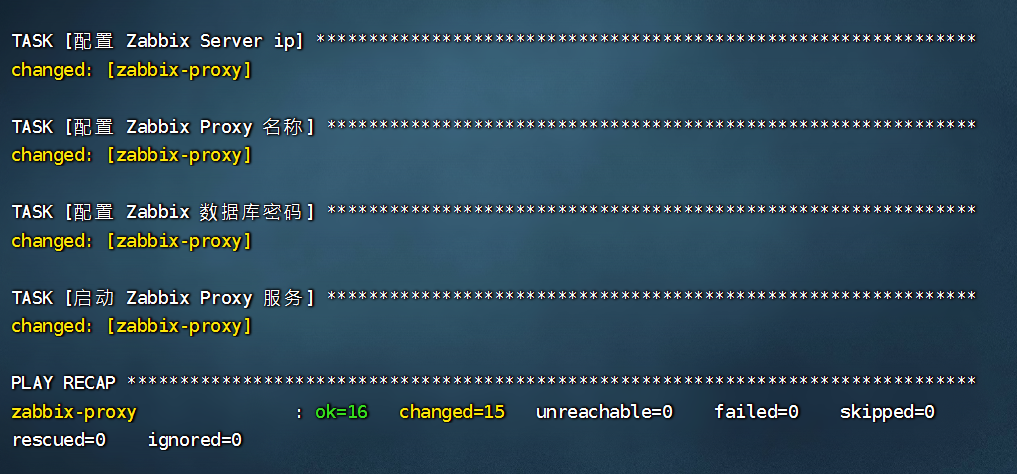
三节点配置agent
为 zabbix-server、zabbix-data1、zx-3f3-proxy 配置 agent 的示例 playbook:
展开代码---
- name: Zabbix Agent 安装
  hosts:
    - zabbix-server
    - zabbix-database
    - zabbix-proxy

  vars:
    # 指定 zabbix 版本
    zabbix_ver: 7.0.10-release1.el9
    # 指定 Zabbix Server ip
    zabbix_server_ip: 192.168.120.136

  tasks:
    - name: 关闭防火墙
      systemd:
        name: firewalld
        state: stopped
        enabled: no

    - name: 关闭 SELinux
      lineinfile:
        path: /etc/selinux/config
        regexp: "^SELINUX=enforcing"
        line: "SELINUX=disabled"
      register: selinux_config_changed

    - name: 立即禁用 SELinux
      command: setenforce 0
      when: selinux_config_changed.changed

    - name: 安装 Zabbix 仓库
      dnf:
        name: https://repo.zabbix.com/zabbix/7.0/centos/9/x86_64/zabbix-release-latest-7.0.el9.noarch.rpm
        state: present
        disable_gpg_check: yes

    - name: 安装 Zabbix Agent
      dnf:
        update_cache: yes
        name:
          - zabbix-agent-{{ zabbix_ver }}
        state: present

    - name: 配置 Zabbix Server ip
      lineinfile:
        path: /etc/zabbix/zabbix_agentd.conf
        regexp: "^Server=127.0.0.1$"
        line: "Server={{ zabbix_server_ip }}"

    - name: 启动 Zabbix 服务
      systemd:
        name: zabbix-agent
        enabled: yes
        state: started
该 playbook 将会在 zabbix-server、zabbix-data1、zx-3f3-proxy 这 3 个系统部署 Zabbix Agent,并将采集到的数据提交给 zabbix-server
检查是否存在语法错误
展开代码ansible-playbook --syntax-check 03-zba.yml

开始执行该 playbook
展开代码ansible-playbook 03-zba.yml
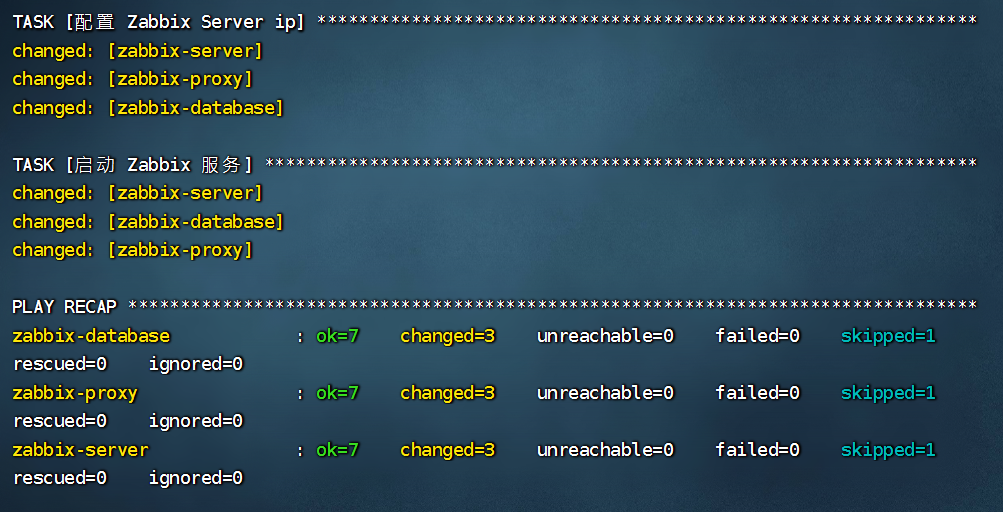
GPU 监控
导入 zbx_export_templates.yaml 模板
展开代码zabbix_export: version: '7.0' template_groups: - uuid: a571c0d144b14fd4a87a9d9b2aa9fcd6 name: Templates/Applications templates: - uuid: 7297d66e419543c6b83dd8cfe5eb4fb7 template: 'Nvidia by Zabbix agent 2 active' name: 'Nvidia by Zabbix agent 2 active' description: | This template is designed for Nvidia GPU monitoring and doesn't require any external scripts. 1. Setup and configure Zabbix agent 2 compiled with the Nvidia monitoring plugin. 2. Create a host and attach the template to it. All Nvidia GPUs will be discovered. Set filters with macros if you want to override default filter parameters. You can discuss this template or leave feedback on our forum https://www.zabbix.com/forum/zabbix-suggestions-and-feedback. Generated by official Zabbix template tool "Templator" vendor: name: Zabbix version: 7.0-1 groups: - name: Templates/Applications items: - uuid: efdffab0b401430388a5cb21a789978d name: 'Number of devices' type: ZABBIX_ACTIVE key: nvml.device.count delay: 1h description: | Retrieves the number of compute devices in the system. A compute device is a single GPU. For all Nvidia products. preprocessing: - type: DISCARD_UNCHANGED_HEARTBEAT parameters: - 1d tags: - tag: component value: nvidia triggers: - uuid: adf85e5ea2404ef4841208a41ca3bb45 expression: 'change(/Nvidia by Zabbix agent 2 active/nvml.device.count) <> 0' name: 'Nvidia: Number of devices has changed' event_name: 'Nvidia: Number of devices on {HOST.HOST} has changed.' opdata: 'current value: {ITEM.LASTVALUE1}' priority: HIGH description: 'Number of devices has changed. Check if this was intentional.' manual_close: 'YES' tags: - tag: scope value: notice - uuid: 6ea9f80195af4c7b89c1f7220fc71df7 name: 'Get devices' type: ZABBIX_ACTIVE key: nvml.device.get delay: 30s history: '0' value_type: TEXT trends: '0' description: 'Retrieves a list of Nvidia devices in the system.' tags: - tag: component value: nvidia - tag: component value: raw - uuid: ace48fd5ae7043afa03c452aa1192c2a name: 'Get devices-tex' type: ZABBIX_ACTIVE key: nvml.device.get.full delay: 30s history: '0' value_type: TEXT trends: '0' description: 'Retrieves a list of Nvidia devices in the system.' tags: - tag: component value: nvidia - tag: component value: raw - uuid: 424bce7a262144d0a2bc33bc0b5ee98a name: 'Driver version' type: ZABBIX_ACTIVE key: nvml.system.driver.version delay: 1h value_type: CHAR trends: '0' description: | Retrieves the version of the system's graphics driver. For all Nvidia products. preprocessing: - type: DISCARD_UNCHANGED_HEARTBEAT parameters: - 1d tags: - tag: component value: nvidia triggers: - uuid: bd2e26231d1a4ae29538c573e69fce34 expression: 'change(/Nvidia by Zabbix agent 2 active/nvml.system.driver.version) <> 0' name: 'Nvidia: Driver version has changed' event_name: 'Nvidia: Driver version on {HOST.HOST} has changed.' opdata: 'current value: {ITEM.LASTVALUE1}' priority: INFO description: | Driver version has changed. Check the Nvidia website for the specific driver version: https://www.nvidia.com/en-us/drivers/ manual_close: 'YES' tags: - tag: scope value: notice - uuid: 1566ad71d26a474a858c12ff1cf438fb name: 'NVML library version' type: ZABBIX_ACTIVE key: nvml.version delay: 1h value_type: CHAR trends: '0' description: | Retrieves the version of the NVML library. For all Nvidia products. preprocessing: - type: DISCARD_UNCHANGED_HEARTBEAT parameters: - 1d tags: - tag: component value: nvidia triggers: - uuid: 8db25f54f23f48c4ae2ead4ca3e52c34 expression: 'change(/Nvidia by Zabbix agent 2 active/nvml.version) <> 0' name: 'Nvidia: NVML library has changed' event_name: 'Nvidia: NVML library on {HOST.HOST} has changed.' opdata: 'current value: {ITEM.LASTVALUE1}' priority: INFO description: | NVML library version has changed. Check the changelog for details: https://docs.nvidia.com/deploy/nvml-api/change-log.html manual_close: 'YES' tags: - tag: scope value: notice discovery_rules: - uuid: d3d6ca6d489b436f8aecef9e2f64bd33 name: 'GPU Discovery' type: DEPENDENT key: nvml.device.discovery delay: '0' filter: evaltype: AND conditions: - macro: '{#NAME}' value: '{$NVIDIA.NAME.MATCHES}' formulaid: A - macro: '{#NAME}' value: '{$NVIDIA.NAME.NOT_MATCHES}' operator: NOT_MATCHES_REGEX formulaid: B - macro: '{#UUID}' value: '{$NVIDIA.UUID.MATCHES}' formulaid: C - macro: '{#UUID}' value: '{$NVIDIA.UUID.NOT_MATCHES}' operator: NOT_MATCHES_REGEX formulaid: D description: 'Nvidia GPU discovery in the system.' item_prototypes: - uuid: 0355d8799fb44e6b8ad144b389641d01 name: '[{#NAME}]: Decoder utilization' type: ZABBIX_ACTIVE key: 'nvml.device.decoder.utilization["{#UUID}"]' units: '%' description: | Retrieves the current utilization for the Decoder. For Nvidia Kepler or newer fully supported devices. tags: - tag: component value: nvidia - tag: device value: '{#NAME}' - tag: device value: '{#UUID}' trigger_prototypes: - uuid: 2ca21d91b7e94f0fa2328dd35846769b expression: 'min(/Nvidia by Zabbix agent 2 active/nvml.device.decoder.utilization["{#UUID}"],3m) > {$NVIDIA.DECODER.UTIL.CRIT}' name: 'Nvidia: [{#NAME}]: Decoder utilization exceeded critical threshold' event_name: 'Nvidia: [{#NAME}]: Decoder utilization ({ITEM.VALUE1}) exceeded critical threshold ({$NVIDIA.DECODER.UTIL.CRIT} %)' opdata: 'current value: {ITEM.LASTVALUE1}' priority: WARNING description: '[{#UUID}]: Decoder utilization is very high. It may indicate abnormal behavior/activity. Change corresponding macro in case of false-positive.' tags: - tag: scope value: performance - uuid: 13f4fd62bdac46118781e3090df30a6e expression: 'min(/Nvidia by Zabbix agent 2 active/nvml.device.decoder.utilization["{#UUID}"],3m) > {$NVIDIA.DECODER.UTIL.WARN}' name: 'Nvidia: [{#NAME}]: Decoder utilization exceeded warning threshold' event_name: 'Nvidia: [{#NAME}]: Decoder utilization ({ITEM.VALUE1}) exceeded warning threshold ({$NVIDIA.DECODER.UTIL.WARN} %)' opdata: 'current value: {ITEM.LASTVALUE1}' priority: INFO description: '[{#UUID}]: Decoder utilization is high. It may indicate abnormal behavior/activity. Change corresponding macro in case of false-positive.' dependencies: - name: 'Nvidia: [{#NAME}]: Decoder utilization exceeded critical threshold' expression: 'min(/Nvidia by Zabbix agent 2 active/nvml.device.decoder.utilization["{#UUID}"],3m) > {$NVIDIA.DECODER.UTIL.CRIT}' tags: - tag: scope value: performance - uuid: a6804c8604cd46bcb5b38144171b9209 name: '[{#NAME}]: Encoder average FPS' type: DEPENDENT key: 'nvml.device.encoder.stats.fps["{#UUID}"]' delay: '0' units: '!fps' description: | Retrieves the trailing average FPS of all active encoder sessions for a given device. For Nvidia Maxwell or newer fully supported devices. preprocessing: - type: JSONPATH parameters: - $.average_fps master_item: key: 'nvml.device.encoder.stats.get["{#UUID}"]' tags: - tag: component value: encoder - tag: component value: nvidia - tag: device value: '{#NAME}' - tag: device value: '{#UUID}' - uuid: 52c3a8fc63fc47e88c976d8d8436a3a5 name: '[{#NAME}]: Encoder stats' type: ZABBIX_ACTIVE key: 'nvml.device.encoder.stats.get["{#UUID}"]' history: '0' value_type: TEXT trends: '0' description: | Retrieves the current encoder statistics for a given device. For Nvidia Maxwell or newer fully supported devices. tags: - tag: component value: nvidia - tag: component value: raw - tag: device value: '{#NAME}' - tag: device value: '{#UUID}' - uuid: 141a77dc82124d0c99c79cbbf729e88d name: '[{#NAME}]: Encoder average latency' type: DEPENDENT key: 'nvml.device.encoder.stats.latency["{#UUID}"]' delay: '0' value_type: FLOAT units: s description: | Retrieves the current encode latency for a given device. For Nvidia Maxwell or newer fully supported devices. preprocessing: - type: JSONPATH parameters: - $.average_latency_ms - type: MULTIPLIER parameters: - '0.001' master_item: key: 'nvml.device.encoder.stats.get["{#UUID}"]' tags: - tag: component value: encoder - tag: component value: nvidia - tag: device value: '{#NAME}' - tag: device value: '{#UUID}' trigger_prototypes: - uuid: 8257801252a14f81af72b7dde279de6e expression: 'last(/Nvidia by Zabbix agent 2 active/nvml.device.encoder.stats.latency["{#UUID}"]) > (2 * avg(/Nvidia by Zabbix agent 2 active/nvml.device.encoder.stats.latency["{#UUID}"],3m))' name: 'Nvidia: [{#NAME}]: Encoder average latency is high' event_name: 'Nvidia: [{#NAME}]: Encoder average latency is 2x higher than usual.' opdata: 'current value: {ITEM.LASTVALUE1}' priority: WARNING tags: - tag: scope value: performance - uuid: 0c441debd2e44b7a9efd4347483b660d name: '[{#NAME}]: Encoder sessions' type: DEPENDENT key: 'nvml.device.encoder.stats.sessions["{#UUID}"]' delay: '0' description: | Retrieves the current count of active encoder sessions for a given device. For Nvidia Maxwell or newer fully supported devices. preprocessing: - type: JSONPATH parameters: - $.session_count master_item: key: 'nvml.device.encoder.stats.get["{#UUID}"]' tags: - tag: component value: encoder - tag: component value: nvidia - tag: device value: '{#NAME}' - tag: device value: '{#UUID}' - uuid: ae76d66eed7b42fb95b13cfcc1e633d1 name: '[{#NAME}]: Encoder utilization' type: ZABBIX_ACTIVE key: 'nvml.device.encoder.utilization["{#UUID}"]' units: '%' description: | Retrieves the current utilization for the Encoder. For Nvidia Kepler or newer fully supported devices. tags: - tag: component value: nvidia - tag: device value: '{#NAME}' - tag: device value: '{#UUID}' trigger_prototypes: - uuid: 86419e03555c4bc38227bc04b1583fba expression: 'min(/Nvidia by Zabbix agent 2 active/nvml.device.encoder.utilization["{#UUID}"],3m) > {$NVIDIA.ENCODER.UTIL.CRIT}' name: 'Nvidia: [{#NAME}]: Encoder utilization exceeded critical threshold' event_name: 'Nvidia: [{#NAME}]: Encoder utilization ({ITEM.VALUE1}) exceeded critical threshold ({$NVIDIA.ENCODER.UTIL.CRIT} %)' opdata: 'current value: {ITEM.LASTVALUE1}' priority: WARNING description: '[{#UUID}]: Encoder utilization is very high. It may indicate abnormal behavior/activity. Change corresponding macro in case of false-positive.' tags: - tag: scope value: performance - uuid: 709342417f4746a6873f5e66601d97ff expression: 'min(/Nvidia by Zabbix agent 2 active/nvml.device.encoder.utilization["{#UUID}"],3m) > {$NVIDIA.ENCODER.UTIL.WARN}' name: 'Nvidia: [{#NAME}]: Encoder utilization exceeded warning threshold' event_name: 'Nvidia: [{#NAME}]: Encoder utilization ({ITEM.VALUE1}) exceeded warning threshold ({$NVIDIA.ENCODER.UTIL.WARN} %)' opdata: 'current value: {ITEM.LASTVALUE1}' priority: INFO description: '[{#UUID}]: Encoder utilization is high. It may indicate abnormal behavior/activity. Change corresponding macro in case of false-positive.' dependencies: - name: 'Nvidia: [{#NAME}]: Encoder utilization exceeded critical threshold' expression: 'min(/Nvidia by Zabbix agent 2 active/nvml.device.encoder.utilization["{#UUID}"],3m) > {$NVIDIA.ENCODER.UTIL.CRIT}' tags: - tag: scope value: performance - uuid: 79928bb18ccc4a4e9d1ed46aa20d5434 name: '[{#NAME}]: Energy consumption' type: ZABBIX_ACTIVE key: 'nvml.device.energy.consumption["{#UUID}"]' value_type: FLOAT units: J description: | Retrieves the total energy consumption of this GPU in joules since the last driver reload. For Nvidia Volta or newer fully supported devices. preprocessing: - type: MULTIPLIER parameters: - '0.001' tags: - tag: component value: nvidia - tag: device value: '{#NAME}' - tag: device value: '{#UUID}' - uuid: 25062054ea774f0caaee6aa342c5e2a2 name: '[{#NAME}]: Memory ECC errors, corrected' type: DEPENDENT key: 'nvml.device.errors.memory.corrected["{#UUID}"]' delay: '0' status: DISABLED discover: NO_DISCOVER description: | Retrieves the count of GPU device memory errors that were corrected. For ECC errors, these are single-bit errors, for Texture memory, these are errors fixed by resend. For Nvidia Fermi or newer fully supported devices. preprocessing: - type: JSONPATH parameters: - $.corrected master_item: key: 'nvml.device.errors.memory["{#UUID}"]' tags: - tag: component value: memory - tag: component value: nvidia - tag: device value: '{#NAME}' - tag: device value: '{#UUID}' trigger_prototypes: - uuid: cbf602d3ed784ec3ae3072899fa91f56 expression: 'change(/Nvidia by Zabbix agent 2 active/nvml.device.errors.memory.corrected["{#UUID}"]) <> 0' name: 'Nvidia: [{#NAME}]: Number of corrected memory ECC errors has changed' event_name: 'Nvidia: Number of corrected memory ECC errors on {HOST.HOST} has changed.' opdata: 'current value: {ITEM.LASTVALUE1}' priority: INFO description: 'An increasing number of corrected ECC errors can indicate (but not necessary mean) aging or degrading of memory.' manual_close: 'YES' tags: - tag: scope value: notice - uuid: 8bc12acbbe7c41c882429ec09bc3d86d name: '[{#NAME}]: Memory ECC errors, uncorrected' type: DEPENDENT key: 'nvml.device.errors.memory.uncorrected["{#UUID}"]' delay: '0' status: DISABLED discover: NO_DISCOVER description: | Retrieves the count of GPU device memory errors that were not corrected. For ECC errors, these are double-bit errors, for Texture memory, these are errors where the resend fails. For Nvidia Fermi or newer fully supported devices. preprocessing: - type: JSONPATH parameters: - $.uncorrected master_item: key: 'nvml.device.errors.memory["{#UUID}"]' tags: - tag: component value: memory - tag: component value: nvidia - tag: device value: '{#NAME}' - tag: device value: '{#UUID}' trigger_prototypes: - uuid: 3a93f82adbed4330b54296beaed17848 expression: 'change(/Nvidia by Zabbix agent 2 active/nvml.device.errors.memory.uncorrected["{#UUID}"]) <> 0' name: 'Nvidia: [{#NAME}]: Number of uncorrected memory ECC errors has changed' event_name: 'Nvidia: Number uncorrected of memory ECC errors on {HOST.HOST} has changed.' opdata: 'current value: {ITEM.LASTVALUE1}' priority: INFO description: 'An increasing number of uncorrected ECC errors can indicate potential issues such as: data corruption, system instability, hardware issues' manual_close: 'YES' tags: - tag: scope value: notice - uuid: e79e45b1625742fea796f14d26c52e6f name: '[{#NAME}]: Memory ECC errors, get' type: ZABBIX_ACTIVE key: 'nvml.device.errors.memory["{#UUID}"]' history: '0' value_type: TEXT trends: '0' status: DISABLED discover: NO_DISCOVER description: | Retrieves the GPU device memory error counters for the device. For Nvidia Fermi or newer fully supported devices. Requires NVML_INFOROM_ECC version 2.0 or higher to report aggregate location-based memory error counts. Requires NVML_INFOROM_ECC version 1.0 or higher to report all other memory error counts. Only applicable to devices with ECC. Requires ECC Mode to be enabled. preprocessing: - type: CHECK_NOT_SUPPORTED parameters: - '0' - 'The requested operation is not available on target device' error_handler: CUSTOM_ERROR error_handler_params: 'No ECC on the device or ECC mode is turned off.' tags: - tag: component value: nvidia - tag: component value: raw - tag: device value: '{#NAME}' - tag: device value: '{#UUID}' - uuid: b472e7b463244d30b79291cd411f160e name: '[{#NAME}]: Register file errors, corrected' type: DEPENDENT key: 'nvml.device.errors.register.corrected["{#UUID}"]' delay: '0' status: DISABLED discover: NO_DISCOVER description: | Retrieves the count of GPU register file errors that were corrected. For ECC errors, these are single-bit errors, for Texture memory, these are errors fixed by resend. For Nvidia Fermi or newer fully supported devices. preprocessing: - type: JSONPATH parameters: - $.corrected master_item: key: 'nvml.device.errors.register["{#UUID}"]' tags: - tag: component value: memory - tag: component value: nvidia - tag: device value: '{#NAME}' - tag: device value: '{#UUID}' trigger_prototypes: - uuid: 4aa09321d7214173a0b1656d18455b78 expression: 'change(/Nvidia by Zabbix agent 2 active/nvml.device.errors.register.corrected["{#UUID}"]) <> 0' name: 'Nvidia: [{#NAME}]: Number of corrected register file errors has changed' event_name: 'Nvidia: Number corrected of register file errors on {HOST.HOST} has changed.' opdata: 'current value: {ITEM.LASTVALUE1}' priority: INFO description: 'An increasing number of corrected register file errors can indicate (but not necessary mean) wearing, aging or degrading of memory.' manual_close: 'YES' tags: - tag: scope value: notice - uuid: 5e66f8e5378d4b1fb4c9959333d0baf5 name: '[{#NAME}]: Register file errors, uncorrected' type: DEPENDENT key: 'nvml.device.errors.register.uncorrected["{#UUID}"]' delay: '0' status: DISABLED discover: NO_DISCOVER description: | Retrieves the count of GPU register file errors that were not corrected. For ECC errors, these are double-bit errors, for Texture memory, these are errors where the resend fails. For Nvidia Fermi or newer fully supported devices. preprocessing: - type: JSONPATH parameters: - $.uncorrected master_item: key: 'nvml.device.errors.register["{#UUID}"]' tags: - tag: component value: memory - tag: component value: nvidia - tag: device value: '{#NAME}' - tag: device value: '{#UUID}' trigger_prototypes: - uuid: 951c54e2edcc43d29ac466a35802cfc9 expression: 'change(/Nvidia by Zabbix agent 2 active/nvml.device.errors.register.uncorrected["{#UUID}"]) <> 0' name: 'Nvidia: [{#NAME}]: Number of uncorrected register file errors has changed' event_name: 'Nvidia: Number uncorrected of register file errors on {HOST.HOST} has changed.' opdata: 'current value: {ITEM.LASTVALUE1}' priority: INFO description: 'An increasing number of uncorrected register file errors can indicate potential issues such as: data corruption, system instability, hardware degradation.' manual_close: 'YES' tags: - tag: scope value: notice - uuid: 3b19ff5ab2ae48049aed8403ab18ebf3 name: '[{#NAME}]: Register file errors, get' type: ZABBIX_ACTIVE key: 'nvml.device.errors.register["{#UUID}"]' history: '0' value_type: TEXT trends: '0' status: DISABLED discover: NO_DISCOVER description: | Retrieves the GPU register file error counters for the device. For Nvidia Fermi or newer fully supported devices. Requires NVML_INFOROM_ECC version 2.0 or higher to report aggregate location-based memory error counts. Requires NVML_INFOROM_ECC version 1.0 or higher to report all other memory error counts. Only applicable to devices with ECC. Requires ECC Mode to be enabled. preprocessing: - type: CHECK_NOT_SUPPORTED parameters: - '0' - 'The requested operation is not available on target device' error_handler: CUSTOM_ERROR error_handler_params: 'No ECC on the device or ECC mode is turned off.' tags: - tag: component value: nvidia - tag: component value: raw - tag: device value: '{#NAME}' - tag: device value: '{#UUID}' - uuid: ece478c8ff5f40dcb3bcb7a4b6d65124 name: '[{#NAME}]: Fan speed' type: ZABBIX_ACTIVE key: 'nvml.device.fan.speed.avg["{#UUID}"]' units: '%' description: | Retrieves the intended operating speed of the specified device fan. Note: The reported speed is the intended fan speed. If the fan is physically blocked and unable to spin, the output will not match the actual fan speed. For all Nvidia discrete products with dedicated fans. The fan speed is expressed as a percentage of the product's maximum noise tolerance fan speed. In certain cases, this value may exceed 100%. tags: - tag: component value: nvidia - tag: device value: '{#NAME}' - tag: device value: '{#UUID}' trigger_prototypes: - uuid: dbc03d55d87946f2a9c279b8c6cbfbbc expression: 'min(/Nvidia by Zabbix agent 2 active/nvml.device.fan.speed.avg["{#UUID}"],3m) > {$NVIDIA.FAN.SPEED.CRIT}' name: 'Nvidia: [{#NAME}]: Fan speed exceeded critical threshold' event_name: 'Nvidia: [{#NAME}]: Fan speed ({ITEM.VALUE1}) exceeded critical threshold ({$NVIDIA.FAN.SPEED.CRIT} %)' opdata: 'current value: {ITEM.LASTVALUE1}' priority: WARNING description: '[{#UUID}]: Fan speed is very high. It may indicate abnormal behavior/activity. Change corresponding macro in case of false-positive.' tags: - tag: scope value: performance - uuid: 636e31ac7a2c48ecbd65b0c4ec4c8fb0 expression: 'min(/Nvidia by Zabbix agent 2 active/nvml.device.fan.speed.avg["{#UUID}"],3m) > {$NVIDIA.FAN.SPEED.WARN}' name: 'Nvidia: [{#NAME}]: Fan speed exceeded warning threshold' event_name: 'Nvidia: [{#NAME}]: Fan speed ({ITEM.VALUE1}) exceeded warning threshold ({$NVIDIA.FAN.SPEED.WARN} %)' opdata: 'current value: {ITEM.LASTVALUE1}' priority: INFO description: '[{#UUID}]: Fan speed is high. It may indicate abnormal behavior/activity. Change corresponding macro in case of false-positive.' dependencies: - name: 'Nvidia: [{#NAME}]: Fan speed exceeded critical threshold' expression: 'min(/Nvidia by Zabbix agent 2 active/nvml.device.fan.speed.avg["{#UUID}"],3m) > {$NVIDIA.FAN.SPEED.CRIT}' tags: - tag: scope value: performance - uuid: c9609ab9041a4f7584bed04b436315c0 name: '[{#NAME}]: Graphics frequency' type: ZABBIX_ACTIVE key: 'nvml.device.graphics.frequency["{#UUID}"]' units: Hz description: | Retrieves the current graphics clock speed for the device. For Nvidia Fermi or newer fully supported devices. preprocessing: - type: MULTIPLIER parameters: - '1000000' tags: - tag: component value: nvidia - tag: device value: '{#NAME}' - tag: device value: '{#UUID}' - uuid: 7556176cdf1943e5aedb7fa3c5ded934 name: '[{#NAME}]: BAR1 memory, free' type: DEPENDENT key: 'nvml.device.memory.bar1.free["{#UUID}"]' delay: '0' units: B description: | Unallocated BAR1 memory on the device. For Nvidia Kepler or newer fully supported devices preprocessing: - type: JSONPATH parameters: - $.free_memory_bytes master_item: key: 'nvml.device.memory.bar1.get["{#UUID}"]' tags: - tag: component value: memory - tag: component value: nvidia - tag: device value: '{#NAME}' - tag: device value: '{#UUID}' - uuid: 8836f8d00eb44a5180c8ced82494c1ba name: '[{#NAME}]: BAR1 memory, get' type: ZABBIX_ACTIVE key: 'nvml.device.memory.bar1.get["{#UUID}"]' history: '0' value_type: TEXT trends: '0' description: | Gets Total, Available, and Used size of BAR1 memory. BAR1 is used to map the FB (device memory) so that it can be directly accessed by the CPU or 3rd party devices (peer-to-peer on the PCIE bus). For Nvidia Kepler or newer fully supported devices tags: - tag: component value: nvidia - tag: component value: raw - tag: device value: '{#NAME}' - tag: device value: '{#UUID}' - uuid: af9070de2bc9454283a32a847b163478 name: '[{#NAME}]: BAR1 memory, total' type: DEPENDENT key: 'nvml.device.memory.bar1.total["{#UUID}"]' delay: '0' units: B description: | Total BAR1 memory on the device. For Nvidia Kepler or newer fully supported devices preprocessing: - type: JSONPATH parameters: - $.total_memory_bytes master_item: key: 'nvml.device.memory.bar1.get["{#UUID}"]' tags: - tag: component value: memory - tag: component value: nvidia - tag: device value: '{#NAME}' - tag: device value: '{#UUID}' trigger_prototypes: - uuid: 794d204946f04b71b451129294b6065c expression: 'change(/Nvidia by Zabbix agent 2 active/nvml.device.memory.bar1.total["{#UUID}"]) <> 0' name: 'Nvidia: [{#NAME}]: Total BAR1 memory has changed' event_name: 'Nvidia: Total BAR1 memory on {HOST.HOST} has changed.' opdata: 'current value: {ITEM.LASTVALUE1}' priority: WARNING description: 'Total BAR1 memory has changed. This could mean possible memory degradation, hardware configuration changes, or memory reservation by system or software.' manual_close: 'YES' tags: - tag: scope value: notice - uuid: 5d76f768d3c644a7a185bb07d109e221 name: '[{#NAME}]: BAR1 memory, used' type: DEPENDENT key: 'nvml.device.memory.bar1.used["{#UUID}"]' delay: '0' units: B description: | Allocated used BAR1 memory on the device. For Nvidia Kepler or newer fully supported devices preprocessing: - type: JSONPATH parameters: - $.used_memory_bytes master_item: key: 'nvml.device.memory.bar1.get["{#UUID}"]' tags: - tag: component value: memory - tag: component value: nvidia - tag: device value: '{#NAME}' - tag: device value: '{#UUID}' - uuid: 20c11439c02d49969bbe13f41e23a31b name: '[{#NAME}]: FB memory, free' type: DEPENDENT key: 'nvml.device.memory.fb.free["{#UUID}"]' delay: '0' units: B description: | Unallocated memory on the device. For all Nvidia products. preprocessing: - type: JSONPATH parameters: - $.free_memory_bytes master_item: key: 'nvml.device.memory.fb.get["{#UUID}"]' tags: - tag: component value: memory - tag: component value: nvidia - tag: device value: '{#NAME}' - tag: device value: '{#UUID}' - uuid: c842f44afa3e49b1b54db7fd6a27d1f4 name: '[{#NAME}]: FB memory, get.full' type: ZABBIX_ACTIVE key: 'nvml.device.memory.fb.get.full["{#UUID}"]' history: '0' value_type: TEXT trends: '0' description: | Retrieves the amount of used, free, reserved, and total memory available on the device. For all Nvidia products. Enabling ECC reduces the amount of total available memory due to the extra required parity bits. Under WDDM, most of the device memory is allocated and managed on startup by Windows. Under Linux and Windows TCC, the reported amount of used memory is equal to the sum of memory allocated by all active channels on the device. tags: - tag: component value: nvidia - tag: component value: raw - tag: device value: '{#NAME}' - tag: device value: '{#UUID}' - uuid: 1f48f586a4ec49ffbe8080bac5df66f8 name: '[{#NAME}]: FB memory, get' type: ZABBIX_ACTIVE key: 'nvml.device.memory.fb.get["{#UUID}"]' history: '0' value_type: TEXT trends: '0' description: | Retrieves the amount of used, free, reserved, and total memory available on the device. For all Nvidia products. Enabling ECC reduces the amount of total available memory due to the extra required parity bits. Under WDDM, most of the device memory is allocated and managed on startup by Windows. Under Linux and Windows TCC, the reported amount of used memory is equal to the sum of memory allocated by all active channels on the device. tags: - tag: component value: nvidia - tag: component value: raw - tag: device value: '{#NAME}' - tag: device value: '{#UUID}' - uuid: 806601ebae81441fbc90523d63470044 name: '[{#NAME}]: FB memory, reserved' type: DEPENDENT key: 'nvml.device.memory.fb.reserved["{#UUID}"]' delay: '0' units: B description: | Memory reserved for system use (driver or firmware) on the device. For all Nvidia products. preprocessing: - type: JSONPATH parameters: - $.reserved_memory_bytes error_handler: CUSTOM_ERROR error_handler_params: 'NVML library too old to support this metric.' master_item: key: 'nvml.device.memory.fb.get.full["{#UUID}"]' tags: - tag: component value: memory - tag: component value: nvidia - tag: device value: '{#NAME}' - tag: device value: '{#UUID}' - uuid: 6a78780f41314641a3478efd0cb9882b name: '[{#NAME}]: FB memory, total' type: DEPENDENT key: 'nvml.device.memory.fb.total["{#UUID}"]' delay: '0' units: B description: | Total physical memory on the device. For all Nvidia products. preprocessing: - type: JSONPATH parameters: - $.total_memory_bytes master_item: key: 'nvml.device.memory.fb.get.full["{#UUID}"]' tags: - tag: component value: memory - tag: component value: nvidia - tag: device value: '{#NAME}' - tag: device value: '{#UUID}' trigger_prototypes: - uuid: 7f1308d09489457db3ce7d6e1afe469b expression: 'change(/Nvidia by Zabbix agent 2 active/nvml.device.memory.fb.total["{#UUID}"]) <> 0' name: 'Nvidia: [{#NAME}]: Total FB memory has changed' event_name: 'Nvidia: Total FB memory on {HOST.HOST} has changed.' opdata: 'current value: {ITEM.LASTVALUE1}' priority: WARNING description: 'Total FB memory has changed. This could mean possible memory degradation, hardware configuration changes, or memory reservation by system or software.' manual_close: 'YES' tags: - tag: scope value: notice - uuid: 4267777a1117490db3c90097aae56d98 name: '[{#NAME}]: FB memory, used' type: DEPENDENT key: 'nvml.device.memory.fb.used["{#UUID}"]' delay: '0' units: B description: | Allocated memory on the device. For all Nvidia products. preprocessing: - type: JSONPATH parameters: - $.used_memory_bytes master_item: key: 'nvml.device.memory.fb.get.full["{#UUID}"]' tags: - tag: component value: memory - tag: component value: nvidia - tag: device value: '{#NAME}' - tag: device value: '{#UUID}' - uuid: b3ec856b4b7f42d9ba76c2ff47752bd7 name: '[{#NAME}]: Memory frequency' type: ZABBIX_ACTIVE key: 'nvml.device.memory.frequency["{#UUID}"]' units: Hz description: | Retrieves the current memory clock speed for the device. For Nvidia Fermi or newer fully supported devices. preprocessing: - type: MULTIPLIER parameters: - '1000000' tags: - tag: component value: nvidia - tag: device value: '{#NAME}' - tag: device value: '{#UUID}' - uuid: 74a8c52b818540418046a1475c063da1 name: '[{#NAME}]: PCIe utilization, Rx' type: DEPENDENT key: 'nvml.device.pci.utilization.rx.rate["{#UUID}"]' delay: '0' units: bps description: | The PCIe Rx (receive) throughput over a 20ms interval on the device. For Nvidia Maxwell or newer fully supported devices. preprocessing: - type: JSONPATH parameters: - $.rx_rate_kb_s - type: MULTIPLIER parameters: - '1024' master_item: key: 'nvml.device.pci.utilization["{#UUID}"]' tags: - tag: component value: nvidia - tag: device value: '{#NAME}' - tag: device value: '{#UUID}' - uuid: 4cb72592564348c6af99f95e592c2591 name: '[{#NAME}]: PCIe utilization, Tx' type: DEPENDENT key: 'nvml.device.pci.utilization.tx.rate["{#UUID}"]' delay: '0' units: bps description: | The PCIe Tx (transmit) throughput over a 20ms interval on the device. For Nvidia Maxwell or newer fully supported devices. preprocessing: - type: JSONPATH parameters: - $.tx_rate_kb_s - type: MULTIPLIER parameters: - '1024' master_item: key: 'nvml.device.pci.utilization["{#UUID}"]' tags: - tag: component value: nvidia - tag: device value: '{#NAME}' - tag: device value: '{#UUID}' - uuid: 3270b9cf246b4b0abf60bb73f2c64c39 name: '[{#NAME}]: PCIe utilization, get' type: ZABBIX_ACTIVE key: 'nvml.device.pci.utilization["{#UUID}"]' history: '0' value_type: TEXT trends: '0' description: | Retrieves PCIe utilization information. For Nvidia Maxwell or newer fully supported devices. tags: - tag: component value: nvidia - tag: component value: raw - tag: device value: '{#NAME}' - tag: device value: '{#UUID}' - uuid: 1ac19949ec11456896562f63525dcb8c name: '[{#NAME}]: Performance state' type: ZABBIX_ACTIVE key: 'nvml.device.performance.state["{#UUID}"]' description: | Retrieves the current performance state for the device. For Nvidia Fermi or newer fully supported devices. valuemap: name: 'Performance state' tags: - tag: component value: nvidia - tag: device value: '{#NAME}' - tag: device value: '{#UUID}' - uuid: 7f4e87102f8042a8802088f842356522 name: '[{#NAME}]: Power limit' type: ZABBIX_ACTIVE key: 'nvml.device.power.limit["{#UUID}"]' delay: 1h value_type: FLOAT units: watts description: | Retrieves the power management limit associated with this device. For Nvidia Fermi or newer fully supported devices. The power limit defines the upper boundary for the card's power draw. If the card's total power draw reaches this limit, the power management algorithm kicks in. This reading is only available if power management mode is supported. preprocessing: - type: MULTIPLIER parameters: - '0.001' tags: - tag: component value: nvidia - tag: device value: '{#NAME}' - tag: device value: '{#UUID}' trigger_prototypes: - uuid: c7ba8c60f3de4c87a528db11d39ee2ec expression: 'change(/Nvidia by Zabbix agent 2 active/nvml.device.power.limit["{#UUID}"]) <> 0' name: 'Nvidia: [{#NAME}]: Power limit has changed' event_name: 'Nvidia: [{#NAME}]Power limit on {HOST.HOST} has changed.' opdata: 'current value: {ITEM.LASTVALUE1}' priority: INFO description: 'Power limit for the device has changed. Check if this was intentional.' manual_close: 'YES' tags: - tag: scope value: notice - uuid: 601901906c634f64a94831a9b44ad59e name: '[{#NAME}]: Power usage' type: ZABBIX_ACTIVE key: 'nvml.device.power.usage["{#UUID}"]' value_type: FLOAT units: watts description: | Retrieves power usage for this GPU (in watts) and its associated circuitry (e.g. memory). For Nvidia Fermi or newer fully supported devices. On Fermi and Kepler GPUs, the reading is accurate to within +/- 5% of current power draw. On Ampere (except GA100) or newer GPUs, the API returns power averaged over a 1 second interval. On GA100 and older architectures, instantaneous power is returned. preprocessing: - type: MULTIPLIER parameters: - '0.001' tags: - tag: component value: nvidia - tag: device value: '{#NAME}' - tag: device value: '{#UUID}' - uuid: 707c859524164a348d142f193fb464d6 name: '[{#NAME}]: Serial number' type: ZABBIX_ACTIVE key: 'nvml.device.serial["{#UUID}"]' delay: 1h value_type: CHAR trends: '0' status: DISABLED discover: NO_DISCOVER description: | Retrieves the globally unique board serial number associated with this device's board. For all products with an inforom. This number matches the serial number tag that is physically attached to the board. preprocessing: - type: CHECK_NOT_SUPPORTED parameters: - '0' - 'The requested operation is not available on target device' error_handler: CUSTOM_ERROR error_handler_params: 'The device does not support operation to retrieve serial number.' tags: - tag: component value: nvidia - tag: device value: '{#NAME}' - tag: device value: '{#UUID}' - uuid: c64fafdc18654ad8adb984673142b614 name: '[{#NAME}]: SM frequency' type: ZABBIX_ACTIVE key: 'nvml.device.sm.frequency["{#UUID}"]' units: Hz description: | Retrieves the current SM clock speed for the device. For Nvidia Fermi or newer fully supported devices. preprocessing: - type: MULTIPLIER parameters: - '1000000' tags: - tag: component value: nvidia - tag: device value: '{#NAME}' - tag: device value: '{#UUID}' - uuid: 513cab732c7648ccb71a7401ebcaebc5 name: '[{#NAME}]: Temperature' type: ZABBIX_ACTIVE key: 'nvml.device.temperature["{#UUID}"]' units: C description: | Retrieves the current temperature readings for the device, in degrees C. For Nvidia all products. tags: - tag: component value: nvidia - tag: device value: '{#NAME}' - tag: device value: '{#UUID}' trigger_prototypes: - uuid: d325cc30ed2c4b539ce26844360077d0 expression: 'min(/Nvidia by Zabbix agent 2 active/nvml.device.temperature["{#UUID}"],3m) > {$NVIDIA.TEMPERATURE.CRIT}' name: 'Nvidia: [{#NAME}]: Temperature exceeded critical threshold' event_name: 'Nvidia: [{#NAME}]: Temperature ({ITEM.VALUE1}) exceeded critical threshold ({$NVIDIA.TEMPERATURE.CRIT} C)' opdata: 'current value: {ITEM.LASTVALUE1}' priority: AVERAGE description: '[{#UUID}]: Temperature is very high. It may indicate abnormal behavior/activity. Change corresponding macro in case of false-positive.' tags: - tag: scope value: performance - uuid: ac0086ae1f4f4dc4bef1dc84f56487f8 expression: 'min(/Nvidia by Zabbix agent 2 active/nvml.device.temperature["{#UUID}"],3m) > {$NVIDIA.TEMPERATURE.WARN}' name: 'Nvidia: [{#NAME}]: Temperature exceeded warning threshold' event_name: 'Nvidia: [{#NAME}]: Temperature ({ITEM.VALUE1}) exceeded warning threshold ({$NVIDIA.TEMPERATURE.WARN} C)' opdata: 'current value: {ITEM.LASTVALUE1}' priority: WARNING description: '[{#UUID}]: Temperature is high. It may indicate abnormal behavior/activity. Change corresponding macro in case of false-positive.' dependencies: - name: 'Nvidia: [{#NAME}]: Temperature exceeded critical threshold' expression: 'min(/Nvidia by Zabbix agent 2 active/nvml.device.temperature["{#UUID}"],3m) > {$NVIDIA.TEMPERATURE.CRIT}' tags: - tag: scope value: performance - uuid: 300507f6bcf8468387df8f8c25b37b49 name: '[{#NAME}]: GPU utilization' type: DEPENDENT key: 'nvml.device.utilization.gpu["{#UUID}"]' delay: '0' units: '%' description: | Percentage of time over the past sampling period during which one or more kernels were running on the GPU. For Nvidia Fermi or newer fully supported devices. preprocessing: - type: JSONPATH parameters: - $.device master_item: key: 'nvml.device.utilization["{#UUID}"]' tags: - tag: component value: nvidia - tag: device value: '{#NAME}' - tag: device value: '{#UUID}' trigger_prototypes: - uuid: 57b043a2966647bea3aa39fe54a7eabf expression: 'min(/Nvidia by Zabbix agent 2 active/nvml.device.utilization.gpu["{#UUID}"],3m) > {$NVIDIA.GPU.UTIL.CRIT}' name: 'Nvidia: [{#NAME}]: GPU utilization exceeded critical threshold' event_name: 'Nvidia: [{#NAME}]: GPU utilization ({ITEM.VALUE1}) exceeded critical threshold ({$NVIDIA.GPU.UTIL.CRIT} %)' opdata: 'current value: {ITEM.LASTVALUE1}' priority: WARNING description: '[{#UUID}]: GPU utilization is very high. It may indicate abnormal behavior/activity. Change corresponding macro in case of false-positive.' tags: - tag: scope value: performance - uuid: 26b8dfb41d2b4f11bdff7addca9eb166 expression: 'min(/Nvidia by Zabbix agent 2 active/nvml.device.utilization.gpu["{#UUID}"],3m) > {$NVIDIA.GPU.UTIL.WARN}' name: 'Nvidia: [{#NAME}]: GPU utilization exceeded warning threshold' event_name: 'Nvidia: [{#NAME}]: GPU utilization ({ITEM.VALUE1}) exceeded warning threshold ({$NVIDIA.GPU.UTIL.WARN} %)' opdata: 'current value: {ITEM.LASTVALUE1}' priority: INFO description: '[{#UUID}]: GPU utilization is high. It may indicate abnormal behavior/activity. Change corresponding macro in case of false-positive.' dependencies: - name: 'Nvidia: [{#NAME}]: GPU utilization exceeded critical threshold' expression: 'min(/Nvidia by Zabbix agent 2 active/nvml.device.utilization.gpu["{#UUID}"],3m) > {$NVIDIA.GPU.UTIL.CRIT}' tags: - tag: scope value: performance - uuid: 7a629aeab4dd4f96995aa92882128eaa name: '[{#NAME}]: Memory utilization' type: DEPENDENT key: 'nvml.device.utilization.memory["{#UUID}"]' delay: '0' units: '%' description: | Percentage of time over the past sampling period during which global (device) memory was being read or written. For Nvidia Fermi or newer fully supported devices. preprocessing: - type: JSONPATH parameters: - $.memory master_item: key: 'nvml.device.utilization["{#UUID}"]' tags: - tag: component value: memory - tag: component value: nvidia - tag: device value: '{#NAME}' - tag: device value: '{#UUID}' trigger_prototypes: - uuid: eae9828d46f94eb1afb70c924dbf160f expression: 'min(/Nvidia by Zabbix agent 2 active/nvml.device.utilization.memory["{#UUID}"],3m) > {$NVIDIA.MEMORY.UTIL.CRIT}' name: 'Nvidia: [{#NAME}]: Memory utilization exceeded critical threshold' event_name: 'Nvidia: [{#NAME}]: Memory utilization ({ITEM.VALUE1}) exceeded critical threshold ({$NVIDIA.MEMORY.UTIL.CRIT} %)' opdata: 'current value: {ITEM.LASTVALUE1}' priority: WARNING description: '[{#UUID}]: Memory utilization is very high. It may indicate abnormal behavior/activity. Change corresponding macro in case of false-positive.' tags: - tag: scope value: performance - uuid: d099782589ec42e99219cce11b424515 expression: 'min(/Nvidia by Zabbix agent 2 active/nvml.device.utilization.memory["{#UUID}"],3m) > {$NVIDIA.MEMORY.UTIL.WARN}' name: 'Nvidia: [{#NAME}]: Memory utilization exceeded warning threshold' event_name: 'Nvidia: [{#NAME}]: Memory utilization ({ITEM.VALUE1}) exceeded warning threshold ({$NVIDIA.MEMORY.UTIL.WARN} %)' opdata: 'current value: {ITEM.LASTVALUE1}' priority: INFO description: '[{#UUID}]: Memory utilization is high. It may indicate abnormal behavior/activity. Change corresponding macro in case of false-positive.' dependencies: - name: 'Nvidia: [{#NAME}]: Memory utilization exceeded critical threshold' expression: 'min(/Nvidia by Zabbix agent 2 active/nvml.device.utilization.memory["{#UUID}"],3m) > {$NVIDIA.MEMORY.UTIL.CRIT}' tags: - tag: scope value: performance - uuid: a573c6926e2b438ba124c824268bacc4 name: '[{#NAME}]: Device utilization, get' type: ZABBIX_ACTIVE key: 'nvml.device.utilization["{#UUID}"]' history: '0' value_type: TEXT trends: '0' description: | Retrieves the current utilization rates for the device's major subsystems. For Nvidia Fermi or newer fully supported devices. tags: - tag: component value: nvidia - tag: component value: raw - tag: device value: '{#NAME}' - tag: device value: '{#UUID}' - uuid: 2cdebc61528440e58cd0df9a43851988 name: '[{#NAME}]: Video frequency' type: ZABBIX_ACTIVE key: 'nvml.device.video.frequency["{#UUID}"]' units: Hz description: | Retrieves the current video encoder/decoder clock speed for the device. For Nvidia Fermi or newer fully supported devices. preprocessing: - type: MULTIPLIER parameters: - '1000000' tags: - tag: component value: nvidia - tag: device value: '{#NAME}' - tag: device value: '{#UUID}' trigger_prototypes: - uuid: c7ab007be36f4766a1ee5973132e95c6 expression: '(min(/Nvidia by Zabbix agent 2 active/nvml.device.power.usage["{#UUID}"],3m) * 100 / last(/Nvidia by Zabbix agent 2 active/nvml.device.power.limit["{#UUID}"])) > {$NVIDIA.POWER.UTIL.CRIT}' name: 'Nvidia: [{#NAME}]: Power usage exceeded critical threshold' event_name: 'Nvidia: [{#NAME}]: Power usage ({ITEM.VALUE1}) exceeded critical threshold ({$NVIDIA.POWER.UTIL.CRIT} %)' opdata: 'current value: {ITEM.LASTVALUE1}' priority: WARNING description: '[{#UUID}]: Power usage is very high. It may indicate abnormal behavior/activity. Change corresponding macro in case of false-positive.' tags: - tag: scope value: performance - uuid: fe4707cde95c4075af78ad456c3b794e expression: '(min(/Nvidia by Zabbix agent 2 active/nvml.device.power.usage["{#UUID}"],3m) * 100 / last(/Nvidia by Zabbix agent 2 active/nvml.device.power.limit["{#UUID}"])) > {$NVIDIA.POWER.UTIL.WARN}' name: 'Nvidia: [{#NAME}]: Power usage exceeded warning threshold' event_name: 'Nvidia: [{#NAME}]: Power usage ({ITEM.VALUE1}) exceeded warning threshold ({$NVIDIA.POWER.UTIL.WARN} %)' opdata: 'current value: {ITEM.LASTVALUE1}' priority: INFO description: '[{#UUID}]: Power usage is high. It may indicate abnormal behavior/activity. Change corresponding macro in case of false-positive.' dependencies: - name: 'Nvidia: [{#NAME}]: Power usage exceeded critical threshold' expression: '(min(/Nvidia by Zabbix agent 2 active/nvml.device.power.usage["{#UUID}"],3m) * 100 / last(/Nvidia by Zabbix agent 2 active/nvml.device.power.limit["{#UUID}"])) > {$NVIDIA.POWER.UTIL.CRIT}' tags: - tag: scope value: performance graph_prototypes: - uuid: a575db91d5e34a039b6b0550773d029c name: 'Nvidia: [{#NAME}]: BAR1 memory' type: STACKED ymax_type_1: ITEM ymax_item_1: host: 'Nvidia by Zabbix agent 2 active' key: 'nvml.device.memory.bar1.total["{#UUID}"]' graph_items: - color: FF0000 item: host: 'Nvidia by Zabbix agent 2 active' key: 'nvml.device.memory.bar1.used["{#UUID}"]' - sortorder: '1' color: 76B900 item: host: 'Nvidia by Zabbix agent 2 active' key: 'nvml.device.memory.bar1.free["{#UUID}"]' - uuid: 5d1a493fa02d47e8b69a254d032d984d name: 'Nvidia: [{#NAME}]: Fan speed' graph_items: - color: 199C0D item: host: 'Nvidia by Zabbix agent 2 active' key: 'nvml.device.fan.speed.avg["{#UUID}"]' - uuid: 6e7b1aeee2cd4995a4c12eba47b7a489 name: 'Nvidia: [{#NAME}]: FB memory' ymax_type_1: ITEM ymax_item_1: host: 'Nvidia by Zabbix agent 2 active' key: 'nvml.device.memory.fb.total["{#UUID}"]' graph_items: - color: FF0000 item: host: 'Nvidia by Zabbix agent 2 active' key: 'nvml.device.memory.fb.used["{#UUID}"]' - sortorder: '1' color: FFBF00 item: host: 'Nvidia by Zabbix agent 2 active' key: 'nvml.device.memory.fb.reserved["{#UUID}"]' - sortorder: '2' color: 76B900 item: host: 'Nvidia by Zabbix agent 2 active' key: 'nvml.device.memory.fb.free["{#UUID}"]' - uuid: 4f95e610f71542358eaab2ed4a3510c9 name: 'Nvidia: [{#NAME}]: FB memory bak' type: STACKED ymax_type_1: ITEM ymax_item_1: host: 'Nvidia by Zabbix agent 2 active' key: 'nvml.device.memory.fb.total["{#UUID}"]' graph_items: - color: FF0000 item: host: 'Nvidia by Zabbix agent 2 active' key: 'nvml.device.memory.fb.used["{#UUID}"]' - sortorder: '1' color: FF8000 item: host: 'Nvidia by Zabbix agent 2 active' key: 'nvml.device.memory.fb.reserved["{#UUID}"]' - sortorder: '2' color: 76B900 item: host: 'Nvidia by Zabbix agent 2 active' key: 'nvml.device.memory.fb.free["{#UUID}"]' discover: NO_DISCOVER - uuid: 360af5210fe14e408ed174bd50ef96b8 name: 'Nvidia: [{#NAME}]: Memory ECC errors' graph_items: - color: 76B900 item: host: 'Nvidia by Zabbix agent 2 active' key: 'nvml.device.errors.memory.corrected["{#UUID}"]' - sortorder: '1' color: FF0000 item: host: 'Nvidia by Zabbix agent 2 active' key: 'nvml.device.errors.memory.uncorrected["{#UUID}"]' - uuid: fbf7220f6e1a4cc2b4409dff7ba183b3 name: 'Nvidia: [{#NAME}]: PCIe utilization' graph_items: - color: FF0000 item: host: 'Nvidia by Zabbix agent 2 active' key: 'nvml.device.pci.utilization.rx.rate["{#UUID}"]' - sortorder: '1' color: 0040FF item: host: 'Nvidia by Zabbix agent 2 active' key: 'nvml.device.pci.utilization.tx.rate["{#UUID}"]' - uuid: 237635b29c6a4a9d919b15879c78e34c name: 'Nvidia: [{#NAME}]: Performance state' yaxismax: '15' ymin_type_1: FIXED ymax_type_1: FIXED graph_items: - color: 199C0D item: host: 'Nvidia by Zabbix agent 2 active' key: 'nvml.device.performance.state["{#UUID}"]' - uuid: 9511ce8b654748fea58c3494c2658121 name: 'Nvidia: [{#NAME}]: Power usage' ymax_type_1: ITEM ymax_item_1: host: 'Nvidia by Zabbix agent 2 active' key: 'nvml.device.power.limit["{#UUID}"]' graph_items: - color: 199C0D item: host: 'Nvidia by Zabbix agent 2 active' key: 'nvml.device.power.usage["{#UUID}"]' - uuid: f42dcd4d79e54db09055bf2e0d8995cf name: 'Nvidia: [{#NAME}]: Register file errors' graph_items: - color: 76B900 item: host: 'Nvidia by Zabbix agent 2 active' key: 'nvml.device.errors.register.corrected["{#UUID}"]' - sortorder: '1' color: FF0000 item: host: 'Nvidia by Zabbix agent 2 active' key: 'nvml.device.errors.register.uncorrected["{#UUID}"]' master_item: key: nvml.device.get.full lld_macro_paths: - lld_macro: '{#NAME}' path: $.device_name - lld_macro: '{#UUID}' path: $.device_uuid preprocessing: - type: DISCARD_UNCHANGED_HEARTBEAT parameters: - 1d tags: - tag: class value: hardware - tag: target value: nvidia macros: - macro: '{$NVIDIA.DECODER.UTIL.CRIT}' value: '90' description: 'Critical threshold for decoder utilization, in %.' - macro: '{$NVIDIA.DECODER.UTIL.WARN}' value: '80' description: 'Warning threshold for decoder utilization, in %.' - macro: '{$NVIDIA.ENCODER.UTIL.CRIT}' value: '90' description: 'Critical threshold for encoder utilization, in %.' - macro: '{$NVIDIA.ENCODER.UTIL.WARN}' value: '80' description: 'Warning threshold for encoder utilization, in %.' - macro: '{$NVIDIA.FAN.SPEED.CRIT}' value: '95' description: 'Critical threshold for fan speed, in %.' - macro: '{$NVIDIA.FAN.SPEED.WARN}' value: '85' description: 'Warning threshold for fan speed, in %.' - macro: '{$NVIDIA.GPU.UTIL.CRIT}' value: '90' description: 'Critical threshold for overall GPU utilization, in %.' - macro: '{$NVIDIA.GPU.UTIL.WARN}' value: '80' description: 'Warning threshold for overall GPU utilization, in %.' - macro: '{$NVIDIA.MEMORY.UTIL.CRIT}' value: '90' description: 'Critical threshold for memory utilization, in %.' - macro: '{$NVIDIA.MEMORY.UTIL.WARN}' value: '80' description: 'Warning threshold for memory utilization, in %.' - macro: '{$NVIDIA.NAME.MATCHES}' value: '.*' description: 'Filter to include GPUs by name in discovery.' - macro: '{$NVIDIA.NAME.NOT_MATCHES}' value: 'CHANGE IF NEEDED' description: 'Filter to exclude GPUs by name in discovery.' - macro: '{$NVIDIA.POWER.UTIL.CRIT}' value: '90' description: 'Critical threshold for power usage, in %.' - macro: '{$NVIDIA.POWER.UTIL.WARN}' value: '80' description: 'Warning threshold for power usage, in %.' - macro: '{$NVIDIA.TEMPERATURE.CRIT}' value: '90' description: 'Critical threshold for temperature, in %.' - macro: '{$NVIDIA.TEMPERATURE.WARN}' value: '80' description: 'Warning threshold for temperature, in %.' - macro: '{$NVIDIA.UUID.MATCHES}' value: '.*' description: 'Filter to include GPUs by UUID in discovery.' - macro: '{$NVIDIA.UUID.NOT_MATCHES}' value: 'CHANGE IF NEEDED' description: 'Filter to exclude GPUs by UUID in discovery.' dashboards: - uuid: 1ef8fd9fdd364f4bae8c57a1d309a4c8 name: 'Nvidia: Overview' pages: - name: Summary widgets: - type: svggraph name: 'GPU utilization' width: '36' height: '6' fields: - type: INTEGER name: ds.0.fill value: '0' - type: STRING name: ds.0.items.0 value: '*GPU utilization*' - type: INTEGER name: ds.0.missingdatafunc value: '1' - type: INTEGER name: ds.0.transparency value: '1' - type: INTEGER name: ds.0.width value: '3' - type: INTEGER name: legend_lines value: '10' - type: INTEGER name: legend_lines_mode value: '1' - type: INTEGER name: legend_statistic value: '1' - type: STRING name: reference value: EBEFB - type: svggraph name: Temperature 'y': '6' width: '36' height: '6' fields: - type: INTEGER name: ds.0.fill value: '0' - type: STRING name: ds.0.items.0 value: '*Temperature*' - type: INTEGER name: ds.0.missingdatafunc value: '1' - type: INTEGER name: ds.0.transparency value: '1' - type: INTEGER name: ds.0.width value: '3' - type: INTEGER name: legend_lines value: '10' - type: INTEGER name: legend_lines_mode value: '1' - type: INTEGER name: legend_statistic value: '1' - type: STRING name: reference value: ECEEB - type: svggraph name: 'Memory utilization' x: '36' width: '36' height: '6' fields: - type: INTEGER name: ds.0.fill value: '0' - type: STRING name: ds.0.items.0 value: '*Memory utilization*' - type: INTEGER name: ds.0.missingdatafunc value: '1' - type: INTEGER name: ds.0.transparency value: '1' - type: INTEGER name: ds.0.width value: '3' - type: INTEGER name: legend_lines value: '10' - type: INTEGER name: legend_lines_mode value: '1' - type: INTEGER name: legend_statistic value: '1' - type: STRING name: reference value: EBEEB - type: svggraph name: 'Power usage' x: '36' 'y': '6' width: '36' height: '6' fields: - type: INTEGER name: ds.0.fill value: '0' - type: STRING name: ds.0.items.0 value: '*Power usage*' - type: INTEGER name: ds.0.missingdatafunc value: '1' - type: INTEGER name: ds.0.transparency value: '1' - type: INTEGER name: ds.0.width value: '3' - type: INTEGER name: legend_lines value: '10' - type: INTEGER name: legend_lines_mode value: '1' - type: INTEGER name: legend_statistic value: '1' - type: STRING name: reference value: ECEDB - name: Frequencies widgets: - type: svggraph name: 'SM frequency' width: '36' height: '6' fields: - type: INTEGER name: ds.0.fill value: '0' - type: STRING name: ds.0.items.0 value: '*SM frequency*' - type: INTEGER name: ds.0.missingdatafunc value: '1' - type: INTEGER name: ds.0.transparency value: '1' - type: INTEGER name: ds.0.width value: '3' - type: INTEGER name: legend_lines value: '10' - type: INTEGER name: legend_lines_mode value: '1' - type: INTEGER name: legend_statistic value: '1' - type: STRING name: reference value: DCBFA - type: svggraph name: 'Video frequency' 'y': '6' width: '36' height: '6' fields: - type: INTEGER name: ds.0.fill value: '0' - type: STRING name: ds.0.items.0 value: '*Video frequency*' - type: INTEGER name: ds.0.missingdatafunc value: '1' - type: INTEGER name: ds.0.transparency value: '1' - type: INTEGER name: ds.0.width value: '3' - type: INTEGER name: legend_lines value: '10' - type: INTEGER name: legend_lines_mode value: '1' - type: INTEGER name: legend_statistic value: '1' - type: STRING name: reference value: FCACC - type: svggraph name: 'Graphics frequency' x: '36' width: '36' height: '6' fields: - type: INTEGER name: ds.0.fill value: '0' - type: STRING name: ds.0.items.0 value: '*Graphics frequency*' - type: INTEGER name: ds.0.missingdatafunc value: '1' - type: INTEGER name: ds.0.transparency value: '1' - type: INTEGER name: ds.0.width value: '3' - type: INTEGER name: legend_lines value: '10' - type: INTEGER name: legend_lines_mode value: '1' - type: INTEGER name: legend_statistic value: '1' - type: STRING name: reference value: ADAEE - type: svggraph name: 'Memory frequency' x: '36' 'y': '6' width: '36' height: '6' fields: - type: INTEGER name: ds.0.fill value: '0' - type: STRING name: ds.0.items.0 value: '*Memory frequency*' - type: INTEGER name: ds.0.missingdatafunc value: '1' - type: INTEGER name: ds.0.transparency value: '1' - type: INTEGER name: ds.0.width value: '3' - type: INTEGER name: legend_lines value: '10' - type: INTEGER name: legend_lines_mode value: '1' - type: INTEGER name: legend_statistic value: '1' - type: STRING name: reference value: DAEBE - name: 'Memory errors' widgets: - type: svggraph name: 'Memory ECC errors, corrected' width: '36' height: '6' fields: - type: INTEGER name: ds.0.fill value: '0' - type: STRING name: ds.0.items.0 value: '*Memory ECC errors, corrected*' - type: INTEGER name: ds.0.transparency value: '1' - type: INTEGER name: ds.0.width value: '3' - type: INTEGER name: legend_lines value: '10' - type: INTEGER name: legend_lines_mode value: '1' - type: INTEGER name: legend_statistic value: '1' - type: STRING name: reference value: ECBFB - type: svggraph name: 'Register file Errors, corrected' 'y': '6' width: '36' height: '6' fields: - type: INTEGER name: ds.0.fill value: '0' - type: STRING name: ds.0.items.0 value: '*Register file errors, corrected*' - type: INTEGER name: ds.0.transparency value: '1' - type: INTEGER name: ds.0.width value: '3' - type: INTEGER name: legend_lines value: '10' - type: INTEGER name: legend_lines_mode value: '1' - type: INTEGER name: legend_statistic value: '1' - type: STRING name: reference value: ECBFF - type: svggraph name: 'Memory ECC errors, uncorrected' x: '36' width: '36' height: '6' fields: - type: INTEGER name: ds.0.fill value: '0' - type: STRING name: ds.0.items.0 value: '*Memory ECC errors, uncorrected*' - type: INTEGER name: ds.0.transparency value: '1' - type: INTEGER name: ds.0.width value: '3' - type: INTEGER name: legend_lines value: '10' - type: INTEGER name: legend_lines_mode value: '1' - type: INTEGER name: legend_statistic value: '1' - type: STRING name: reference value: EABFF - type: svggraph name: 'Register file Errors, uncorrected' x: '36' 'y': '6' width: '36' height: '6' fields: - type: INTEGER name: ds.0.fill value: '0' - type: STRING name: ds.0.items.0 value: '*Register file errors, uncorrected*' - type: INTEGER name: ds.0.transparency value: '1' - type: INTEGER name: ds.0.width value: '3' - type: INTEGER name: legend_lines value: '10' - type: INTEGER name: legend_lines_mode value: '1' - type: INTEGER name: legend_statistic value: '1' - type: STRING name: reference value: ECBFA - name: 'Memory, PCI, fan' widgets: - type: graphprototype name: 'BAR1 memory' width: '36' height: '6' fields: - type: INTEGER name: columns value: '1' - type: GRAPH_PROTOTYPE name: graphid.0 value: host: 'Nvidia by Zabbix agent 2 active' name: 'Nvidia: [{#NAME}]: BAR1 memory' - type: STRING name: reference value: DCBFB - type: graphprototype name: 'PCIe utilization' 'y': '6' width: '36' height: '6' fields: - type: INTEGER name: columns value: '1' - type: GRAPH_PROTOTYPE name: graphid.0 value: host: 'Nvidia by Zabbix agent 2 active' name: 'Nvidia: [{#NAME}]: PCIe utilization' - type: STRING name: reference value: ACECA - type: graphprototype name: 'FB memory' x: '36' width: '36' height: '6' fields: - type: INTEGER name: columns value: '1' - type: GRAPH_PROTOTYPE name: graphid.0 value: host: 'Nvidia by Zabbix agent 2 active' name: 'Nvidia: [{#NAME}]: FB memory' - type: STRING name: reference value: ACDCA - type: graphprototype name: 'Fan speed' x: '36' 'y': '6' width: '36' height: '6' fields: - type: INTEGER name: columns value: '1' - type: GRAPH_PROTOTYPE name: graphid.0 value: host: 'Nvidia by Zabbix agent 2 active' name: 'Nvidia: [{#NAME}]: Fan speed' - type: STRING name: reference value: ACFCA - name: Encoders widgets: - type: svggraph name: 'Encoder utilization' width: '36' height: '6' fields: - type: INTEGER name: ds.0.fill value: '0' - type: STRING name: ds.0.items.0 value: '*Encoder utilization*' - type: INTEGER name: ds.0.transparency value: '1' - type: INTEGER name: ds.0.width value: '3' - type: INTEGER name: legend_lines value: '10' - type: INTEGER name: legend_lines_mode value: '1' - type: INTEGER name: legend_statistic value: '1' - type: STRING name: reference value: ECAFB - type: svggraph name: 'Encoder average FPS' 'y': '6' width: '36' height: '6' fields: - type: INTEGER name: ds.0.fill value: '0' - type: STRING name: ds.0.items.0 value: '*Encoder average FPS*' - type: INTEGER name: ds.0.transparency value: '1' - type: INTEGER name: ds.0.width value: '3' - type: INTEGER name: legend_lines value: '10' - type: INTEGER name: legend_lines_mode value: '1' - type: INTEGER name: legend_statistic value: '1' - type: STRING name: reference value: ECFFF - type: svggraph name: 'Encoder sessions' x: '36' width: '36' height: '6' fields: - type: INTEGER name: ds.0.fill value: '0' - type: STRING name: ds.0.items.0 value: '*Encoder sessions*' - type: INTEGER name: ds.0.transparency value: '1' - type: INTEGER name: ds.0.width value: '3' - type: INTEGER name: legend_lines value: '10' - type: INTEGER name: legend_lines_mode value: '1' - type: INTEGER name: legend_statistic value: '1' - type: STRING name: reference value: ECAFF - type: svggraph name: 'Encoder average latency' x: '36' 'y': '6' width: '36' height: '6' fields: - type: INTEGER name: ds.0.fill value: '0' - type: STRING name: ds.0.items.0 value: '*Encoder average latency*' - type: INTEGER name: ds.0.transparency value: '1' - type: INTEGER name: ds.0.width value: '3' - type: INTEGER name: legend_lines value: '10' - type: INTEGER name: legend_lines_mode value: '1' - type: INTEGER name: legend_statistic value: '1' - type: STRING name: reference value: ECFFA valuemaps: - uuid: 6893a941192a4513ab24b20b0885b27e name: 'Performance state' mappings: - value: '0' newvalue: Maximum - type: IN_RANGE value: 1-4 newvalue: High - type: IN_RANGE value: 5-10 newvalue: Average - type: IN_RANGE value: 11-14 newvalue: Low - value: '15' newvalue: Minimum - value: '32' newvalue: Unknown
代码放入 yaml 文件,导入到 Server 端
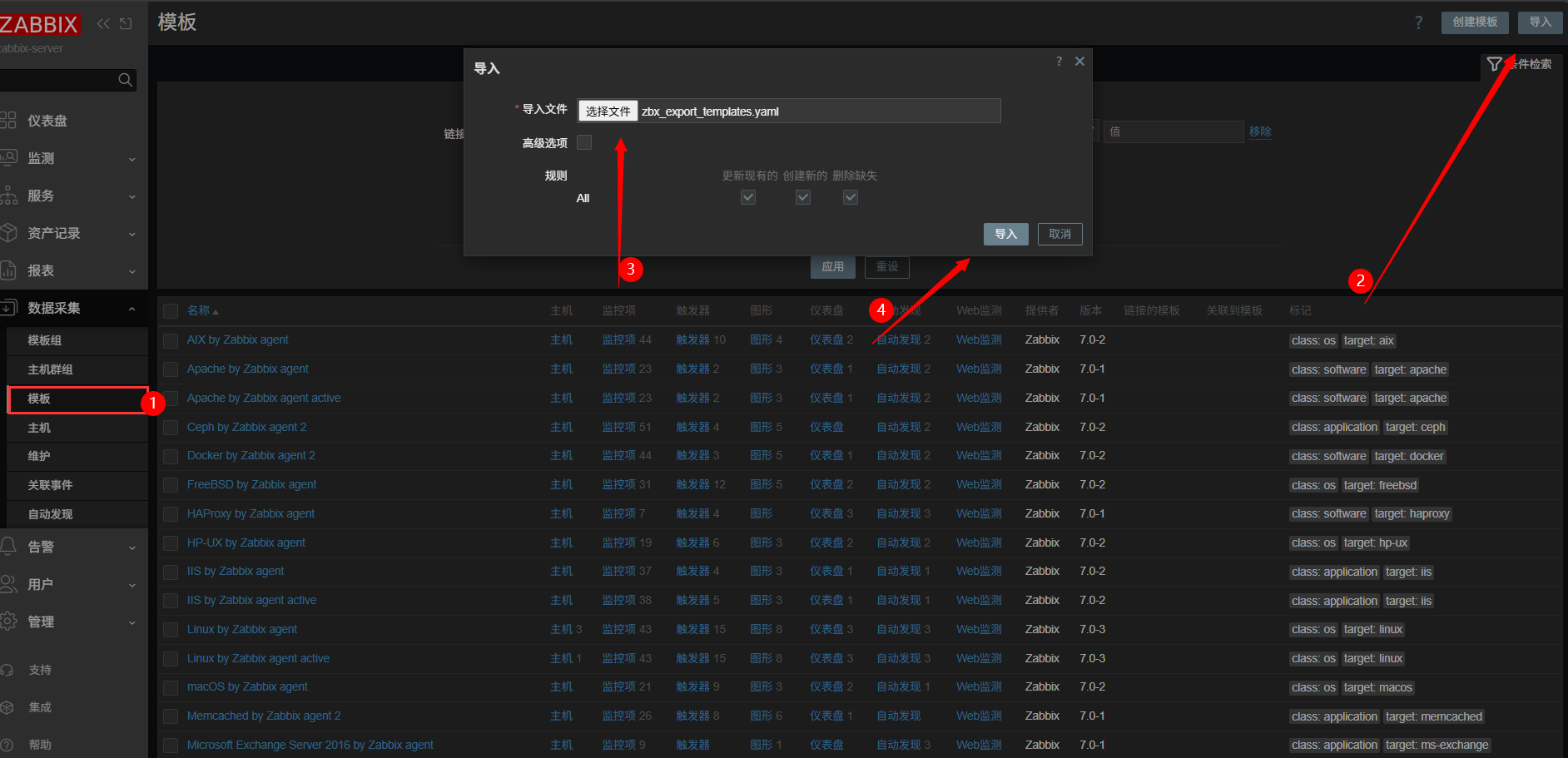
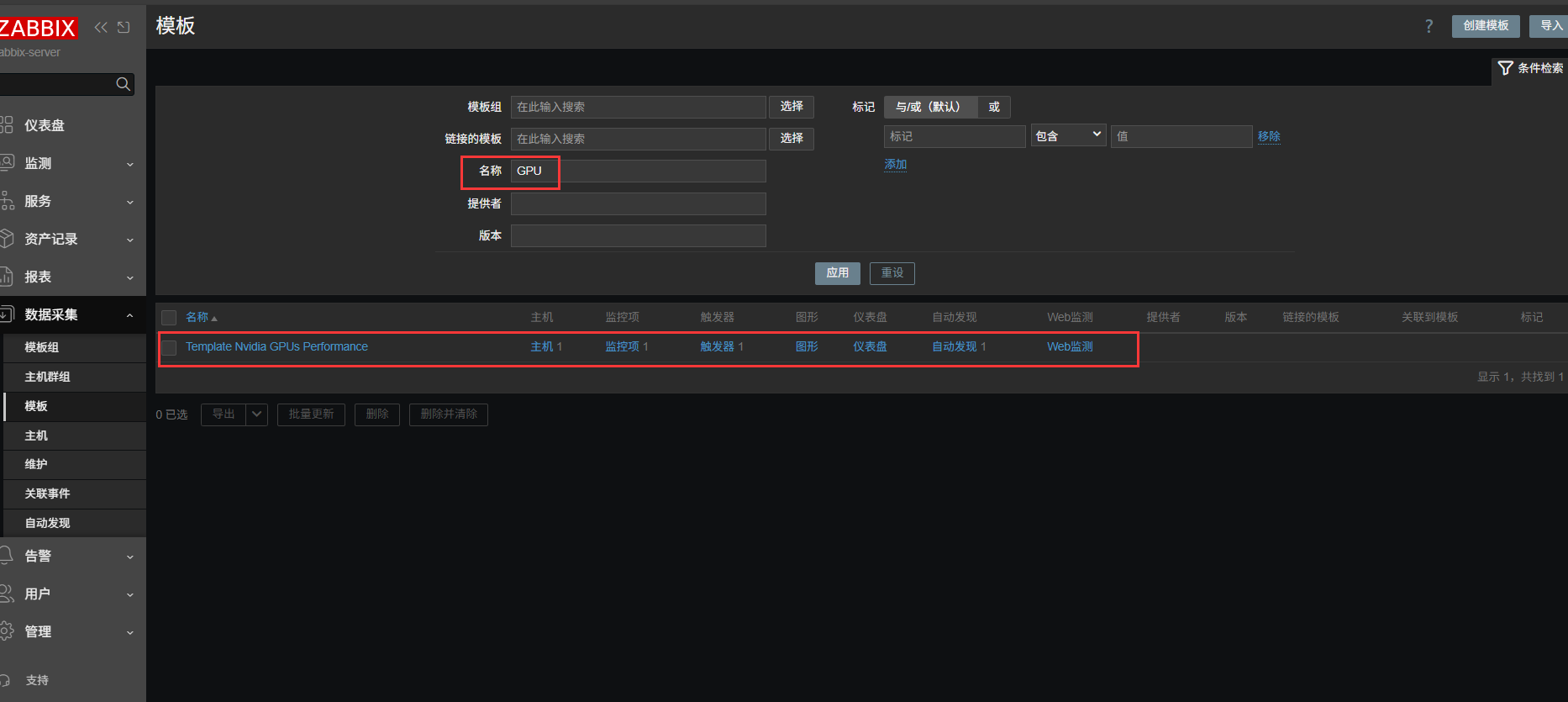
导入后,查看模板是否存在
配置自动发现及其对应动作
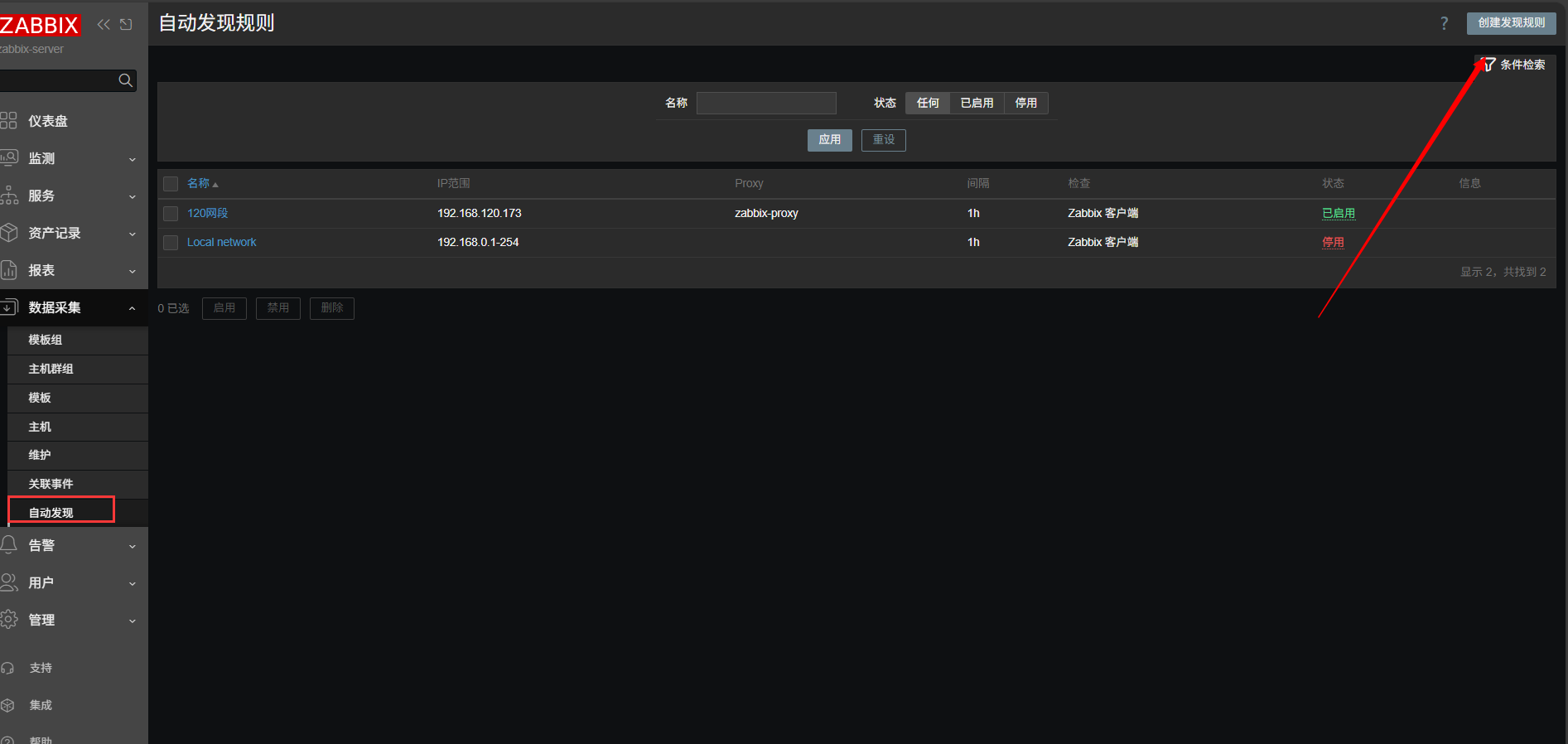
设定规则
由于部署的是 server+database+proxy 三节点,所以通过proxy进行发现主机并收集数据。测试阶段时,时间间隔可设定为30s。
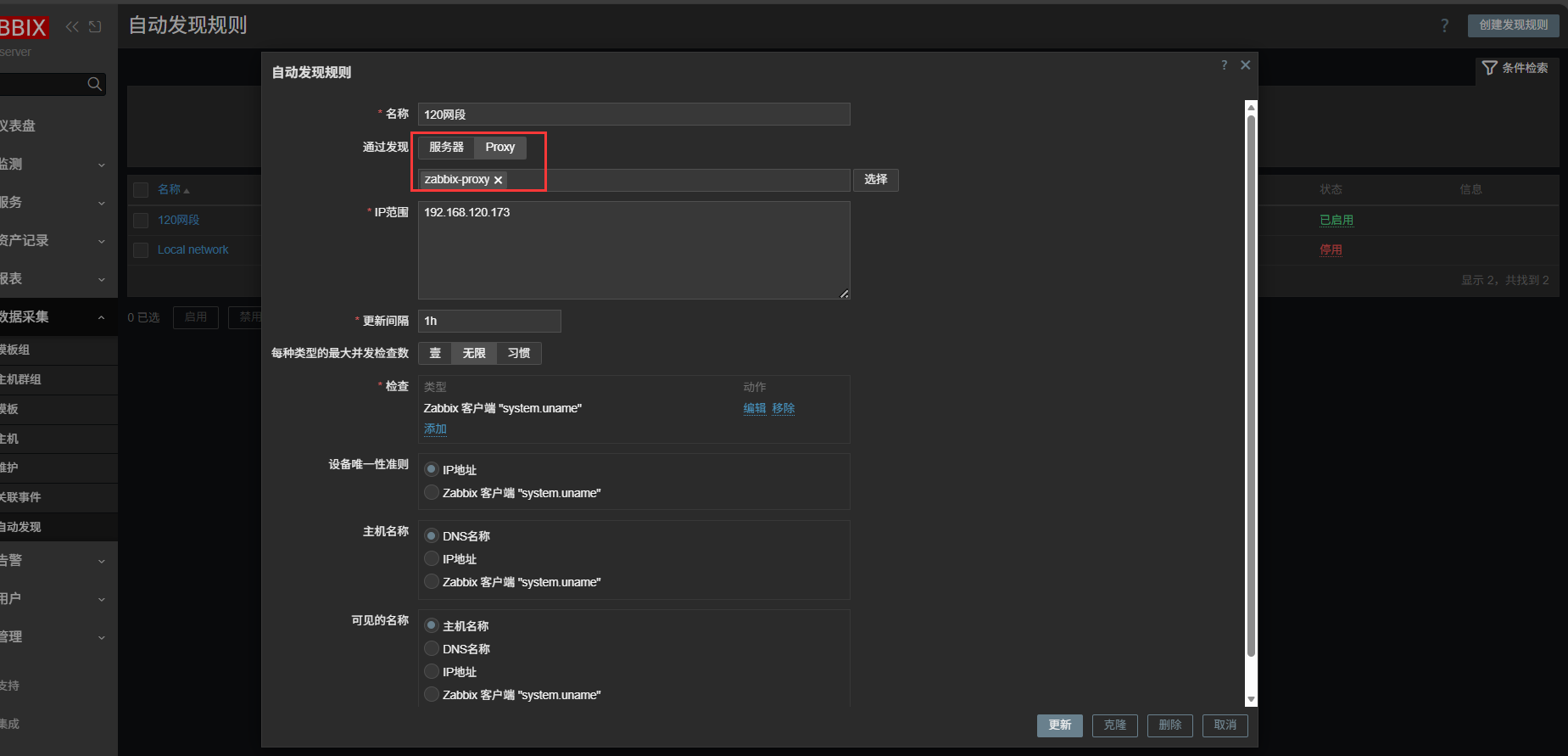
配置发现动作
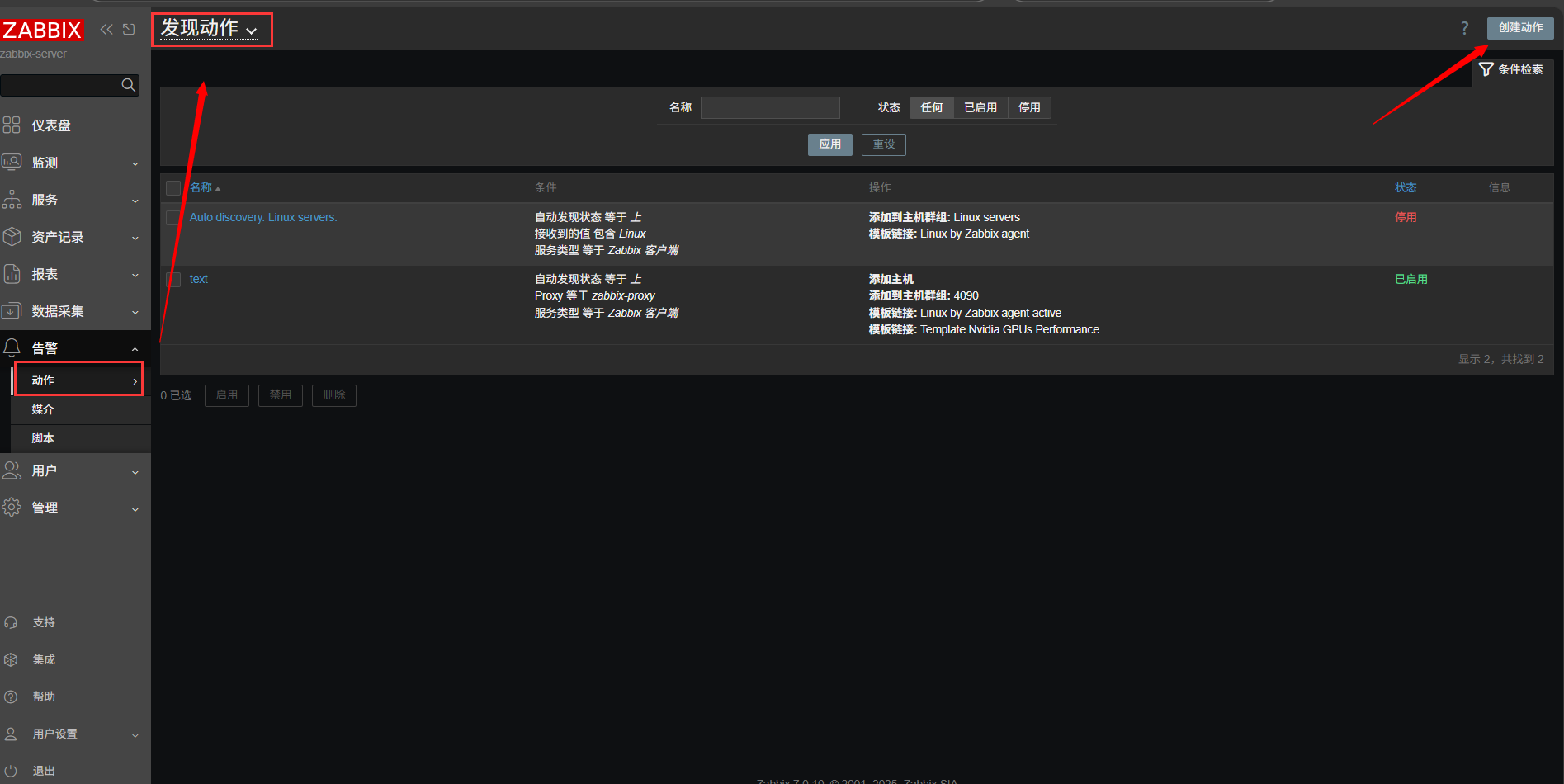
三个条件,需要同时满足,才能执行相应操作
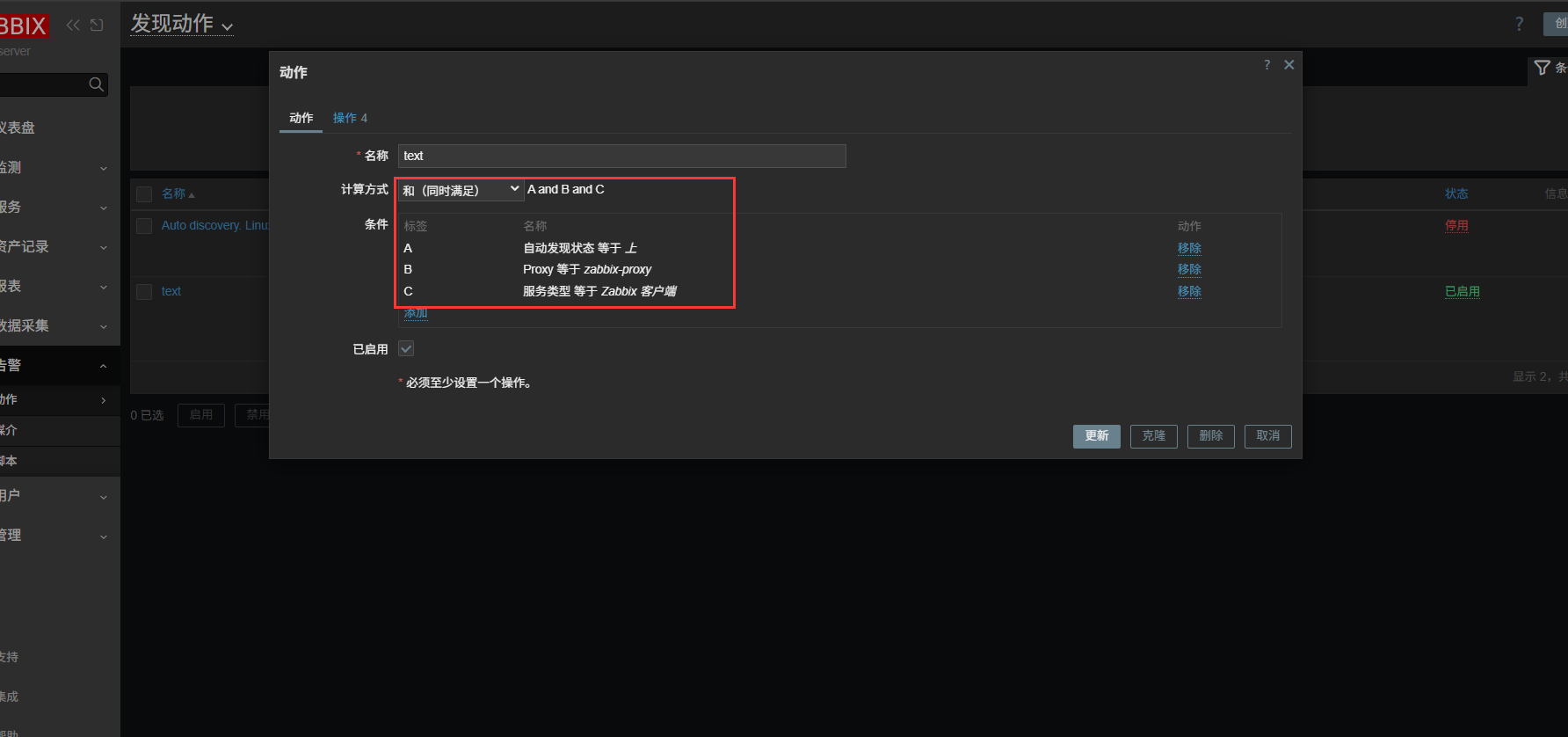
满足发现条件后,自动执行添加主机、主机群组和关联模板操作
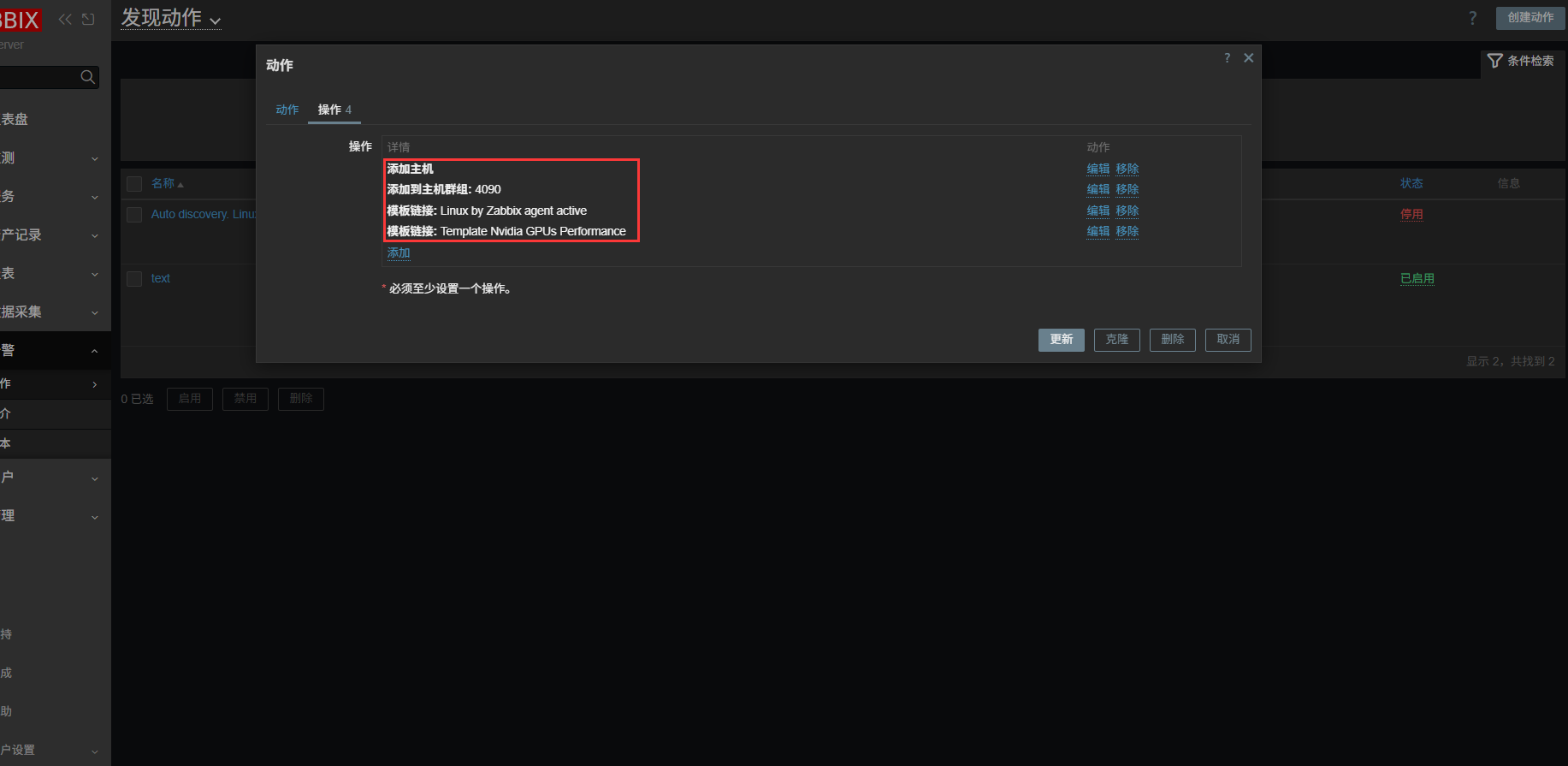
添加 Agent2 主机
设定好自动发现规则之后,找一台空白显卡机器进行脚本自动安装测试。
展开代码# 更新系统并导入 zabbix 仓库
sudo apt update && sudo apt upgrade -y
wget -q "https://repo.zabbix.com/zabbix/7.0/ubuntu/pool/main/z/zabbix-release/zabbix-release_latest+ubuntu22.04_all.deb"
sudo dpkg -i zabbix-release_latest+ubuntu22.04_all.deb
sudo rm -f zabbix-release_latest+ubuntu22.04_all.deb
sudo apt update
# 安装 Agent2
sudo apt install -y zabbix-agent2
# 修改 Agent2 配置文件  192.168.120.138为 server 或者 proxy 的IP地址
sudo sed -i "s/^Server=.*/Server=192.168.120.138/"           /etc/zabbix/zabbix_agent2.conf
sudo sed -i "s/^ServerActive=.*/ServerActive=192.168.120.138/" /etc/zabbix/zabbix_agent2.conf
sudo sed -i "s/^Hostname=.*/Hostname=$(hostname -I | tr ' ' '\n' | grep -E '^192\.168\.' | head -n1)/" /etc/zabbix/zabbix_agent2.conf
# 设置开机自启
sudo systemctl restart zabbix-agent2
sudo systemctl enable  zabbix-agent2
# 防火墙放行对应端口
sudo ufw allow 10050/tcp
# 导入 agent2-nvml 库
sudo apt update && sudo apt upgrade -y
wget -q "https://repo.zabbix.com/zabbix/7.4/stable/ubuntu/pool/main/z/zabbix-agent2-plugin-nvidia-gpu/zabbix-agent2-plugin-nvidia-gpu_7.4.0-1%2Bubuntu22.04_amd64.deb"
sudo dpkg -i zabbix-agent2-plugin-nvidia-gpu_7.4.0-1+ubuntu22.04_amd64.deb
sudo rm -rf zabbix-agent2-plugin-nvidia-gpu_7.4.0-1+ubuntu22.04_amd64.deb
sudo apt update
# 修改 nvml 配置文件的路径和名称
sudo mkdir /opt/zabbix
sudo cp /usr/libexec/zabbix/zabbix-agent2-plugin-nvidia-gpu /opt/zabbix/zabbix-agent2-plugin-nvidia-gpu
sudo chmod 755 /opt/zabbix/zabbix-agent2-plugin-nvidia-gpu
sudo rm -rf /usr/libexec/zabbix
sudo sed -i 's|^\(Plugins\.NVIDIA\.System\.Path=\).*|\1/opt/zabbix/zabbix-agent2-plugin-nvidia-gpu|' /etc/zabbix/zabbix_agent2.d/plugins.d/nvidia.conf
sudo mv /etc/zabbix/zabbix_agent2.d/plugins.d/nvidia.conf /etc/zabbix/zabbix_agent2.d/plugins.d/gpu_plugin.conf
sudo systemctl restart zabbix-agent2
监控主机添加 nvml_mem.sh 文件
nvml_mem.sh
展开代码#!/bin/bash
UUID="$1"
nvidia-smi --id="$UUID" \
           --query-gpu=memory.total,memory.used,memory.free,memory.reserved \
           --format=csv,noheader,nounits \
| awk -F', *' '{printf "{\"total_memory_bytes\":%d,\"free_memory_bytes\":%d,\"used_memory_bytes\":%d,\"reserved_memory_bytes\":%d}\n", $1*1048576,$3*1048576,$2*1048576,$4*1048576}'
将 nvml_mem.sh 文件放入到 GPU agent 的 /etc/zabbix/scripts/
展开代码mkdir /etc/zabbix/scripts mv ~/nvml_mem.sh /etc/zabbix/scripts/ # 附加执行权限 chmod +x /etc/zabbix/scripts/nvml_mem.sh
监控主机添加 nvidia-idx.conf 文件
nvidia-idx.conf
展开代码UserParameter=nvml.device.get.full,nvidia-smi -L | grep -oP 'UUID: \K[^)]+' | jq -R -s -c 'split("\n")|map(select(length>0))|to_entries|map({"device_name":("GPU-"+(.key|tostring)),"device_uuid":.value})' UserParameter=nvml.device.memory.fb.get.full[*],/etc/zabbix/scripts/nvml_mem.sh "$1"
将 nvidia-idx.conf 文件内容并入 GPU agent 的 /etc/zabbix/zabbix_agentd.conf 文件中
展开代码cat ~/nvidia-idx.conf >> /etc/zabbix/zabbix_agentd.conf # 或者直接放置在 /etc/zabbix/zabbix_agent.d/ 文件夹中 mv ~/nvidia-idx.conf /etc/zabbix/zabbix_agentd.d/
执行完上述步骤之后,重启zabbix-agent2服务
展开代码sudo systemctl restart zabbix-agent2.service
自动添加脚本
只添加 Agent2 和 GPU监控项脚本
展开代码#!/bin/bash
#==============================================================
# Ubuntu 22.04 初始化脚本
# 需 root 权限执行:sudo bash agent2_gpu.sh
#==============================================================

################  需改的部分  ####################
ZBX_PROXY_IP="192.168.120.138"   # <-- Zabbix Server/Proxy 地址
HOSTNAME="$(hostname -f)"
ZBX_VERSION="7.0"
#################################################

set -e

[[ $EUID -eq 0 ]] || { echo "请用 sudo 执行"; exit 1; }

echo "==== 11. 更新系统并导入 Zabbix 仓库 ===="
sudo apt update && sudo apt upgrade -y
wget -q "https://repo.zabbix.com/zabbix/${ZBX_VERSION}/ubuntu/pool/main/z/zabbix-release/zabbix-release_latest+ubuntu22.04_all.deb"
sudo dpkg -i zabbix-release_latest+ubuntu22.04_all.deb
sudo rm -f zabbix-release_latest+ubuntu22.04_all.deb
sudo apt update

echo "==== 12. 安装 zabbix-agent2 ===="
sudo apt install -y zabbix-agent2

echo "==== 13. 修改配置文件 ===="
sudo sed -i "s/^Server=.*/Server=${ZBX_PROXY_IP}/"           /etc/zabbix/zabbix_agent2.conf
sudo sed -i "s/^ServerActive=.*/ServerActive=${ZBX_PROXY_IP}/" /etc/zabbix/zabbix_agent2.conf
# sudo sed -i "s/^Hostname=.*/Hostname=${HOSTNAME}/"             /etc/zabbix/zabbix_agent2.conf
sudo sed -i "s/^Hostname=.*/Hostname=$(hostname -I | tr ' ' '\n' | grep -E '^192\.168\.' | head -n1)/" /etc/zabbix/zabbix_agent2.conf

echo "==== 14. 启动并设为开机自启 ===="
sudo systemctl restart zabbix-agent2
sudo systemctl enable  zabbix-agent2

echo "==== 15. 防火墙放行 10050/tcp ===="
sudo ufw allow 10050/tcp

echo "==== 16. 验证zabbix-agent2 ===="
sudo systemctl status zabbix-agent2 --no-pager -l

echo "==== 17. 导入官方 agent2-nvml 库 ===="
sudo apt update && sudo apt upgrade -y
wget -q "https://repo.zabbix.com/zabbix/7.4/stable/ubuntu/pool/main/z/zabbix-agent2-plugin-nvidia-gpu/zabbix-agent2-plugin-nvidia-gpu_7.4.0-1%2Bubuntu22.04_amd64.deb"
sudo dpkg -i zabbix-agent2-plugin-nvidia-gpu_7.4.0-1+ubuntu22.04_amd64.deb
sudo rm -rf zabbix-agent2-plugin-nvidia-gpu_7.4.0-1+ubuntu22.04_amd64.deb
sudo apt update

echo "==== 18. 修改 nvml 配置文件路径和名称 ===="
sudo mkdir /opt/zabbix
sudo cp /usr/libexec/zabbix/zabbix-agent2-plugin-nvidia-gpu /opt/zabbix/zabbix-agent2-plugin-nvidia-gpu
sudo chmod 755 /opt/zabbix/zabbix-agent2-plugin-nvidia-gpu
sudo rm -rf /usr/libexec/zabbix
sudo sed -i 's|^\(Plugins\.NVIDIA\.System\.Path=\).*|\1/opt/zabbix/zabbix-agent2-plugin-nvidia-gpu|' /etc/zabbix/zabbix_agent2.d/plugins.d/nvidia.conf
sudo mv /etc/zabbix/zabbix_agent2.d/plugins.d/nvidia.conf /etc/zabbix/zabbix_agent2.d/plugins.d/gpu_plugin.conf
sudo systemctl restart zabbix-agent2

echo "==== 19. 新增 GPU 监控配置文件 ===="
cat >/etc/zabbix/zabbix_agent2.d/nvidia-idx.conf <<'EOF'
# 修改 GPU 获取的 NAME 值为 index
UserParameter=nvml.device.get.full,nvidia-smi -L | grep -oP 'UUID: \K[^)]+' | jq -R -s -c 'split("\n")|map(select(length>0))|to_entries|map({"device_name":("GPU-"+(.key|tostring)),"device_uuid":.value})'
# 增加获取 FB 内存数据
UserParameter=nvml.device.memory.fb.get.full[*],/etc/zabbix/scripts/nvml_mem.sh "$1"
EOF

echo "==== 20. Agent2 新增可执行脚本,配合获取 FB 内存数据 ===="
mkdir -p /etc/zabbix/scripts
cat >/etc/zabbix/scripts/nvml_fb_mem.sh <<'EOF'
#!/bin/bash
UUID="$1"
nvidia-smi --id="$UUID" \
           --query-gpu=memory.total,memory.used,memory.free,memory.reserved \
           --format=csv,noheader,nounits \
| awk -F', *' '{printf "{\"total_memory_bytes\":%d,\"free_memory_bytes\":%d,\"used_memory_bytes\":%d,\"reserved_memory_bytes\":%d}\n", $1*1048576,$3*1048576,$2*1048576,$4*1048576}'
EOF
chmod +x /etc/zabbix/scripts/nvml_fb_mem.sh

echo "==== 21. 重启 Agent2 服务 ===="
sudo systemctl restart zabbix-agent2

echo "==== 安装 Zabbix-Agent 和 GPU 监控项完成! ===="
重装后的裸金属 Ubuntu22.04 系统初始化安装驱动cuda并添加 Agent2 和 GPU 监控项脚本
展开代码#!/bin/bash
#==============================================================
# Ubuntu 22.04 初始化脚本
# 需 root 权限执行:sudo ./init-GPU.sh
#==============================================================

################  需改的部分  ####################
ZBX_PROXY_IP="192.168.120.138"   # <-- Zabbix Server/Proxy 地址
HOSTNAME="$(hostname -f)"
ZBX_VERSION="7.0"
#################################################

set -e

[[ $EUID -eq 0 ]] || { echo "请用 sudo 执行"; exit 1; }

echo "==== 1. 设置时区与 NTP ===="
timedatectl set-timezone Asia/Shanghai
cat >/etc/systemd/timesyncd.conf <<'EOF'
NTP=time.apple.com time.windows.com
EOF
systemctl restart systemd-timesyncd

echo "==== 2. 关闭自动更新 ===="
mkdir -p /etc/apt/apt.conf.d
cat >/etc/apt/apt.conf.d/10periodic <<'EOF'
APT::Periodic::Update-Package-Lists "0";
APT::Periodic::Download-Upgradeable-Packages "0";
APT::Periodic::AutocleanInterval "0";
EOF
cat >/etc/apt/apt.conf.d/20auto-upgrades <<'EOF'
APT::Periodic::Update-Package-Lists "0";
APT::Periodic::Unattended-Upgrade "0";
EOF

echo "==== 3. 禁用 APT 相关定时器 ===="
for timer in motd-news.timer apt-daily.timer apt-daily-upgrade.timer \
             update-notifier-download.timer update-notifier-motd.timer; do
  systemctl disable --now $timer 2>/dev/null || true
  systemctl mask $timer 2>/dev/null || true
done

echo "==== 4. 导入 NVIDIA 官方 GPG 密钥与源 ===="
cd /tmp
wget -q https://developer.download.nvidia.com/compute/cuda/repos/ubuntu2204/x86_64/cuda-keyring_1.1-1_all.deb
dpkg -i cuda-keyring_1.1-1_all.deb
rm -f cuda-keyring_1.1-1_all.deb
apt-get update

echo "==== 5. 升级系统 ===="
apt-get full-upgrade -y

# echo "==== 6. 配置 SSHD ===="
# mkdir -p /etc/ssh/sshd_config.d
# cat >/etc/ssh/sshd_config.d/00-user-init.conf <<'EOF'
# PermitRootLogin no
# PasswordAuthentication yes
# Port 9922
# EOF
# systemctl restart sshd

# echo "==== 7. 配置 UFW 防火墙 ===="
# ufw allow 9922/tcp
# ufw --force enable

echo "==== 8. 安装 NVIDIA 驱动 + CUDA ===="
DRIVER_PKG="nvidia-headless-570-server-open"
UTILS_PKG="nvidia-utils-570-server"
CUDA_PKG="cuda-toolkit-12-8"
NVIDIA_CONTAINER_PKG="nvidia-container-toolkit"

apt-get install -y $DRIVER_PKG $UTILS_PKG $CUDA_PKG $NVIDIA_CONTAINER_PKG

echo "==== 9. 写入 CUDA 环境变量 ===="
mkdir -p /etc/profile.d
cat >/etc/profile.d/cuda.sh <<'EOF'
export PATH=/usr/local/cuda/bin${PATH:+:${PATH}}
export LD_LIBRARY_PATH=/usr/local/cuda/lib64${LD_LIBRARY_PATH:+:${LD_LIBRARY_PATH}}
EOF
chmod 644 /etc/profile.d/cuda.sh

echo "==== 10. 解决 nvidia-persistenced 权限问题 ===="
mkdir -p /etc/systemd/system/nvidia-persistenced.service.d
cat >/etc/systemd/system/nvidia-persistenced.service.d/override.conf <<'EOF'
[Service]
ExecStart=
ExecStart=/usr/bin/nvidia-persistenced --user nvidia-persistenced
EOF
systemctl daemon-reload
systemctl enable --now nvidia-persistenced

echo "==== 11. 更新系统并导入 Zabbix 仓库 ===="
sudo apt update && sudo apt upgrade -y
wget -q "https://repo.zabbix.com/zabbix/${ZBX_VERSION}/ubuntu/pool/main/z/zabbix-release/zabbix-release_latest+ubuntu22.04_all.deb"
sudo dpkg -i zabbix-release_latest+ubuntu22.04_all.deb
sudo rm -f zabbix-release_latest+ubuntu22.04_all.deb
sudo apt update

echo "==== 12. 安装 zabbix-agent2 ===="
sudo apt install -y zabbix-agent2

echo "==== 13. 修改配置文件 ===="
sudo sed -i "s/^Server=.*/Server=${ZBX_PROXY_IP}/"           /etc/zabbix/zabbix_agent2.conf
sudo sed -i "s/^ServerActive=.*/ServerActive=${ZBX_PROXY_IP}/" /etc/zabbix/zabbix_agent2.conf
# sudo sed -i "s/^Hostname=.*/Hostname=${HOSTNAME}/"             /etc/zabbix/zabbix_agent2.conf
sudo sed -i "s/^Hostname=.*/Hostname=$(hostname -I | tr ' ' '\n' | grep -E '^192\.168\.' | head -n1)/" /etc/zabbix/zabbix_agent2.conf

echo "==== 14. 启动并设为开机自启 ===="
sudo systemctl restart zabbix-agent2
sudo systemctl enable  zabbix-agent2

echo "==== 15. 防火墙放行 10050/tcp ===="
sudo ufw allow 10050/tcp

echo "==== 16. 验证zabbix-agent2 ===="
sudo systemctl status zabbix-agent2 --no-pager -l

echo "==== 17. 导入官方 agent2-nvml 库 ===="
sudo apt update && sudo apt upgrade -y
wget -q "https://repo.zabbix.com/zabbix/7.4/stable/ubuntu/pool/main/z/zabbix-agent2-plugin-nvidia-gpu/zabbix-agent2-plugin-nvidia-gpu_7.4.0-1%2Bubuntu22.04_amd64.deb"
sudo dpkg -i zabbix-agent2-plugin-nvidia-gpu_7.4.0-1+ubuntu22.04_amd64.deb
sudo rm -rf zabbix-agent2-plugin-nvidia-gpu_7.4.0-1+ubuntu22.04_amd64.deb
sudo apt update

echo "==== 18. 修改 nvml 配置文件路径和名称 ===="
sudo mkdir /opt/zabbix
sudo cp /usr/libexec/zabbix/zabbix-agent2-plugin-nvidia-gpu /opt/zabbix/zabbix-agent2-plugin-nvidia-gpu
sudo chmod 755 /opt/zabbix/zabbix-agent2-plugin-nvidia-gpu
sudo rm -rf /usr/libexec/zabbix
sudo sed -i 's|^\(Plugins\.NVIDIA\.System\.Path=\).*|\1/opt/zabbix/zabbix-agent2-plugin-nvidia-gpu|' /etc/zabbix/zabbix_agent2.d/plugins.d/nvidia.conf
sudo mv /etc/zabbix/zabbix_agent2.d/plugins.d/nvidia.conf /etc/zabbix/zabbix_agent2.d/plugins.d/gpu_plugin.conf
sudo systemctl restart zabbix-agent2

echo "==== 19. 新增 GPU 监控配置文件 ===="
cat >/etc/zabbix/zabbix_agent2.d/nvidia-idx.conf <<'EOF'
# 修改 GPU 获取的 NAME 值为 index
UserParameter=nvml.device.get.full,nvidia-smi -L | grep -oP 'UUID: \K[^)]+' | jq -R -s -c 'split("\n")|map(select(length>0))|to_entries|map({"device_name":("GPU-"+(.key|tostring)),"device_uuid":.value})'
# 增加获取 FB 内存数据
UserParameter=nvml.device.memory.fb.get.full[*],/etc/zabbix/scripts/nvml_mem.sh "$1"
EOF

echo "==== 20. Agent2 新增可执行脚本,配合获取 FB 内存数据 ===="
mkdir -p /etc/zabbix/scripts
cat >/etc/zabbix/scripts/nvml_fb_mem.sh <<'EOF'
#!/bin/bash
UUID="$1"
nvidia-smi --id="$UUID" \
           --query-gpu=memory.total,memory.used,memory.free,memory.reserved \
           --format=csv,noheader,nounits \
| awk -F', *' '{printf "{\"total_memory_bytes\":%d,\"free_memory_bytes\":%d,\"used_memory_bytes\":%d,\"reserved_memory_bytes\":%d}\n", $1*1048576,$3*1048576,$2*1048576,$4*1048576}'
EOF
chmod +x /etc/zabbix/scripts/nvml_fb_mem.sh

echo "==== 21. 重启 Agent2 服务 ===="
sudo systemctl restart zabbix-agent2

echo "==== 安装 Zabbix-Agent 和 GPU 监控项完成! ===="
注:脚本设定 Agent2 的配置文件中 Hostname = IP地址
执行完成后,查看 server 端是否存在监控主机
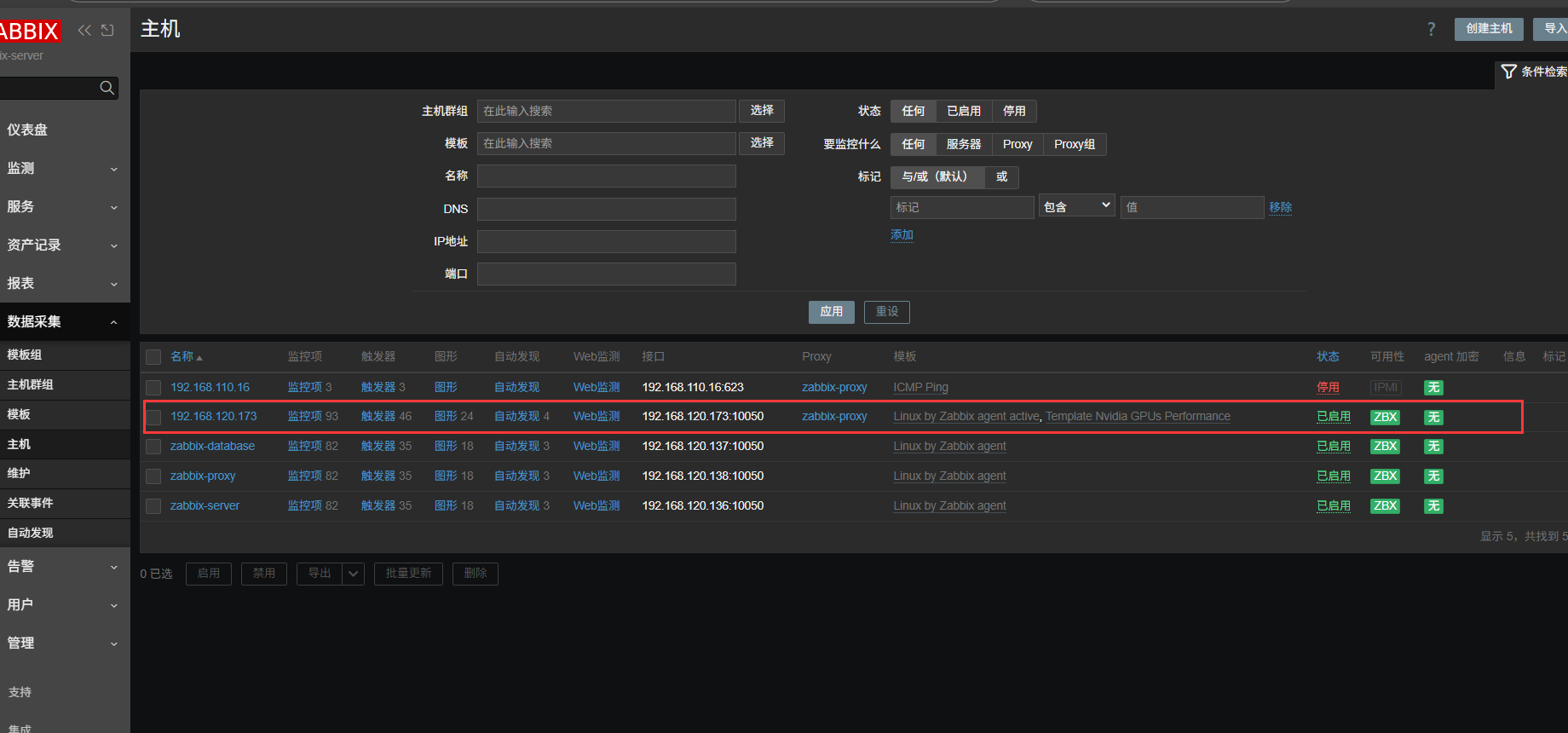
配置钉钉机器人告警
拉取一个普通群,然后设置中找到添加机器人

添加机器出网口地址
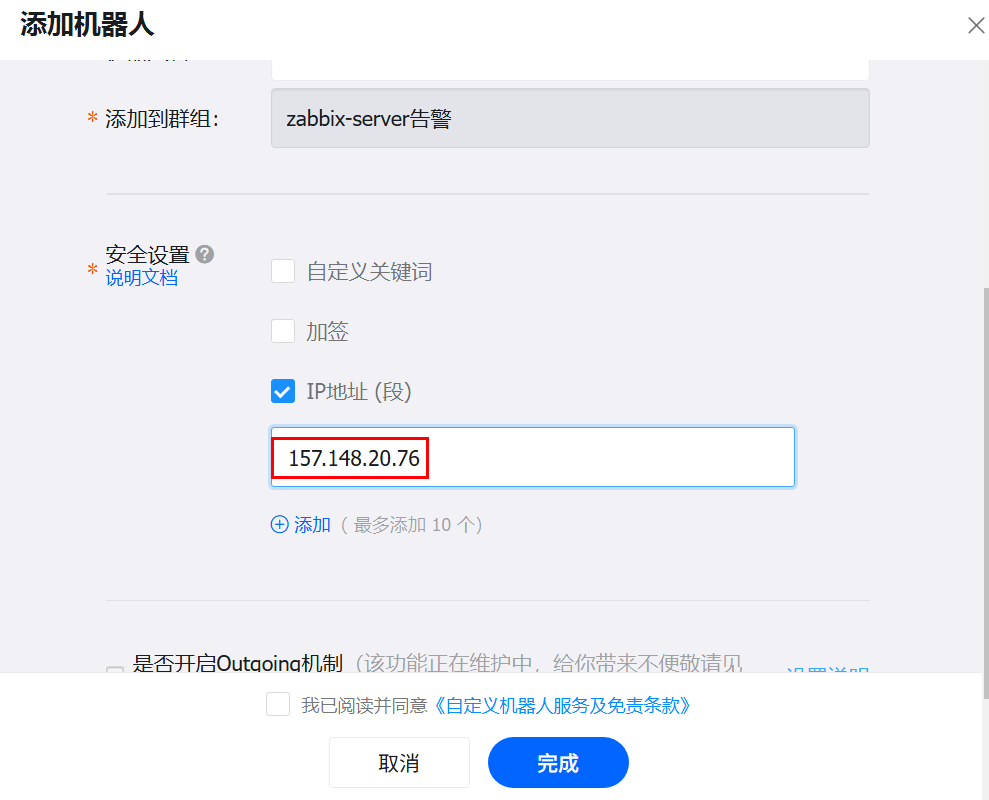
保存 Webhook 地址

到服务端 /usr/lib/zabbix/alertscripts 下准备 zabbix-dd.py 脚本
展开代码#!/usr/bin/python
# -*- coding: utf-8 -*-
# Author: xxxxxxxx
import requests
import json
import sys
import os

headers = {'Content-Type': 'application/json;charset=utf-8'}
api_url = "https://oapi.dingtalk.com/robot/send?access_token=7b7f9820e221a6a6ecca0944622275ab9c53394cc66145e58156e95e319fc30e"	#写自己的Webhook
def msg(text):
    json_text= {
    "msgtype": "text",
    "at": {
        "atMobiles": [
            "13333333333"
        ],
            "isAtAll": True
     },
     "text": {
        "content": text
     }
    }
    print requests.post(api_url,json.dumps(json_text),headers=headers).content

if __name__ == '__main__':
     text = "zabbix-test"	#测试一下文本
     #text = sys.argv[1]
     msg(text)
给脚本附加执行权限
展开代码chmod +x zabbix-dd.py
测试脚本
展开代码./zabbix-dd.py

有回复就没问题,可以将 zabbix-dd.py 脚本中的第27行注释掉,第28行取消注释
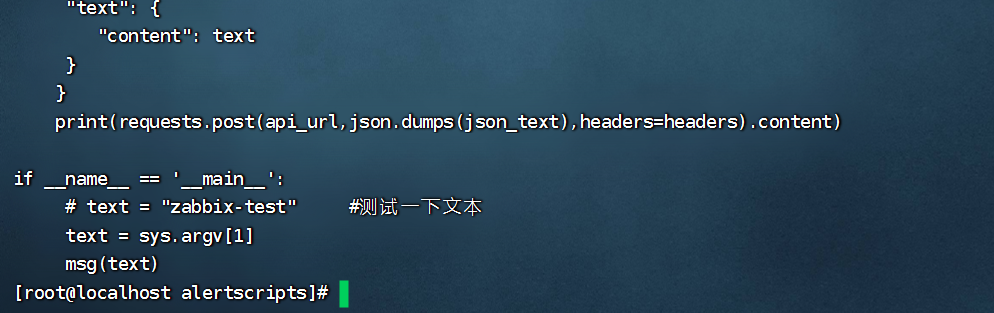
随后在 zabbix-server 的 web 界面中告警 -> 媒介 -> 创建媒介类型
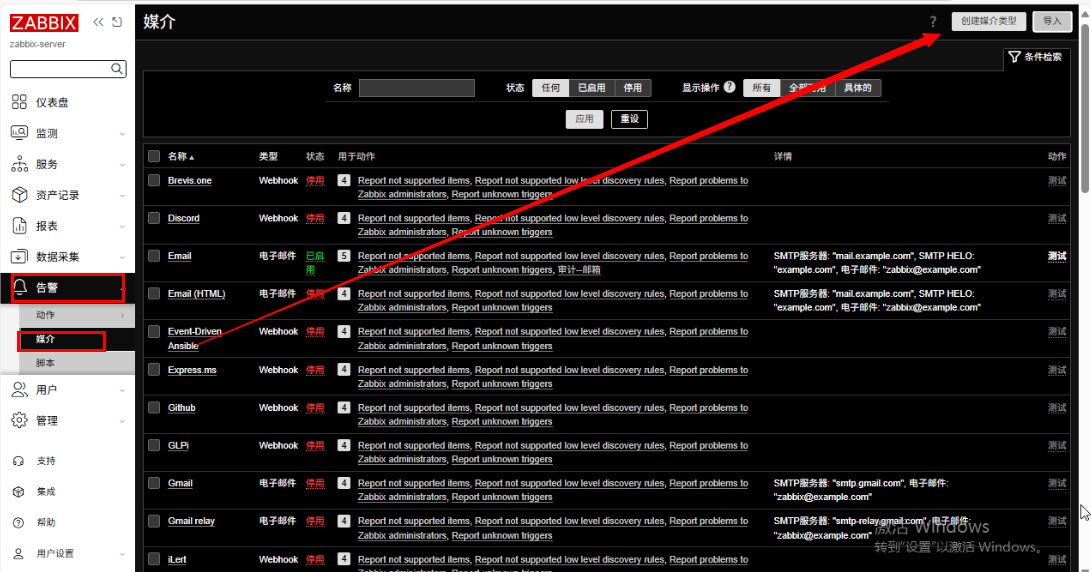
填写相关信息,脚本名称要对应放置在 /usr/lib/zabbix/alertscripts 脚本名称
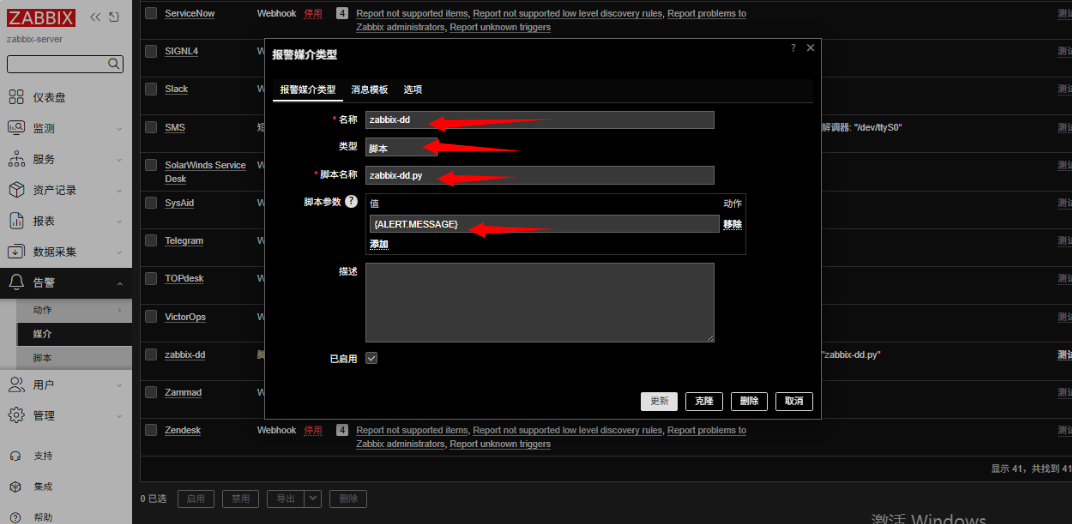
确保该脚本媒介已启用,这里的测试也可以测试钉钉机器人回复
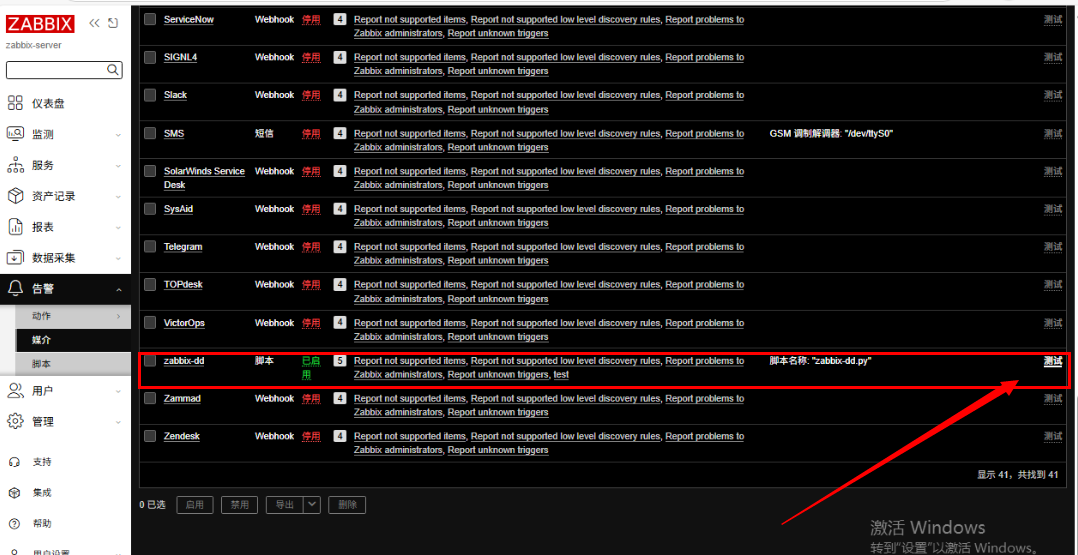
添加触发器动作
导入模板触发器
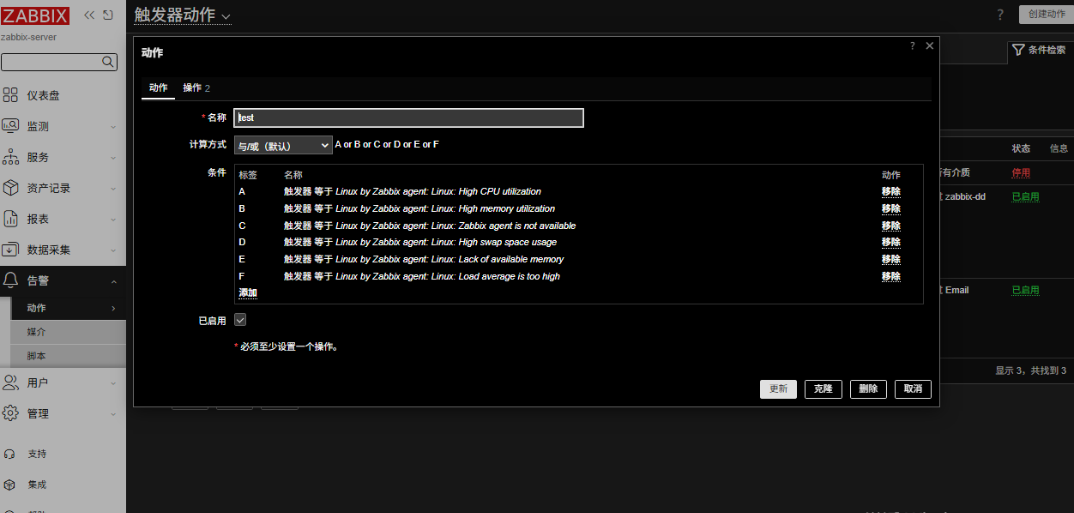
在操作中,设置告警媒介为脚本以及消息内容
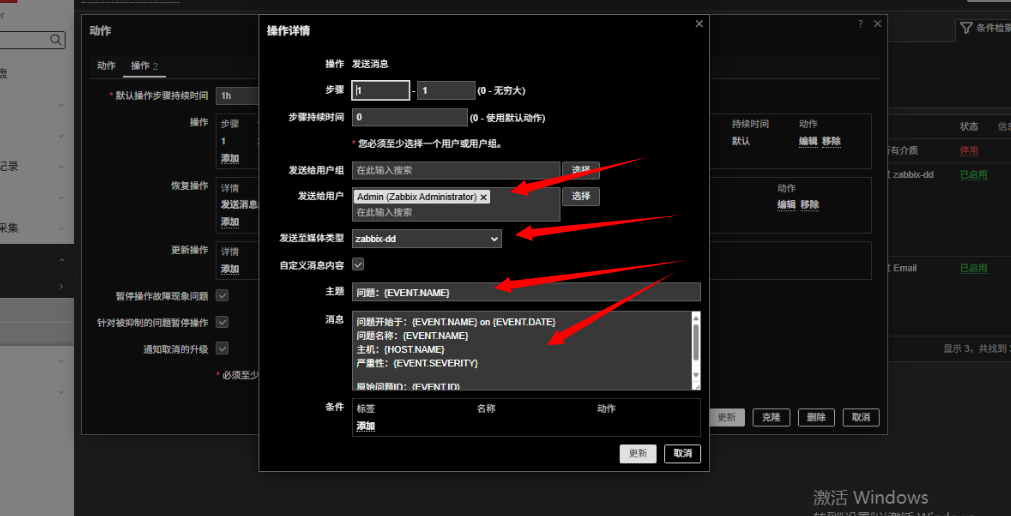
最后,在用户设置中添加相关信息,收件人填写为钉钉绑定的号码
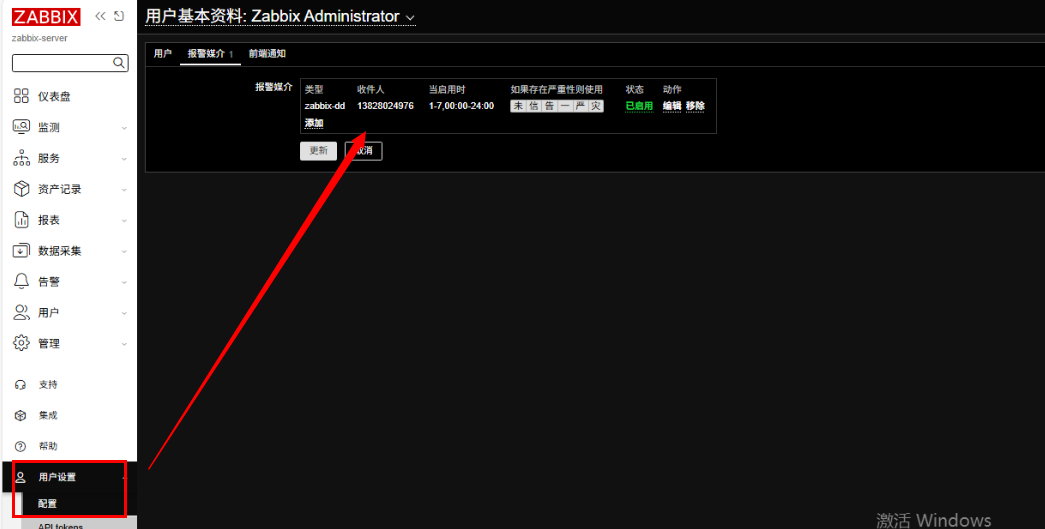
将关联模板的机器关机,测试
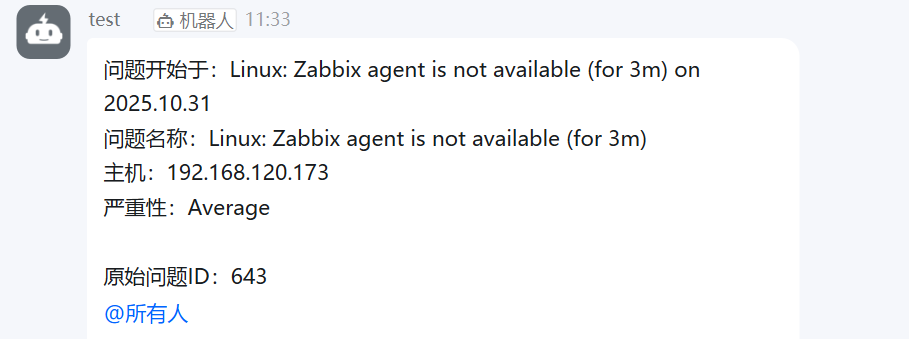
测试成功
本文作者:zzz
本文链接:
版权声明:本博客所有文章除特别声明外,均采用 BY-NC-SA 许可协议。转载请注明出处!