华为VRP系统基本操作
请注意,本文编写于 55 天前,最后修改于 5 天前,其中某些信息可能已经过时。
目录
简介:
VRP是Versatile Routing Platform的简称,它是华为公司数据通信产品的通用网络操 作系统。目前,在全球各地的网络通信系统中,华为设备几乎无处不在,因此,学习了 解VRP的相关知识对于网络通信技术人员来说就显得尤为重要。
VRP系统提供了丰富的命令行视图,包括用户视图、系统视图、接口视图等,用户可以通过相应的命令进入不同的视图进行配置和管理。例如,system-view命令可以进入系统视图,interface命令可以进入接口视图
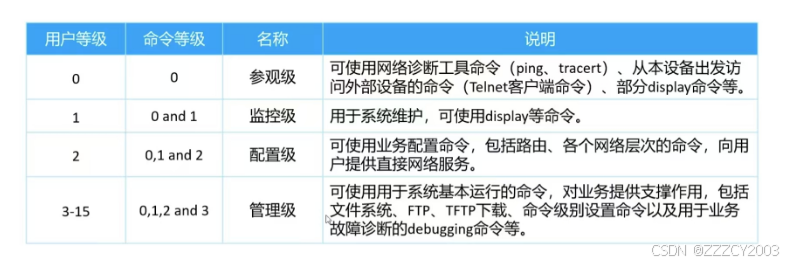
1、通过Console方式登录Router
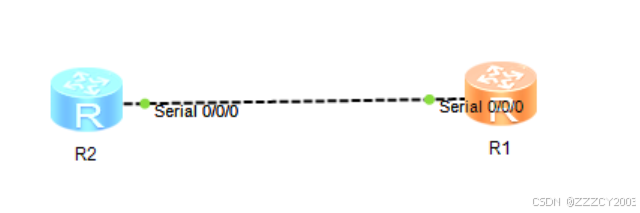
2、查看设备基本信息
展开代码<Huawei>display version    //查看设备基本信息
Huawei Versatile Routing Platform Software
VRP (R) software, Version 5.110 (eNSP V100R001C00)
Copyright (c) 2000-2011 HUAWEI TECH CO., LTD
3、完成基本配置
3.1、修改设备名称
展开代码<Huawei>sys	     //TAB键补全
<Huawei>system-view   //进入系统视图
Enter system view, return user view with Ctrl+Z.
[Huawei]sysname R1    //将设备命名为R1
[R1]
3.2、进入接口配置IP地址
展开代码[R1]interface Serial 0/0/0
[R1-Serial0/0/0]ip address 12.11.10.1 255.255.255.0
[R1-Serial0/0/0]display this  //使用display this可以查看当前视图的运行配置
#
interface Serial0/0/0
 link-protocol ppp
 ip address 12.11.10.1 255.255.255.0
#
return
[R1-Serial0/0/0]
使用display this可以查看当前视图的运行配置
若是忘记命令的作用和用法等等,可以通过 “ 关键字 + ?” 来查看信息
展开代码[R1-Serial0/0/0]ip ?
  address             Set the IP address of an interface
  binding             Enable binding of an interface with a VPN instance
  forward-broadcast   Specify IP directed broadcast information
  netstream           Netstream feature
  policy-based-route  Enable policy based routing on the interface
  tcp                 Specify TCP(Transmission Control Protocol) configuration
                      information
  topology            The name of topology
  verify              IP verify
3.3、当接口的IP地址配置错误时
需要先删除当前接口的错误IP地址配置,再重新在其他接口进行配置IP地址,否则会出现地址冲突无法配置。
展开代码[R1]interface Serial 0/0/0
[R1-Serial0/0/0]undo ip address
[R1-Serial0/0/0]display this
#
interface Serial0/0/0
 link-protocol ppp
#
return
[R1-Serial0/0/0]
4、查看设备当前配置
展开代码[R1]display current-configuration
#
sysname R1
#
undo info-center enable
#
aaa
 authentication-scheme default
 authorization-scheme default
 accounting-scheme default
 domain default
 domain default_admin
 local-user admin password cipher OOCM4m($F4ajUn1vMEIBNUw#
 local-user admin service-type http
#
firewall zone Local
 priority 16
#
interface Ethernet0/0/0
#
interface Ethernet0/0/1
#
interface Serial0/0/0
 link-protocol ppp
#
  ---- More ----
当执行命令时,显示的信息超过一定数量时,系统会自动暂停输出信息,以方便用户查看。如上图中的---- More ----的字样,此时可通过:
- <Ctrl + C>或<Ctrl + Z>,停止或命令执行
- 空格键,继续显示下一屏信息
- 回车键,继续显示下一行信息
5、保存设备当前配置
展开代码[R1]quit       //返回上一视图
<R1>

[R1]return     //在任何视图中,返回用户视图
<R1>

[R1]           //ctrl+z  在任何视图中,返回用户视图
<R1>
保存命令
展开代码<R1>save
The current configuration will be written to the device.
Are you sure to continue?[Y/N]y      //需要输入y来确认继续
Info: Please input the file name ( *.cfg, *.zip ) [vrpcfg.zip]:
Now saving the current configuration to the slot 17.
Save the configuration successfully.
<R1>
6、操作设备的文件系统
展开代码<R1>dir
Directory of flash:/

  Idx  Attr     Size(Byte)  Date        Time       FileName
    0  drw-              -  Aug 07 2015 13:51:14   src
    1  drw-              -  Sep 11 2024 11:36:01   pmdata
    2  drw-              -  Sep 11 2024 11:36:04   dhcp
    3  -rw-            603  Sep 11 2024 12:55:06   private-data.txt
    4  drw-              -  Sep 11 2024 11:56:30   mplstpoam
    5  -rw-            435  Sep 11 2024 12:55:05   vrpcfg.zip

32,004 KB total (31,993 KB free)

<R1>
配置文件:vrpcfg.zip。其中配置文件以“.cfg”或“.zip”作为扩展名
6.1、将当前配置文件保存并命名为zzz.cfg
展开代码<R1>save zzz.cfg
Are you sure to save the configuration to flash:/zzz.cfg?[Y/N]:y
Now saving the current configuration to the slot 17.
Save the configuration successfully.
<R1>dir
Directory of flash:/

  Idx  Attr     Size(Byte)  Date        Time       FileName
    0  drw-              -  Aug 07 2015 13:51:14   src
    1  drw-              -  Sep 11 2024 11:36:01   pmdata
    2  drw-              -  Sep 11 2024 11:36:04   dhcp
    3  -rw-            603  Sep 11 2024 12:55:06   private-data.txt
    4  drw-              -  Sep 11 2024 11:56:30   mplstpoam
    5  -rw-            435  Sep 11 2024 12:55:05   vrpcfg.zip
    6  -rw-            816  Sep 11 2024 13:01:39   zzz.cfg

32,004 KB total (31,991 KB free)

<R1>
6.2、把该文件设置为设备下一次启动所使用的配置文件
展开代码<R1>startup saved-configuration zzz.cfg  //设置
Info: Succeeded in setting the configuration for booting system.
<R1>
<R1>display startup        //查看下一次启动的配置文件
MainBoard:
  Configured startup system software:        NULL
  Startup system software:                   NULL
  Next startup system software:              NULL
  Startup saved-configuration file:          NULL
  Next startup saved-configuration file:     flash:/zzz.cfg
  Startup paf file:                          NULL
  Next startup paf file:                     NULL
  Startup license file:                      NULL
  Next startup license file:                 NULL
  Startup patch package:                     NULL
  Next startup patch package:                NULL
<R1>
6.3、清空配置文件
展开代码<R1>reset saved-configuration
Warning: The action will delete the saved configuration in the device.
The configuration will be erased to reconfigure. Continue? [Y/N]:y     //需要输入y来确认继续
Warning: Now clearing the configuration in the device.
Info: Succeeded in clearing the configuration in the device.
<R1>
7、重启设备
展开代码<R1>reboot
Info: The system is now comparing the configuration, please wait.
Warning: All the configuration will be saved to the configuration file for the n
ext startup:, Continue?[Y/N]:y
flash:/vrpcfg.zip exists, overwrite?[Y/N]:y
Now saving the current configuration to the slot 17.
Save the configuration successfully.
Info: If want to reboot with saving diagnostic information, input 'N' and then e
xecute 'reboot save diagnostic-information'.
System will reboot! Continue?[Y/N]:y
<R1>
8、基础常用命令
| 查看当前配置 | display current-configuration |
|---|---|
| 保存配置 | save |
| 查看保存的配置 | display saved-configuration |
| 重置保存的配置 | reset saved-configuration |
| 设置系统启动配置文件 | startup saved-configuration |
| 重启设备 | reboot |
| 配置设备名称 | sysname |
| 配置IP地址 | ip address IP 掩码 |
| 关闭接口 | shutdown |
| 查看接口状态 | display interface brief |
| 配置时区和时间 | clock datetime 20:45:00 2019-07-30 |
| 配置用户登录信息 | header login information |
| 配置命令行等级 | user privilege level |
本文作者:zzz
本文链接:
版权声明:本博客所有文章除特别声明外,均采用 BY-NC-SA 许可协议。转载请注明出处!
目录