目录
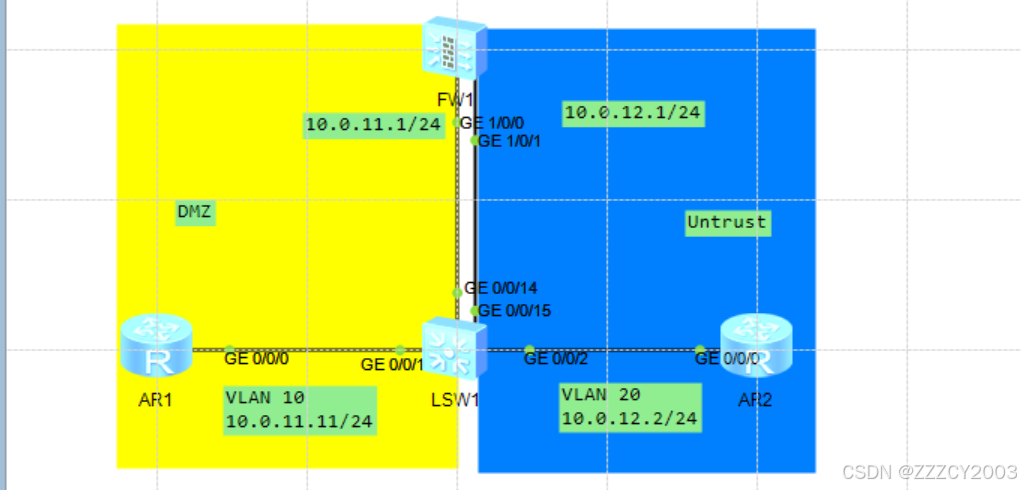
交换机LSW1通过VLAN10、20 分别与AR1、AR2连接实现路由器与防火墙进行三层通信。
AR1属于DMZ区域、AR2属于Untrust区域,在FW1上配置源NAT使AR1以FW1的GE1/0/1接口地址访问Untrust区域,同时配置NAT Server,使得AR2可以通过FW1的GE1/0/1接口地址访问AR1上开启的FTP服务
配置安全策略,限制AR1、AR2之间的访问:DMZ区域的AR1对Untrust区域的访问不受任何限制,Untrust区域只能主动访问DMZ区域中AR1上FTP服务
实验任务
- 基础设置配置
- 将接口加入安全域,配置安全策略方通local区域到外部区域的访问
- 配置源NAT、NAT Server
- 配置安全策略,限制Untrust、DMZ区域之间的访问
- 查看FW1上Untrust、DMZ区域之间访问流量生成的会话表项
- 在AR1上开启FTP服务,AR2访问AR1的FTP服务,并通过dir命令进行FTP数据通道的传输,查看FW1上的Server-map表项
实现步骤
一、基础设置配置
完成互联接口IP地址配置、交换机VLAN划分、在AR1和FW1上配置默认路由
展开代码# LSW1配置
[LSW1]vlan batch 10 20
[LSW1]int vlan 10
[LSW1-vlan10] description DMZ
[LSW1-vlan10] quit
[LSW1]interface GigabitEthernet0/0/1
[LSW1-GigabitEthernet0/0/1] port link-type access
[LSW1-GigabitEthernet0/0/1] port default vlan 10
[LSW1-GigabitEthernet0/0/1] quit
[LSW1]interface GigabitEthernet0/0/14
[LSW1-GigabitEthernet0/0/14] port link-type access
[LSW1-GigabitEthernet0/0/14] port default vlan 10
[LSW1-GigabitEthernet0/0/14] quit
[LSW1]int vlan 20
[LSW1-vlan20] description Untrust
[LSW1-vlan20] quit
[LSW1]interface GigabitEthernet0/0/2
[LSW1-GigabitEthernet0/0/2] port link-type access
[LSW1-GigabitEthernet0/0/2] port default vlan 20
[LSW1-GigabitEthernet0/0/2] quit
[LSW1]interface GigabitEthernet0/0/15
[LSW1-GigabitEthernet0/0/15] port link-type access
[LSW1-GigabitEthernet0/0/15] port default vlan 20
[LSW1-GigabitEthernet0/0/15] quit

# AR1配置
[AR1]int g0/0/0
[AR1-GigabitEthernet0/0/0]ip address 10.0.11.11 24
[AR1-GigabitEthernet0/0/0]q
[AR1]ip route-static 0.0.0.0 0.0.0.0 10.0.11.1  # 配置用于访问Internet的默认路由

# AR2配置
[AR2]int g0/0/0
[AR2-GigabitEthernet0/0/0]ip address 10.0.12.2 24
[AR2-GigabitEthernet0/0/0]q
展开代码Login authentication
Username:admin
Password:
The password needs to be changed. Change now? [Y/N]: Y
Please enter old password:
Please enter new password:
Please confirm new password:
# 防火墙的Console接口默认存在登录设置,默认账号密码为:admin  Admin@123,登录之后需要修改密码才能正常登录

# 配置FW1接口IP、默认路由
[FW1]int g 1/0/0
[FW1-GigabitEthernet1/0/0]ip address 10.0.11.1 24
[FW1-GigabitEthernet1/0/0]q
[FW1]int g1/0/1
[FW1-GigabitEthernet1/0/1]ip address 10.0.12.1 24
[FW1-GigabitEthernet1/0/1]q
[FW1]
[FW1]ip route-static 0.0.0.0 0.0.0.0 10.0.12.2

# 配置FW1接口允许通过ping报文
[FW1]int g1/0/0
[FW1-GigabitEthernet1/0/0]service-manage ping permit
[FW1-GigabitEthernet1/0/0]q
[FW1]int g1/0/1
[FW1-GigabitEthernet1/0/1]service-manage ping permit
[FW1-GigabitEthernet1/0/1]q
防火墙的接口缺省开启service-manage,service-manage在接口层面进行安全把控,它决定用户能否通过该接口管理/访问防火墙。GE1/0/0接口是设备的网管接口,该接口配置了service-manage ping permit、service-manage ssh permit等命令,因此用户能够通过该接口管理防火墙。但是对于其它接口,缺省时防火墙禁止用户从该接口管理/访问自己,除非显式地配置service-manage命令。例如,如果希望允许用户ping GE1/0/1接口,则需要在GE1/0/1接口上配置service-manage ping permit命令,同理如果希望允许用户SSH GE1/0/1接口,则需要配置service-manage ssh permit命。
二、配置Local域到其它区域的安全策略规则
将接口加入到安全域,同时创建一个安全策略规则local_to
展开代码# 将接口加入到安全域
[FW1]firewall zone dmz
[FW1-zone-dmz]description DMZ
[FW1-zone-dmz]add interface g1/0/0
[FW1-zone-dmz]q
[FW1]firewall zone untrust
[FW1-zone-untrust]description Untrust
[FW1-zone-untrust]add interface g1/0/1
[FW1-zone-untrust]q
[FW1]

# 创建安全策略规则local_to
[FW1]security-policy
[FW1-policy-security]rule name local_to
[FW1-policy-security-rule-local_to]source-zone local
[FW1-policy-security-rule-local_to]action permit
[FW1-policy-security-rule-local_to]q
[FW1-policy-security]q
# 未配置源、目的IP,目的安全域,服务,默认为any
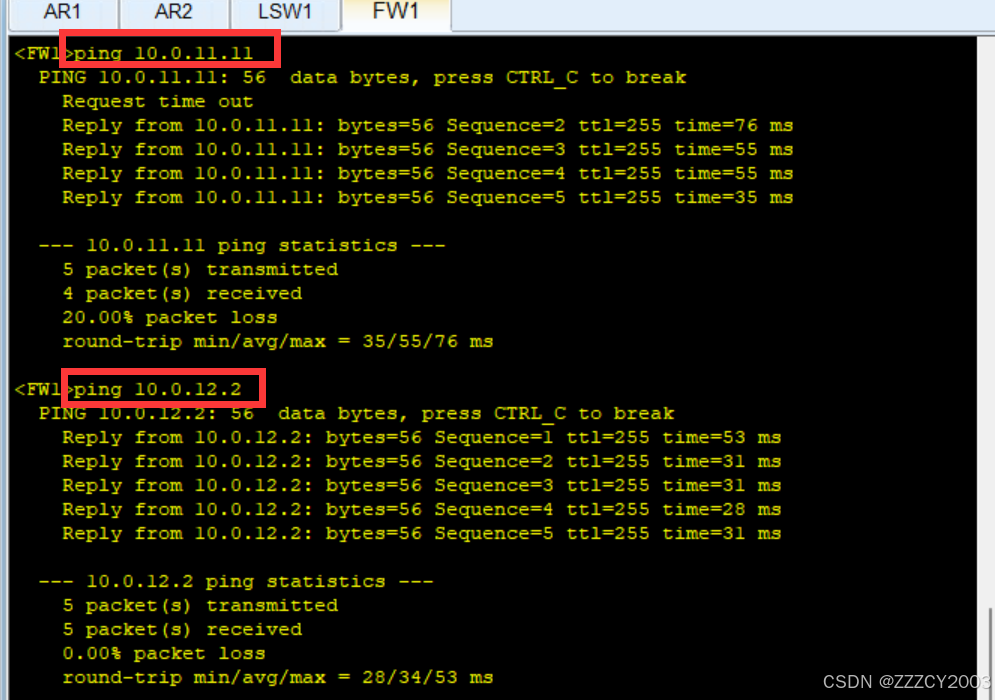
测试FW1与AR1、AR2之间的连通性
三、配置源NAT、NAT Server
配置NAPT用于私网用户AR1访问Internet,配置NAT Server将AR1的FTP服务映射到公网
展开代码# 配置NAT地址池,配置时开启允许端口地址转换,实现公网地址复用
[FW1]nat address-group 1
[FW1-address-group-1]mode pat
[FW1-address-group-1]section 0 10.0.12.1 10.0.12.1
[FW1-address-group-1]q
[FW1]

# 配置源NAT策略,实现私网指定网段访问Internet时自动进行源地址转换
[FW1]nat-policy
[FW1-policy-nat]rule name 1
[FW1-policy-nat-rule-1]source-zone dmz
[FW1-policy-nat-rule-1]destination-zone untrust
[FW1-policy-nat-rule-1]source-address 10.0.11.0 24
[FW1-policy-nat-rule-1]action source-nat address-group 1
[FW1-policy-nat-rule-1]q
[FW1-policy-nat]q
[FW1]

# 配置NAT Server功能,创建静态映射,映射AR1的FTP服务
[FW1]nat server policy_ftp protocol tcp global 10.0.12.1 ftp inside 10.0.11.11 ftp

# 开启FTP协议的NAT ALG功能
[FW1]firewall zone dmz
[FW1-zone-dmz]detect ftp
[FW1-zone-dmz]q
[FW1]firewall zone untrust
[FW1-zone-untrust]detect ftp
[FW1-zone-untrust]q
[FW1]
四、配置DMZ、Untrust区域之间的安全策略规则
配置安全策略DMZ to Untrust,源地址限制为10.0.11.0/24,动作为允许;配置安全策略Untrust_DMZ,只允许AR2访问AR1提供的FTP服务
展开代码# 创建安全策略规则DMZtoUntrust
[FW1]security-policy
[FW1-policy-security]rule name DMZtoUntrust
[FW1-policy-security-rule-DMZtoUntrust]source-zone dmz
[FW1-policy-security-rule-DMZtoUntrust]destination-zone untrust
[FW1-policy-security-rule-DMZtoUntrust]source-address 10.0.11.0 24
[FW1-policy-security-rule-DMZtoUntrust]action permit
[FW1-policy-security-rule-DMZtoUntrust]q
[FW1-policy-security]q
[FW1]

# 创建安全策略规则Untrust_DMZ
[FW1]security-policy
[FW1-policy-security]rule name Untrust_DMZ
[FW1-policy-security-rule-Untrust_DMZ]source-zone untrust
[FW1-policy-security-rule-Untrust_DMZ]destination-zone dmz
[FW1-policy-security-rule-Untrust_DMZ]destination-address 10.0.11.11 24
[FW1-policy-security-rule-Untrust_DMZ]service ftp
[FW1-policy-security-rule-Untrust_DMZ]action permit
[FW1-policy-security-rule-Untrust_DMZ]q
[FW1-policy-security]q
[FW1]
需要注意mudiIP地址为映射的内部地址,安全策略对报文的处理在NAT Server修改报文的目的IP地址之后
五、查看FW1会话
在AR1上ping AR2,查看FW1会话的详细信息
展开代码<AR1>ping -c 100 10.0.12.2
查看FW1会话
展开代码[FW1]display firewall session table verbose destination global 10.0.12.2
编辑
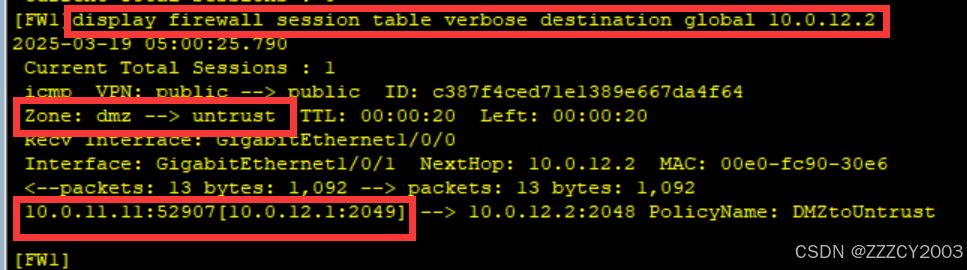
查看目的global IP为10.0.12.2的会话详细信息:安全域方向从dmz到untrust、会话老化时间为20s、接收报文接口为g1/0/0、发送报文接口为1/0/1......
同时我们可以看到该报文进行了源地址转换,源IP:10.0.11.11转换为10.0.12.1
六、观察NAT、ALG工作过程
在AR1上开启FTP服务,AR2作为FTP客户端通过FW1映射出地址登录AR1的FTP服务,并执行命令dir查看文件列表,观察FW1的ASPF如何处理多通道协议
在AR1上开启FTP服务
展开代码[AR1]aaa
[AR1-aaa]local-user ftp service-type ftp
Info: Add a new user.
[AR1-aaa]local-user ftp password cipher zhengchangren
[AR1-aaa]local-user ftp privilege level 15
[AR1-aaa]local-user ftp ftp-directory flash:
[AR1-aaa]q
[AR1]ftp server enable
Info: Succeeded in starting the FTP server
在AR2访问AR1开启的FTP服务,注意是通过FW1上映射的地址进行访问
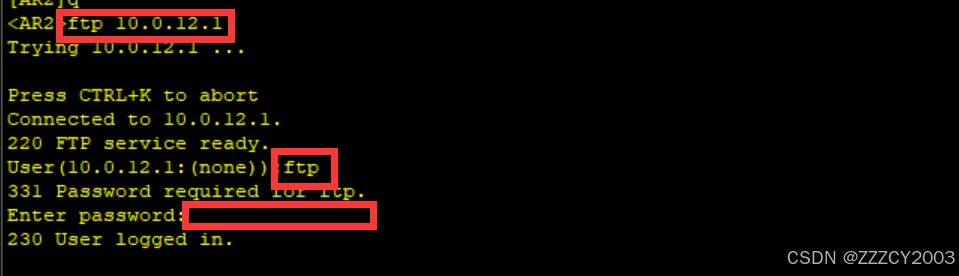
AR2可以成功通过FW1的NAT Server映射访问AR1开启的FTP服务
查看FW1的会话表
展开代码<FW1>display firewall session table verbose protocol tcp destination-port global 21
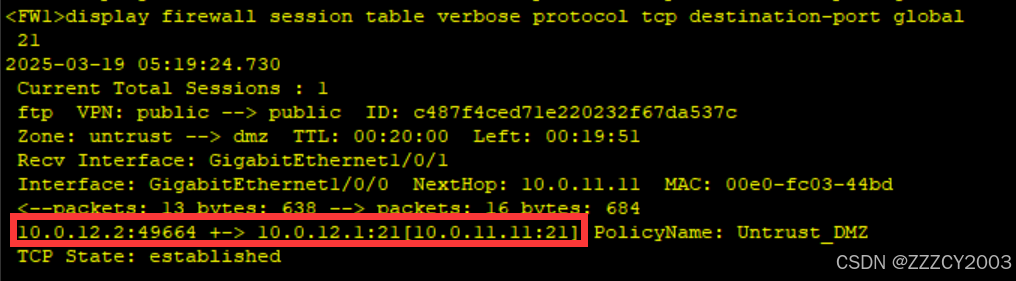
FTP的控制通道已经建立
在AR2上执行命令dir
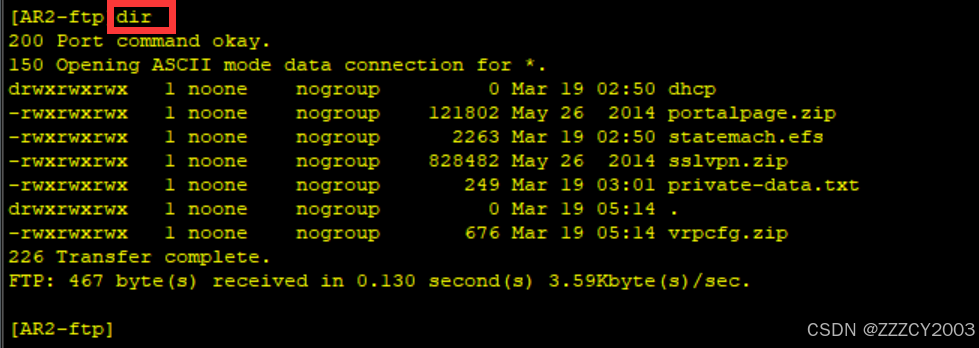
已经可以看到AR1的文件列表,此时已经使用FTP的传输通道
再次查看FW1的会话表
展开代码<FW1>display firewall session table

依旧是只存在FTP控制通道会话,没有传输通道会话
查看NAT ALG生成的Server-map表项
展开代码<FW1>display firewall server-map
2025-03-19 10:15:24.830
 Current Total Server-map : 2
 Type: Nat Server,  ANY -> 10.0.12.1:21[10.0.11.11:21],  Zone:---,  protocol:tcp
 Vpn: public -> public
 Type: Nat Server Reverse,  10.0.11.11[10.0.12.1] -> ANY,  Zone:---,  protocol:tcp
 Vpn: public -> public,  counter: 1
FW1上已经生成了FTP数据通道的Server-map表项
本文作者:zzz
本文链接:
版权声明:本博客所有文章除特别声明外,均采用 BY-NC-SA 许可协议。转载请注明出处!